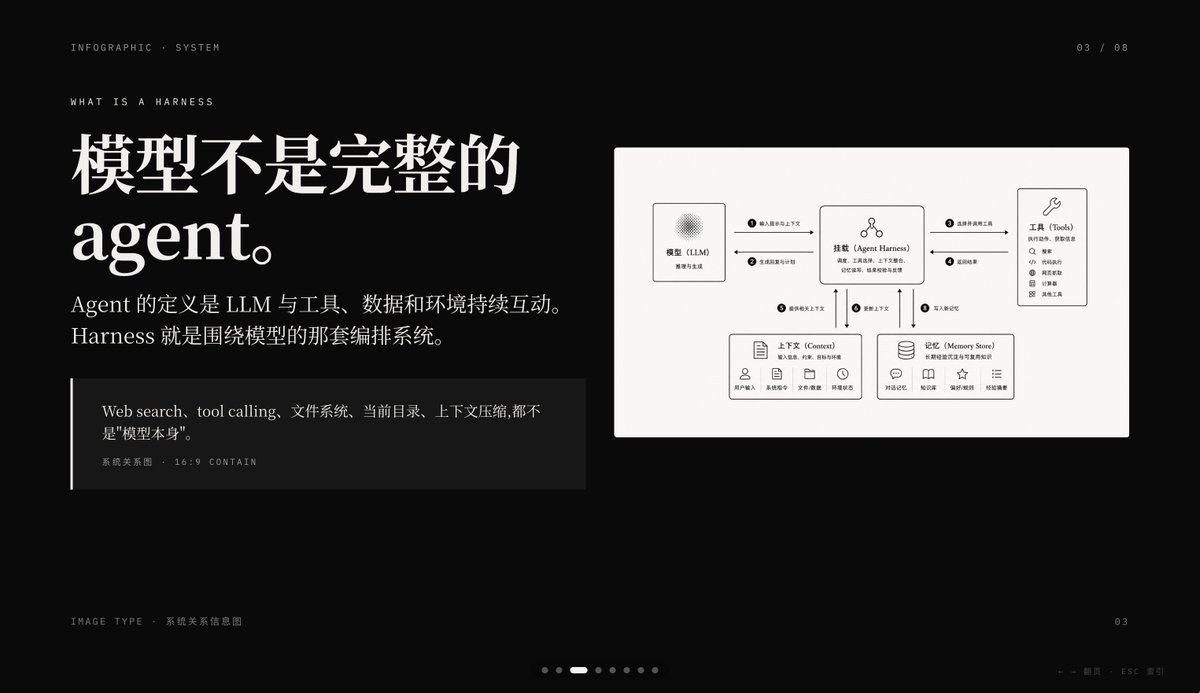
Infografik-slide om mørk AI-sele
En førsteklasses præsentationsslide med sort baggrund, der forklarer et AI-agentværktøj med stor kinesisk redaktionel typografi og et rent systemrelationsdiagram. Ideel til PowerPoint-omslag eller sider med forklaring af koncepter.
Dette er et GPT Image 2 -eksempel på en prompt for Grafik og plakat . Brug den kopieringsklare prompt nedenfor til at generere lignende visuelle elementer, og gennemgå Awesome GPT Image 2 Prompts -kreditering samt kommercielle brugsrettigheder før genbrug.
Har du brug for det fulde promptsæt? Brug Grafik og plakat emnehub for flere relaterede eksempler, eller åbn GPT Image 2 hurtig katalog for det fulde eksempelindeks, genanvendelige strukturer og kildeattribution.
Free 1K preview
Generate one preview image instantly, no sign-up required.
4000/4000
Hurtig
Klar til kopiering
{
  "type": "dark editorial infographic slide",
  "style": "premium keynote-style presentation page with minimalist Swiss-inspired layout, strong contrast, elegant serif headline paired with small uppercase sans-serif metadata, lots of negative space, cinematic black background, subtle grain, refined white typography, monochrome diagram card",
  "aspect_ratio": "16:9",
  "background": {
    "color": "deep black"
  },
  "layout": {
    "sections": [
      {
        "title": "top metadata",
        "position": "top edge",
        "count": 3,
        "labels": [
          "INFOGRAPHIC · SYSTEM",
          "03 / 08",
          "WHAT IS A HARNESS"
        ]
      },
      {
        "title": "main text block",
        "position": "left side",
        "count": 3,
        "labels": [
          "The model is not a complete Agent.",
          "The definition of an Agent is the continuous interaction of an LLM with tools, data, and the environment. Harness is the orchestration system around the model.",
          "Web search, tool calling, file system, current directory, and context compression are not the \"model itself\"."
        ]
      },
      {
        "title": "diagram card",
        "position": "right side",
        "count": 5,
        "labels": [
          "Model (LLM)",
          "Mount (Agent Harness)",
          "Tools",
          "Context",
          "Memory Store"
        ]
      },
      {
        "title": "footer",
        "position": "bottom edge",
        "count": 4,
        "labels": [
          "Image Type · System Relationship Diagram",
          "03",
          "← → Page   ESC Close",
          "7 pagination dots with the 3rd highlighted"
        ]
      }
    ],
    "centerpiece": "a large off-white rectangular card on the right containing a clean systems diagram"
  },
  "typography": {
    "headline_font": "high-contrast editorial serif, oversized, bold",
    "body_font": "modern serif for Chinese body copy",
    "meta_font": "thin uppercase sans-serif with generous tracking"
  },
  "diagram": {
    "card_color": "warm light gray",
    "border": "none or extremely subtle",
    "line_style": "thin black connector arrows",
    "icon_style": "simple outline icons",
    "nodes": [
      {
        "name": "Model (LLM)",
        "position": "upper left inside card",
        "details": "small box with subtle radial texture behind the heading, subtitle suggests reasoning and generation"
      },
      {
        "name": "Mount (Agent Harness)",
        "position": "upper center inside card",
        "details": "central orchestration box with small person-like icon above title and short descriptive text below"
      },
      {
        "name": "Tools",
        "position": "upper right inside card",
        "details": "tall box with wrench icon and a vertical list of 8 tool items"
      },
      {
        "name": "Context",
        "position": "lower left inside card",
        "details": "wide box with document icon, description line, and 5 small labeled icons along the bottom"
      },
      {
        "name": "Memory Store",
        "position": "lower right inside card",
        "details": "wide box with database icon, description line, and 5 small labeled icons along the bottom"
      }
    ],
    "connections": {
      "count": 8,
      "description": "numbered circular markers on the connector arrows show the orchestration flow between the 5 nodes, including bidirectional links from the central harness to tools, context, and memory, plus one link from the model to the harness"
    }
  },
  "color_palette": {
    "count": 4,
    "colors": [
      "black background",
      "white headline text",
      "soft gray body text",
      "warm light-gray diagram panel"
    ]
  },
  "customization": {
    "headline": "{argument name=\"headline text\" default=\"The model is not a complete Agent.\"}",
    "page_index": "{argument name=\"page number\" default=\"03 / 08\"}",
    "section_kicker": "{argument name=\"section label\" default=\"WHAT IS A HARNESS\"}",
    "diagram_topic": "{argument name=\"diagram topic\" default=\"System Relationship Diagram\"}",
    "quote": "{argument name=\"quote\" default=\"Web search, tool calling, file system, current directory, and context compression are not the "model itself".\"}"
  }
}
Promptvariabler
Redigerbare argumentpladsholdere fundet i prompten med deres standardværdier.
Variabel
headline text
Misligholdelse
The model is not a complete Agent.
Variabel
page number
Misligholdelse
03 / 08
Variabel
section label
Misligholdelse
WHAT IS A HARNESS
Variabel
diagram topic
Misligholdelse
System Relationship Diagram
Variabel
quote
Misligholdelse
Web search, tool calling, file system, current directory, and context compression are not the "model itself".
Best for
- - Grafik og plakat visual exploration
- - Image generation and reference-image edits
- - Reusable briefs that keep source attribution visible
Change these parts
- - Subject, product, character, or scene
- - Aspect ratio, camera, lighting, and background
- - Brand, text, color, and output constraints
Recommended model and settings
- - Model: gpt-image-2
- - Input mode: Tekst til billede
- - Aspect ratio: source
- - Commercial status: review original source
How to use this prompt
- 1. Copy the prompt and preserve its structure for the first test.
- 2. Replace the subject, context, and publishing channel.
- 3. Change one camera, lighting, or style variable per iteration.
- 4. Inspect the output, source, text, and rights before reuse.
Limitations, source, and reuse cautions
- - Generated output is an editable draft, not factual, legal, or rights evidence.
- - Review the linked source, people, brands, logos, text, and third-party media before commercial use.
Importeret fra Awesome GPT Image 2 Prompts . Kreditering er påkrævet. Status for kommerciel brug er allowed ; gennemgå kilderettighederne før betalt brug.
Flere sager i denne kategori
Prioriteret efter kategori, kompatibilitet med inputtilstande, kvalitet og lavere risiko.

Surreal 3D Chess Match Artwork
Tekst til billede

Pink Hijab Mirror Selfie Portrait
Tekst til billede

Fashion Studio Portrait with Blue Rim Lighting
Tekst til billede

Spring Editorial Fashion Collage
Tekst til billede

Glitch Aesthetic Surreal Portrait
Tekst til billede

New Chinese-Style Editorial Portrait
Tekst til billede
Genbrug og kildenoter
Brug denne prompt sikkert efter at have gennemgået sagen.
- 1.Kopier prompten, eller åbn den direkte i Dovoo med genereringsknappen.
- 2.Juster variabler, billedformat og referencebilleder til din egen brug.
- 3.Før udgivelse eller betalt brug skal du verificere kilderettigheder, krav til kreditering og risici forbundet med branding eller lighed.