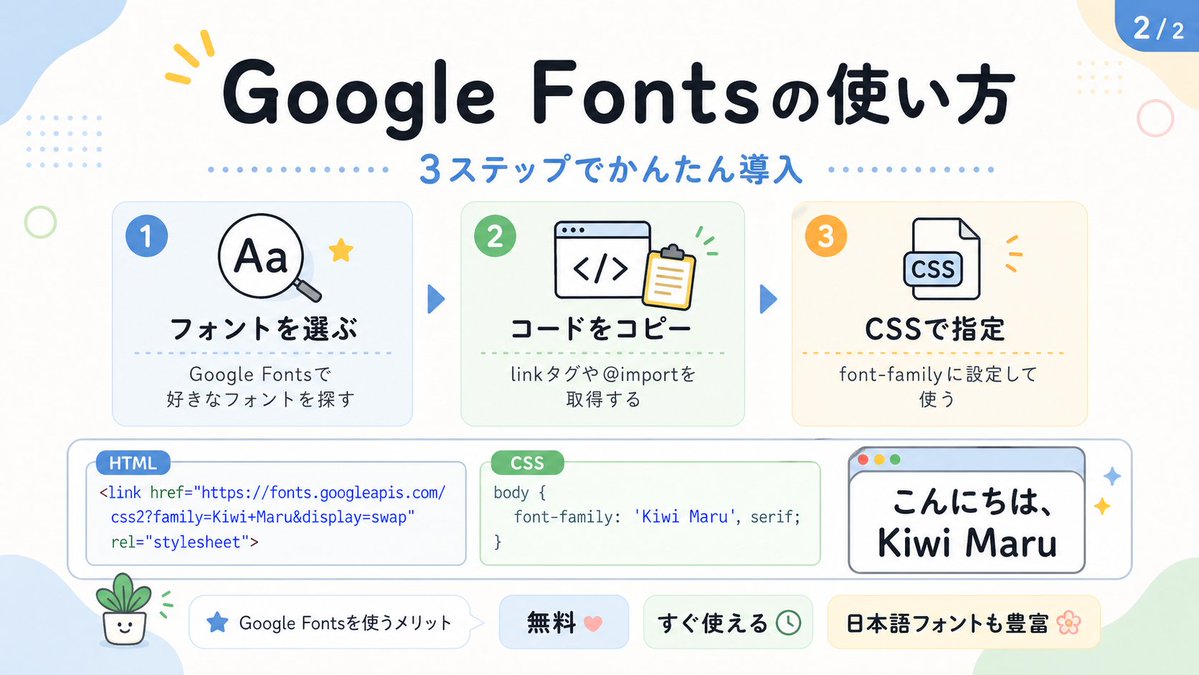
Sød Google Fonts-vejledningsinfografik
Denne prompt genererer en pastelfarvet japansk infografik, der forklarer opsætningen af Google Fonts i tre trin. Den er velegnet til sociale medie-karruseller eller indlæg om tekniske tutorials.
Dette er et GPT Image 2 -eksempel på en prompt for Grafik og plakat . Brug den kopieringsklare prompt nedenfor til at generere lignende visuelle elementer, og gennemgå Awesome GPT Image 2 Prompts -kreditering samt kommercielle brugsrettigheder før genbrug.
Har du brug for det fulde promptsæt? Brug Grafik og plakat emnehub for flere relaterede eksempler, eller åbn GPT Image 2 hurtig katalog for det fulde eksempelindeks, genanvendelige strukturer og kildeattribution.
Free 1K preview
Generate one preview image instantly, no sign-up required.
3261/4000
Hurtig
Klar til kopiering
Create a cute pastel Japanese infographic slide with a clean white background and soft rounded abstract corner blobs in pale blue, cream, and light green. The design is friendly, educational, and modern, with thick rounded sans-serif Japanese typography, subtle drop shadows, thin gray outlines, dotted divider accents, and small decorative doodles. At the top center, place a large bold headline in dark navy that reads "Google Fontsの使い方". Directly below it, add a blue subheadline reading "3ステップでかんたん導入" with a horizontal row of small blue dots on both sides. In the top right corner, add a rounded blue page badge that reads "2/2".

Arrange 3 rounded rectangular step cards across the upper middle row, evenly spaced left to right, each with a pale tinted background, soft border, and a colored circular number badge in the upper left. Card 1 has a pale blue background and a blue badge with "1". Inside, show a simple magnifying glass icon over the letters "Aa" plus a small yellow star accent. The bold title reads "フォントを選ぶ" and the smaller text below reads "Google Fontsで
好きなフォントを探す". Card 2 has a pale green background and a green badge with "2". Inside, show a browser window icon with code brackets "</>" and a clipboard, plus tiny green motion marks. The bold title reads "コードをコピー" and the smaller text below reads "linkタグや@importを
取得する". Card 3 has a pale cream background and an orange badge with "3". Inside, show a document icon labeled "CSS" with small orange accent marks. The bold title reads "CSSで指定" and the smaller text below reads "font-family に設定して
使う". Place 2 medium blue triangular arrows between the 3 cards to show progression.

Across the lower middle, create 3 horizontally aligned demo boxes. The left box is a rounded white code panel with a small blue tab label reading "HTML". Inside, display this code in blue text exactly across 3 lines: "<link href=\"https://fonts.googleapis.com/"
"css2?family=Kiwi+Maru&display=swap"
"rel=\"stylesheet\">". The center box is a rounded white code panel with a green tab label reading "CSS". Inside, display dark text exactly as: "body {"
"    font-family: 'Kiwi Maru', serif;"
"}". The right box is a rounded white mock browser window with a pale blue title bar and 3 tiny circular window buttons at top left in red, yellow, and green. Inside, show large Japanese sample text in black reading "こんにちは、
Kiwi Maru" in a cute rounded handwritten-style font. Add 2 small sparkle accents to the right of this browser window.

At the bottom, place 4 pill-shaped badges from left to right. Badge 1 is white with a small blue star icon and text "Google Fontsを使うメリット". Badge 2 is pale blue with bold text "無料" followed by a pink heart. Badge 3 is pale green with bold text "すぐ使える" followed by a small clock icon. Badge 4 is pale yellow with bold text "日本語フォントも豊富" followed by a flower icon.

Add 4 extra decorative elements around the canvas: a yellow 3-stroke sparkle near the top left of the headline, a pale blue dotted square grid in the upper left background, a thin light green ring on the left side, and a tiny smiling potted plant illustration in the lower left corner. Keep the whole composition flat vector-like, crisp, cute, and highly legible, in a social-media educational carousel style.
Best for
- - Grafik og plakat visual exploration
- - Image generation and reference-image edits
- - Reusable briefs that keep source attribution visible
Change these parts
- - Subject, product, character, or scene
- - Aspect ratio, camera, lighting, and background
- - Brand, text, color, and output constraints
Recommended model and settings
- - Model: gpt-image-2
- - Input mode: Tekst til billede
- - Aspect ratio: source
- - Commercial status: review original source
How to use this prompt
- 1. Copy the prompt and preserve its structure for the first test.
- 2. Replace the subject, context, and publishing channel.
- 3. Change one camera, lighting, or style variable per iteration.
- 4. Inspect the output, source, text, and rights before reuse.
Limitations, source, and reuse cautions
- - Generated output is an editable draft, not factual, legal, or rights evidence.
- - Review the linked source, people, brands, logos, text, and third-party media before commercial use.
Importeret fra Awesome GPT Image 2 Prompts . Kreditering er påkrævet. Status for kommerciel brug er allowed ; gennemgå kilderettighederne før betalt brug.
Flere sager i denne kategori
Prioriteret efter kategori, kompatibilitet med inputtilstande, kvalitet og lavere risiko.

Grumpy Rhino Storybook Illustration
Tekst til billede

Y2K Style Photo Booth Collage
Tekst til billede

Martial Arts Legend Character Bible Sheet
Tekst til billede

Surreal 3D Chess Match Artwork
Tekst til billede

Pink Hijab Mirror Selfie Portrait
Tekst til billede

Manga Desert Radio Telescope Road Trip
Tekst til billede
Genbrug og kildenoter
Brug denne prompt sikkert efter at have gennemgået sagen.
- 1.Kopier prompten, eller åbn den direkte i Dovoo med genereringsknappen.
- 2.Juster variabler, billedformat og referencebilleder til din egen brug.
- 3.Før udgivelse eller betalt brug skal du verificere kilderettigheder, krav til kreditering og risici forbundet med branding eller lighed.