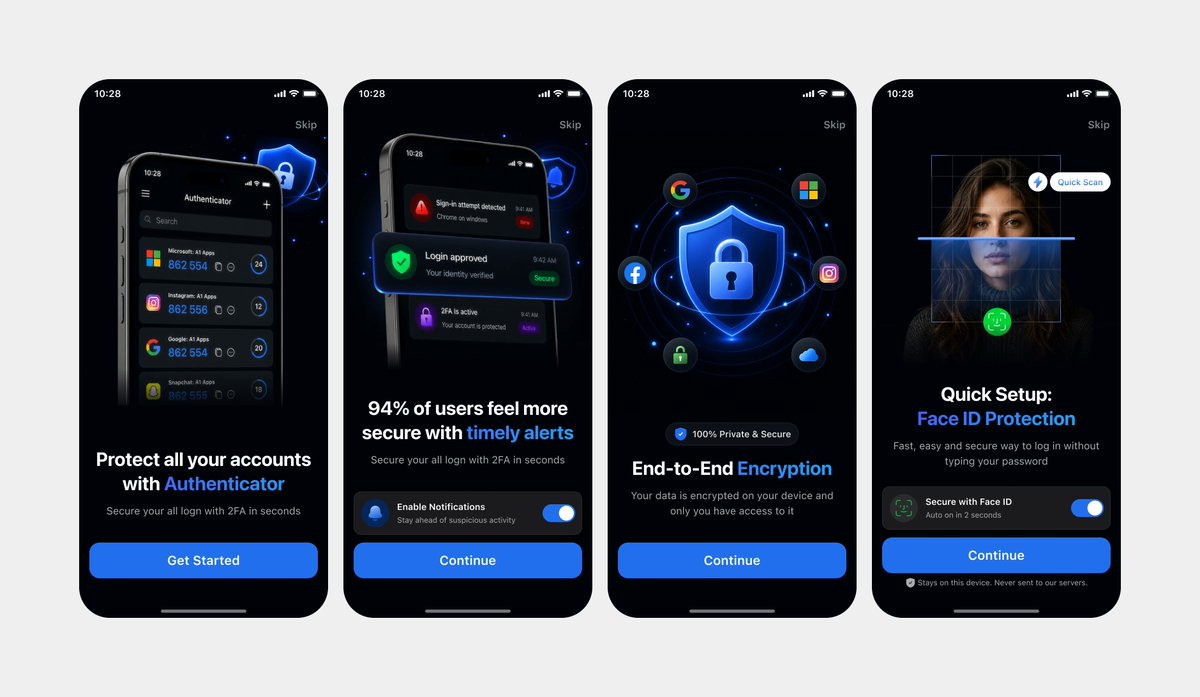
Clean Authenticator Onboarding UI-mockups
Genererer en poleret onboardingpræsentation i mørk tilstand på fire skærme baseret på fotograferede brugergrænsefladereferencer, nyttig til app-landingssider eller designpræsentationer.
Dette er et GPT Image 2 -eksempel på en prompt for Produkt og kommercielt . Brug den kopieringsklare prompt nedenfor til at generere lignende visuelle elementer, og gennemgå Awesome GPT Image 2 Prompts -kreditering samt kommercielle brugsrettigheder før genbrug.
Har du brug for det fulde promptsæt? Brug Produkt og kommercielt emnehub for flere relaterede eksempler, eller åbn GPT Image 2 hurtig katalog for det fulde eksempelindeks, genanvendelige strukturer og kildeattribution.
Free 1K preview
Generate one preview image instantly, no sign-up required.
1002/4000
Hurtig
Klar til kopiering
Using REFERENCE_0 and REFERENCE_1 as the design references, recreate the same 4 mobile onboarding screens as clean, high-fidelity UI mockups instead of a photographed laptop screen. Remove all perspective distortion, laptop/browser surroundings, glare, and camera artifacts. Present the four iPhone-style screens front-facing, evenly spaced in one horizontal row on a light gray canvas, preserving the dark-mode version from REFERENCE_0 and the same screen order, typography hierarchy, blue security visual style, rounded phone frames, status bars, skip links, bottom home indicators, and CTA structure. Keep exactly 4 screens: 1) authenticator account protection with “Get Started”, 2) timely alerts with notification toggle and “Continue”, 3) end-to-end encryption with shield/lock and social icons plus “Continue”, 4) Face ID protection quick setup with scan overlay, toggle, and “Continue”. Make the UI crisp, polished, app-store-presentation ready, with sharp readable text and consistent spacing.
Best for
- - Produkt og kommercielt visual exploration
- - Image generation and reference-image edits
- - Reusable briefs that keep source attribution visible
Change these parts
- - Subject, product, character, or scene
- - Aspect ratio, camera, lighting, and background
- - Brand, text, color, and output constraints
Recommended model and settings
- - Model: gpt-image-2
- - Input mode: Tekst til billede
- - Aspect ratio: source
- - Commercial status: review original source
How to use this prompt
- 1. Copy the prompt and preserve its structure for the first test.
- 2. Replace the subject, context, and publishing channel.
- 3. Change one camera, lighting, or style variable per iteration.
- 4. Inspect the output, source, text, and rights before reuse.
Limitations, source, and reuse cautions
- - Generated output is an editable draft, not factual, legal, or rights evidence.
- - Review the linked source, people, brands, logos, text, and third-party media before commercial use.
Importeret fra Awesome GPT Image 2 Prompts . Kreditering er påkrævet. Status for kommerciel brug er allowed ; gennemgå kilderettighederne før betalt brug.
Flere sager i denne kategori
Prioriteret efter kategori, kompatibilitet med inputtilstande, kvalitet og lavere risiko.

Matte Black B.AI Keyboard Keycap
Tekst til billede

Cute Speech Bubble Mascot Profile Icon
Tekst til billede

Autumn Cozy Casual Outfit Prompt
Tekst til billede

Tuxedo Cat Photo and Line Art Diptych
Tekst til billede

Luxury Travel Fashion Portrait Prompt
Tekst til billede

Cute Focus Desk Flat Lay and Kawaii Illustration
Tekst til billede
Genbrug og kildenoter
Brug denne prompt sikkert efter at have gennemgået sagen.
- 1.Kopier prompten, eller åbn den direkte i Dovoo med genereringsknappen.
- 2.Juster variabler, billedformat og referencebilleder til din egen brug.
- 3.Før udgivelse eller betalt brug skal du verificere kilderettigheder, krav til kreditering og risici forbundet med branding eller lighed.