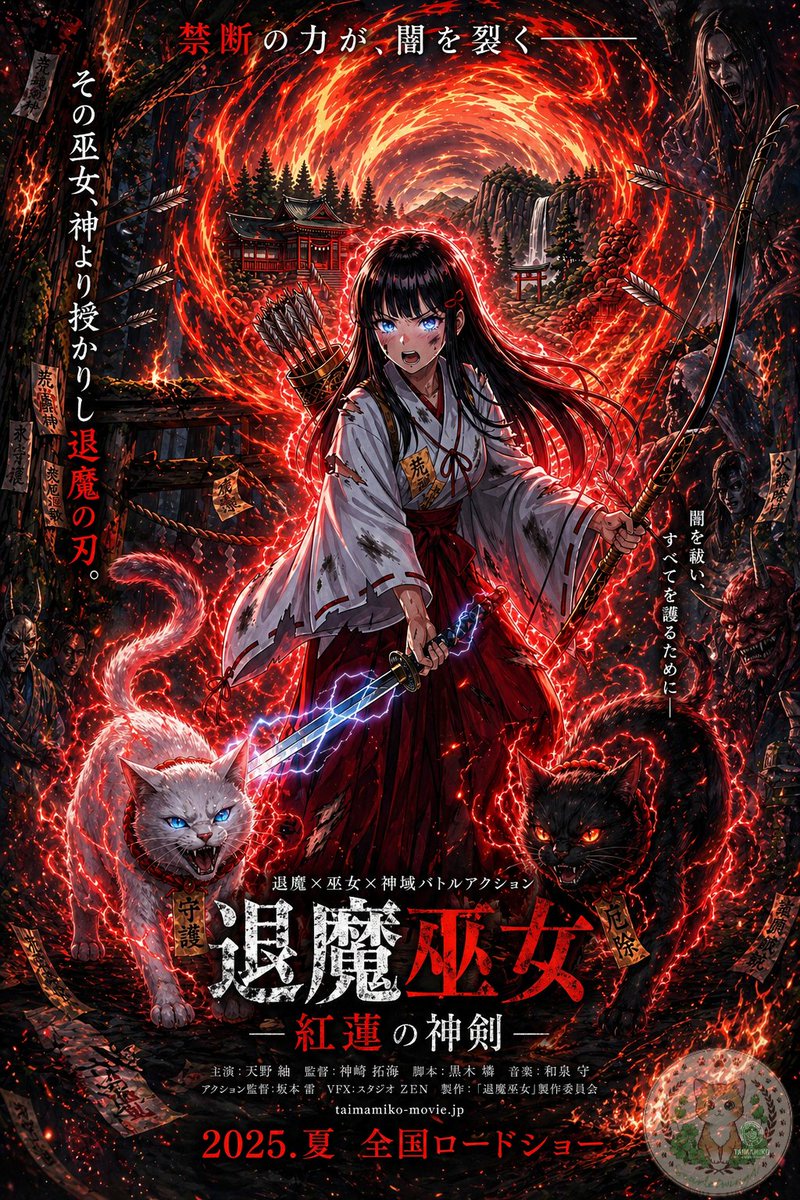
Anime Shrine Maiden-filmplakat
Denne prompt forvandler en illustration af en referencefantasykarakter til en mørk, teksttung japansk teaterplakat til en fiktiv overnaturlig actionfilm.
Dette er et GPT Image 2 -eksempel på en prompt for Grafik og plakat . Brug den kopieringsklare prompt nedenfor til at generere lignende visuelle elementer, og gennemgå Awesome GPT Image 2 Prompts -kreditering samt kommercielle brugsrettigheder før genbrug.
Har du brug for det fulde promptsæt? Brug Grafik og plakat emnehub for flere relaterede eksempler, eller åbn GPT Image 2 hurtig katalog for det fulde eksempelindeks, genanvendelige strukturer og kildeattribution.
Free 1K preview
Generate one preview image instantly, no sign-up required.
Free text preview doesn’t preserve reference-image consistency.
1642/4000
Hurtig
Klar til kopiering
Using the provided reference image, turn it into a dramatic Japanese theatrical movie poster while keeping the same shrine maiden archer-swordswoman, fiery portal, bow, quiver, lightning sword, and shrine setting as the base. Push the image into a much darker, high-contrast, more detailed cinematic poster style with intense red-and-black grading, denser embers, stronger rim lighting, and a more ominous supernatural atmosphere. Add 2 demonic guardian cats in the foreground at the character’s feet: 1 white cat on the left with blue glowing eyes and an open snarling mouth, and 1 black cat on the right with red glowing eyes and an open snarling mouth, both wrapped in crackling red energy. Add shadowy monster and oni faces emerging from the dark forest edges on both sides. Increase the number of flying arrows, talismans, sparks, and glowing red energy trails around the character. Preserve the central heroic composition, but format the whole image as a full Japanese film poster with layered typography. Add the top tagline in Japanese: "禁断の力が、闇を裂く—". Add 2 vertical side taglines: left side "その巫女神より授かりし退魔の刃。" and right side "闇を祓い、すべてを護るために—". Add a small genre line above the title: "退魔×巫女×神域バトルアクション". Add the main title near the bottom center in large distressed kanji: "退魔巫女", with the subtitle beneath it: "—紅蓮の神剣—". Add a credits block in small Japanese text below the title, then add the website "taimamiko-movie.jp" and the release line at the very bottom: "2025.夏 全国ロードショー". Include a small dark rectangular logo block in the top-right corner. Make it look like a polished fantasy-horror action poster for a fictional movie.
Best for
- - Grafik og plakat visual exploration
- - Image generation and reference-image edits
- - Reusable briefs that keep source attribution visible
Change these parts
- - Subject, product, character, or scene
- - Aspect ratio, camera, lighting, and background
- - Brand, text, color, and output constraints
Recommended model and settings
- - Model: gpt-image-2
- - Input mode: Billede til billede
- - Aspect ratio: source
- - Commercial status: review original source
How to use this prompt
- 1. Copy the prompt and preserve its structure for the first test.
- 2. Replace the subject, context, and publishing channel.
- 3. Change one camera, lighting, or style variable per iteration.
- 4. Inspect the output, source, text, and rights before reuse.
Limitations, source, and reuse cautions
- - Generated output is an editable draft, not factual, legal, or rights evidence.
- - Review the linked source, people, brands, logos, text, and third-party media before commercial use.
Importeret fra Awesome GPT Image 2 Prompts . Kreditering er påkrævet. Status for kommerciel brug er allowed ; gennemgå kilderettighederne før betalt brug.
Flere sager i denne kategori
Prioriteret efter kategori, kompatibilitet med inputtilstande, kvalitet og lavere risiko.

Split Face Horror Transformation
Billede til billede

Dax Cinematic Character Bible Sheet
Billede til billede

Vintage Digital Camera Mirror Selfie
Billede til billede

Manga Desert Radio Telescope Road Trip
Tekst til billede

Multi-Pose Wavy Dark Hair Portrait
Billede til billede

Surreal Macro Fashion Illusion
Billede til billede
Genbrug og kildenoter
Brug denne prompt sikkert efter at have gennemgået sagen.
- 1.Kopier prompten, eller åbn den direkte i Dovoo med genereringsknappen.
- 2.Juster variabler, billedformat og referencebilleder til din egen brug.
- 3.Før udgivelse eller betalt brug skal du verificere kilderettigheder, krav til kreditering og risici forbundet med branding eller lighed.