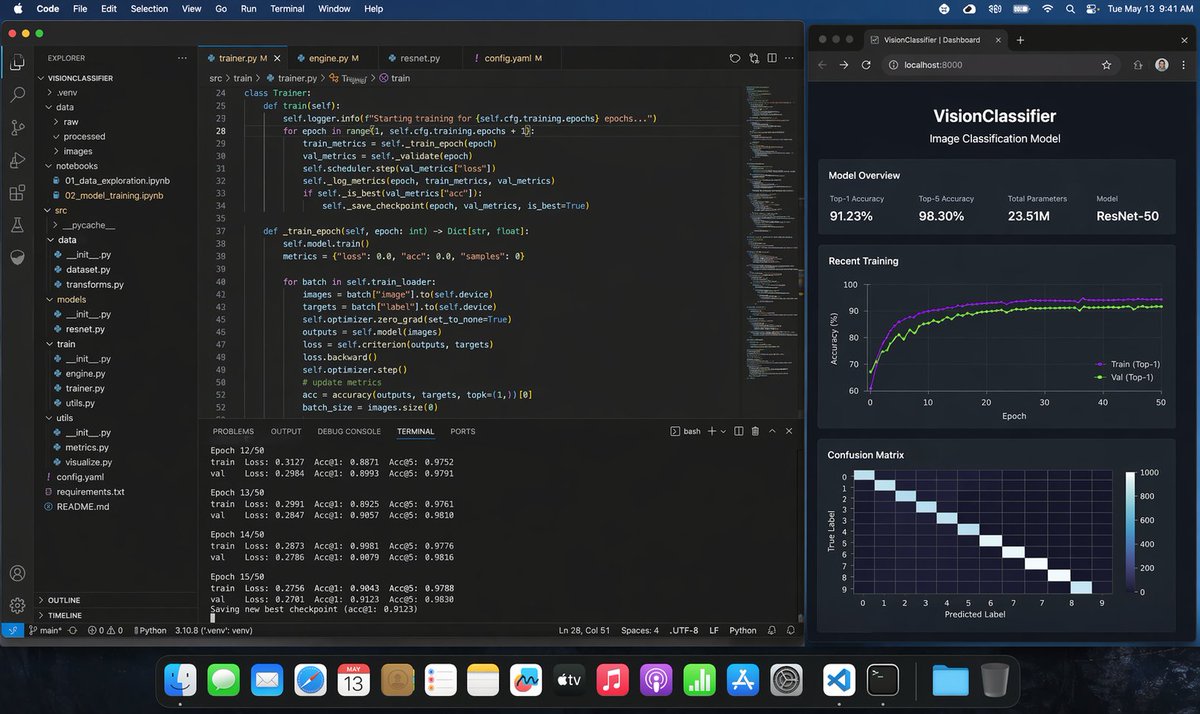
Photoreal ML Developer Desktop
This generates a highly realistic macOS screenshot of a programmer training a Python image-classification model in VS Code with a live browser dashboard, useful for product mockups, social posts, and AI demo visuals.
This is a GPT Image 2 prompt case for Product & Commercial. Use the copy-ready prompt below to generate similar visuals, and review Awesome GPT Image 2 Prompts attribution plus commercial-use rights before reuse.
Free 1K preview
Generate one preview image instantly, no sign-up required.
Free text preview doesn’t preserve reference-image consistency.
Prompt
Copy-ready prompt
A photorealistic macOS desktop screenshot of a machine learning engineer’s workspace at night, shown straight-on with a dark blue macOS menu bar and the dock visible along the bottom. The desktop contains exactly 2 main application windows side by side. On the left, a large Visual Studio Code window in dark theme occupies about two-thirds of the screen. The VS Code project is named "VISIONCLASSIFIER" in the Explorer sidebar, with a realistic Python ML folder tree including exactly 11 visible top-level or expanded items: .venv, data, raw, processed, images, notebooks, src, utils, config.yaml, requirements.txt, README.md. Inside notebooks, show exactly 2 visible files: 01_data_exploration.ipynb and 02_model_training.ipynb. Inside src, show a realistic ML code structure with dataset.py, transforms.py, models, resnet.py, train, engine.py, trainer.py, utils.py. The editor area has exactly 4 tabs open: trainer.py, engine.py, resnet.py, config.yaml. The active tab is trainer.py. Display clean, believable Python training code for a ResNet image classification pipeline, including a class Trainer, methods train(self) and train_epoch(self, epoch: int) -> Dict[str, float], references to self.cfg.training.epochs, train_metrics, val_metrics, scheduler.step, save_checkpoint, self.model.train(), batch["image"], batch["label"], optimizer.zero_grad, criterion, loss.backward, optimizer.step, accuracy(outputs, targets, topk=(1,))[0]. Make the code sharp but naturally screen-like, with line numbers visible around lines 24 to 52. At the bottom of the VS Code window, the integrated terminal is open on the TERMINAL tab and shows realistic training logs for exactly 4 epochs in view: Epoch 12/50, Epoch 13/50, Epoch 14/50, Epoch 15/50, each with train and val lines listing Loss, Acc@1, and Acc@5, plus a final line saying a new best checkpoint was saved. Keep the numbers plausible for a successful training run, with top-1 accuracy around 0.88 to 0.91 and top-5 around 0.97 to 0.98. Include the usual VS Code status bar along the bottom with Python environment details. On the right, place exactly 1 dark-themed web browser window showing a local dashboard at localhost:8000 with the page title "VisionClassifier | Dashboard" and the app header "VisionClassifier" plus subtitle "Image Classification Model". The dashboard contains exactly 3 stacked sections. The first section is "Model Overview" with exactly 4 metric cards: Top-1 Accuracy 91.23%, Top-5 Accuracy 98.30%, Total Parameters 23.51M, Model ResNet-50. The second section is "Recent Training" with a dark line chart of accuracy over 50 epochs, showing exactly 2 colored curves labeled Train (Top-1) and Val (Top-1), both rising quickly and stabilizing around the low 90s. The third section is "Confusion Matrix" showing a 10x10 heatmap with a bright diagonal and axes labeled True Label and Predicted Label. Use subtle reflections, crisp typography, realistic UI spacing, and believable screen glow. The macOS top menu bar should show common menus like Code, File, Edit, Selection, View, Go, Run, Terminal, Window, Help on the left and system icons with the time reading Tue May 13 9:41 AM on the right. The dock should contain many recognizable app icons and feel authentic but not distracting. Overall style: ultra-realistic screenshot, professional developer workstation, polished dark mode interfaces, no stylization, no illustration, indistinguishable from a real screen capture.
Best for
- - Product & Commercial visual exploration
- - Image generation and reference-image edits
- - Reusable briefs that keep source attribution visible
Change these parts
- - Subject, product, character, or scene
- - Aspect ratio, camera, lighting, and background
- - Brand, text, color, and output constraints
Recommended model and settings
- - Model: gpt-image-2
- - Input mode: Image to Image
- - Aspect ratio: source
- - Commercial status: review original source
How to use this prompt
- 1. Copy the prompt and preserve its structure for the first test.
- 2. Replace the subject, context, and publishing channel.
- 3. Change one camera, lighting, or style variable per iteration.
- 4. Inspect the output, source, text, and rights before reuse.
Limitations, source, and reuse cautions
- - Generated output is an editable draft, not factual, legal, or rights evidence.
- - Review the linked source, people, brands, logos, text, and third-party media before commercial use.
More cases in this category
Prioritized by category, input mode compatibility, quality, and lower risk.
Reuse and source notes
Use this prompt safely after previewing the case.
- 1.Copy the prompt or open it directly in Dovoo with the generation button.
- 2.Adjust variables, aspect ratio, and reference images for your own use case.
- 3.Before publishing or paid usage, verify source rights, attribution requirements, and brand or likeness risks.
Can I use this prompt commercially?
Commercial-use status is allowed. Review the original source, license, brand constraints, and legal requirements before paid usage.
Where does this case come from?
This case is imported from Awesome GPT Image 2 Prompts; keep attribution visible and check the source URL before reuse.