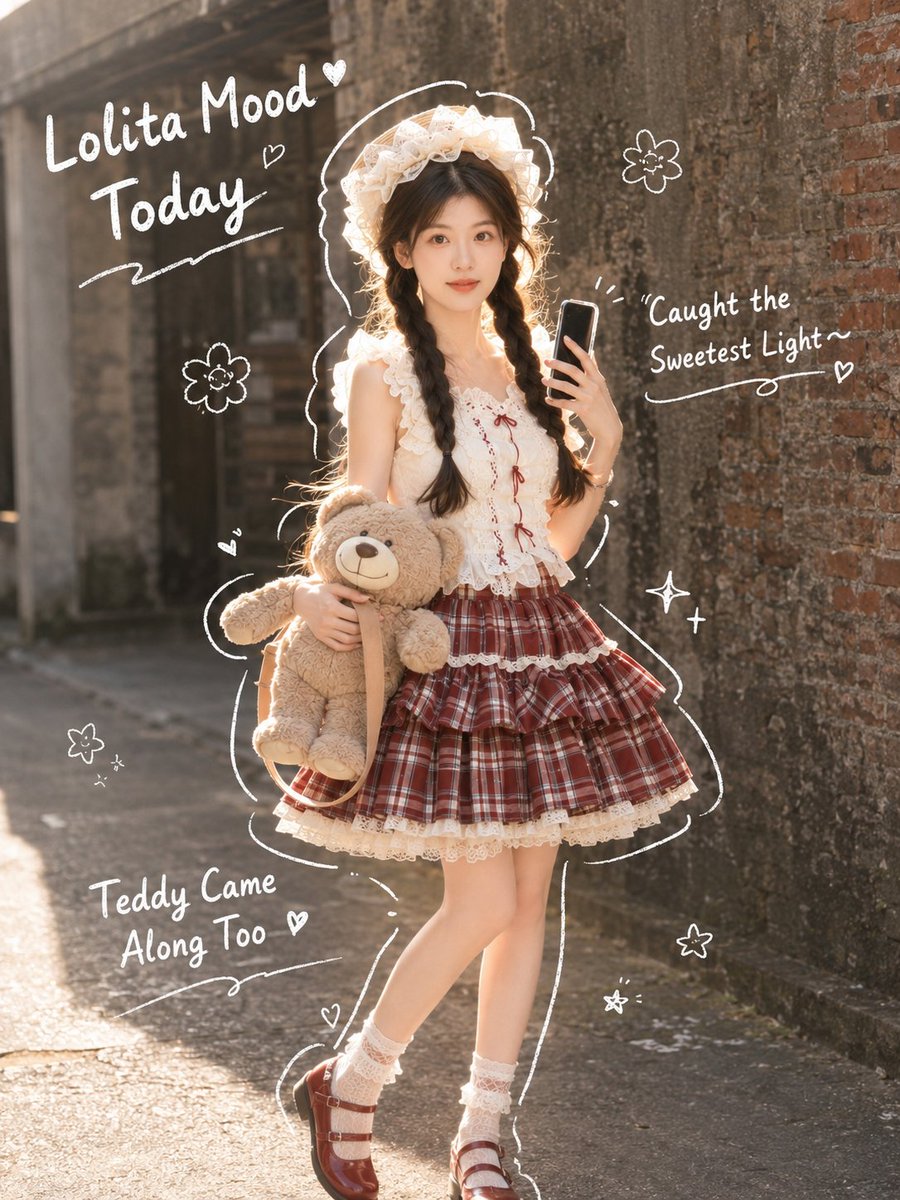
Japanese Lolita Street Style Selfie
A prompt for a realistic portrait in a Japanese Lolita style, featuring a character taking a selfie with sunlight and cute doodle accents.
Prompt
Copy-ready prompt
Use the uploaded portrait only as the identity reference. Preserve the subject’s real face, hairstyle, hair color, skin tone, and natural facial structure. Do not copy the original portrait’s clothes, background, lighting, or {argument name="pose" default="pose"}.

Create a realistic vertical 3:4 outdoor photo in a soft Japanese Lolita street style. The subject is shown in side profile, standing in front of an old textured concrete and brick wall, holding a phone up as if taking a mirror-style selfie. She wears a {argument name="top" default="white lace blouse"}, a {argument name="skirt" default="red plaid Lolita skirt"}, soft frills, and carries a {argument name="accessory" default="beige teddy bear"} under one arm. Warm natural sunlight hits the hair and shoulders, creating a gentle backlit glow. Add cute white hand-drawn doodles around the subject: hearts, flowers, outline strokes, and small handwritten English notes.

Text overlay should be clean white handwritten style:
“Today’s Lolita Fit Check”
“Even Teddy Wants Some Sun~”
“The Light on the Wall Feels So Soft”
Realistic skin texture, natural body proportions, soft sunlight, real camera feel, no plastic skin, no anime style, no watermark, no logo

Negative Prompt:
anime, cartoon, 3D doll, plastic skin, fake face, over-smoothed skin, distorted hands, extra fingers, bad anatomy, blurry face, low quality, messy text, unreadable text, watermark, logo, Chinese text, Japanese text
Prompt variables
Editable argument placeholders found in the prompt, with their default values.
Variable
pose
Default
pose
Variable
top
Default
white lace blouse
Variable
skirt
Default
red plaid Lolita skirt
Variable
accessory
Default
beige teddy bear
More cases in this category
Prioritized by category, input mode compatibility, quality, and lower risk.

Reuse and source notes
Use this prompt safely after previewing the case.
- 1.Copy the prompt or open it directly in Dovoo with the generation button.
- 2.Adjust variables, aspect ratio, and reference images for your own use case.
- 3.Before publishing or paid usage, verify source rights, attribution requirements, and brand or likeness risks.
Can I use this prompt commercially?
Commercial-use status is allowed. Review the original source, license, brand constraints, and legal requirements before paid usage.
Where does this case come from?
This case is imported from GPT Image 2 prompt catalog; keep attribution visible and check the source URL before reuse.