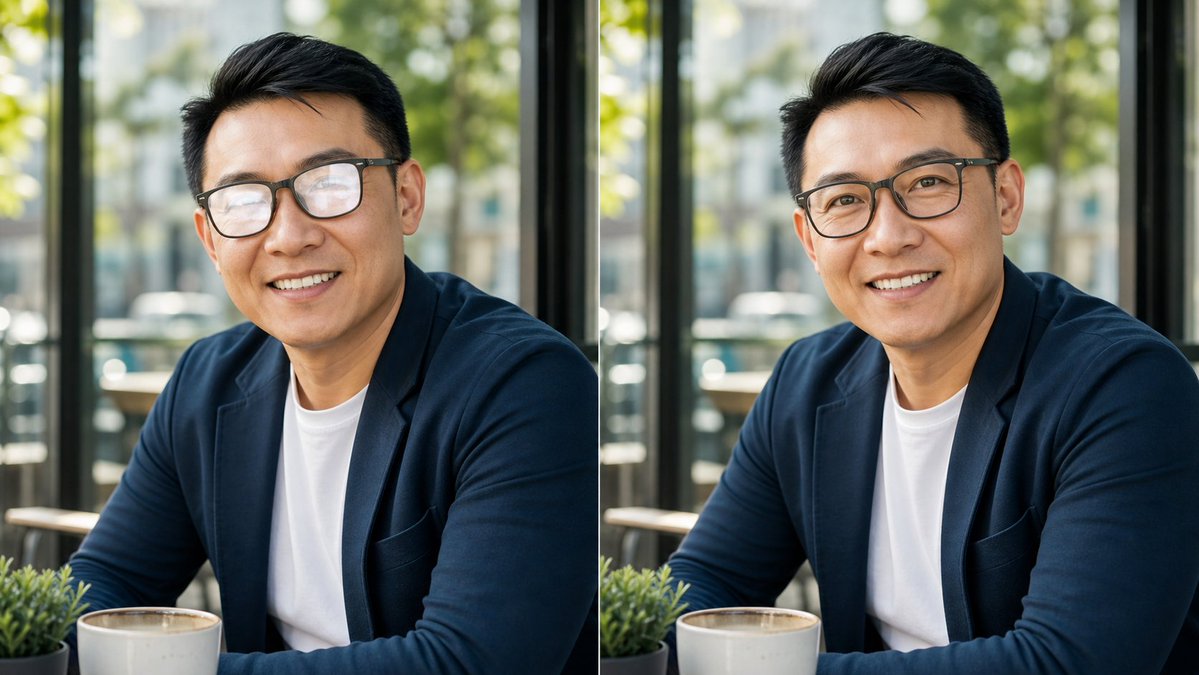
Cafe Portrait Glare Removal Comparison
Generates a realistic side-by-side cafe portrait comparison for demonstrating subtle glasses-glare removal in a profile photo.
This prompt is designed for multiple reference images. We will open Dovoo with the prompt and the available preview image; add the remaining references in Dovoo before generating.
Prompt
Copy-ready prompt
Create a realistic side-by-side comparison image showing the same cafe portrait duplicated in two equal vertical panels, like a before-and-after social media demonstration for removing glasses glare while preserving identity. Canvas is a wide 16:9 image, approximately 1200×675, split exactly down the center by a thin vertical white divider. Both panels show one adult man seated at a cafe table by large windows, wearing a dark navy blazer over a plain white crew-neck T-shirt, arms resting forward, with short neatly styled black hair and warm medium skin tone. In both panels, place a large opaque tan square censorship block over the center of the face, covering the eyes, nose, and mouth while leaving hair, ears, jawline, neck, and clothing visible; use {argument name="face block color" default="muted tan brown"}. The left panel should subtly imply the original portrait with eyeglass frames and glare partly visible at the edges of the face block, while the right panel should show the cleaned version with no visible glasses glare and the same face shape, pose, hair, outfit, lighting, and background. Include exactly 2 portrait panels: left original and right edited. Include exactly 2 identical coffee cups, one near the bottom center of each panel, cream-colored ceramic with coffee inside. Include exactly 2 small green potted plants, one at the lower left of each panel. Background: bright cafe interior with black window frames, sunlit glass, soft green foliage outside, blurred street and building shapes, shallow depth of field, natural daylight, realistic photography. Style should be high-quality candid profile-photo realism, crisp subject details, soft bokeh background, no text labels, no watermark, no extra people, and no changes between the two panels except the suggested glasses-glare removal on the right. Use {argument name="subject outfit" default="dark navy blazer over a white T-shirt"}, {argument name="setting" default="sunlit cafe by large windows"}, and {argument name="comparison theme" default="glasses glare removal before and after"}.Prompt variables
Editable argument placeholders found in the prompt, with their default values.
Variable
face block color
Default
muted tan brown
Variable
subject outfit
Default
dark navy blazer over a white T-shirt
Variable
setting
Default
sunlit cafe by large windows
Variable
comparison theme
Default
glasses glare removal before and after
More cases in this category
Prioritized by category, input mode compatibility, quality, and lower risk.
Reuse and source notes
Use this prompt safely after previewing the case.
- 1.Copy the prompt or open it directly in Dovoo with the generation button.
- 2.Adjust variables, aspect ratio, and reference images for your own use case.
- 3.Before publishing or paid usage, verify source rights, attribution requirements, and brand or likeness risks.
Can I use this prompt commercially?
Commercial-use status is unknown. Review the original source, license, brand constraints, and legal requirements before paid usage.
Where does this case come from?
This case is imported from GPT Image 2 OpenLab gpt-image-2-prompts; keep attribution visible and check the source URL before reuse.