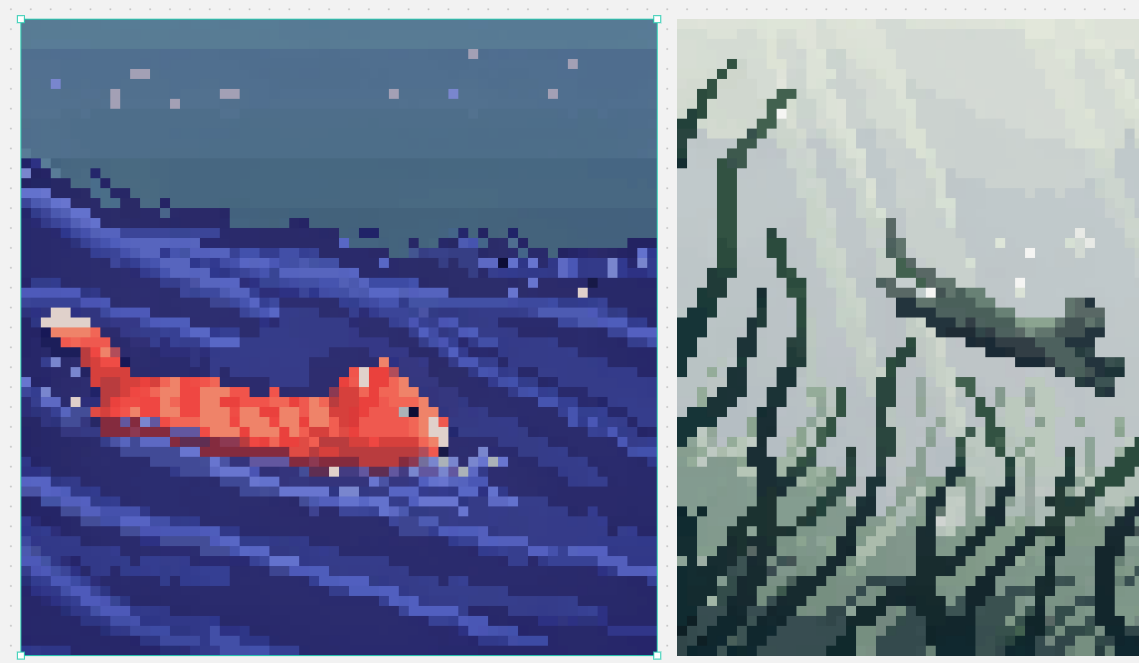
Split Pixel Art Canvas
Generates a two-panel pixel art comparison canvas with a selected ocean fish scene and a misty mountain landscape.
هذا GPT Image 2 لحالة الرسم والتوضيح الفني . استخدم النموذج الجاهز للنسخ أدناه لإنشاء صور مشابهة، وراجع حقوق الإسناد Awesome GPT Image 2 Prompts وحقوق الاستخدام التجاري قبل إعادة الاستخدام.
هل تحتاج إلى مجموعة كاملة من المطالبات؟ استخدم الرسم والتوضيح الفني للاطلاع على المزيد من الأمثلة ذات الصلة، أو افتح مركز المواضيع. GPT Image 2 كتالوج سريع للاطلاع على فهرس الأمثلة الكامل، والهياكل القابلة لإعادة الاستخدام، ونسب المصادر.
Free 1K preview
Generate one preview image instantly, no sign-up required.
2749/4000
المطالبة
نموذج جاهز للطباعة
Goal: Create a split-screen pixel art comparison image in the style of a design canvas, showing exactly 2 square pixel-art panels side by side.

Canvas: Wide horizontal canvas, about 1139×671 px, light gray workspace background with tiny scattered gray speckles. Place two large square artworks aligned horizontally with a narrow vertical gap between them. Add a thin bright cyan selection outline with small square corner/edge handles around the left artwork only, as if it is selected in an editor.

Layout: Left panel occupies slightly more than half the canvas width and is framed by the cyan selection box. Right panel is the same height but slightly narrower in the visible crop, flush to the right side. Keep both artworks rendered as low-resolution blocky pixel art with crisp square pixels and no antialiasing.

Left panel subject: A night ocean scene in deep indigo and blue pixel art. A small orange-red koi or goldfish swims from left to right in the lower left-to-center area, with a pale cream tail tip and lighter orange highlights on its segmented body. The water is dark navy with diagonal wave streaks and layered horizontal bands in violet, periwinkle, and electric blue. The upper third is a muted blue-gray night sky with exactly 8 small square star-like pixels scattered across it in pale lavender, pink, and blue. Mood: calm, retro game scene, underwater/night seascape.

Right panel subject: A misty mountainous landscape rendered in desaturated green-gray pixel art. Tall jagged mountain ridges and cliff faces fill the frame, with dark teal outlines and angular snowy or misty white planes. Include a winding dark ridge or branch-like ledge crossing the mid-right area, and pale foggy atmosphere in the upper background. Use muted sage, gray, off-white, and dark forest-green tones.

Visual style: authentic 16-bit pixel art, large visible square pixels, limited color palettes, high contrast silhouettes, no smooth gradients except stepped pixel dithering. Make the two panels feel like examples from different pixel-art models: left colorful and aquatic, right monochrome misty fantasy landscape.

Customizable details: left fish color {argument name="fish color" default="orange-red"}; left scene theme {argument name="left scene theme" default="night ocean"}; right landscape theme {argument name="right landscape theme" default="misty green-gray mountains"}; pixel art scale {argument name="pixel art scale" default="large crisp square pixels"}; selection outline color {argument name="selection outline color" default="bright cyan"}.

Constraints: Show exactly 2 main image panels. Do not add text, logos, characters, UI menus, or watermarks. Preserve the editor-like cyan selection border only around the left panel.
متغيرات المطالبة
عناصر نائبة قابلة للتعديل موجودة في موجه الأوامر، مع قيمها الافتراضية.
عامل
fish color
تقصير
orange-red
عامل
left scene theme
تقصير
night ocean
عامل
right landscape theme
تقصير
misty green-gray mountains
عامل
pixel art scale
تقصير
large crisp square pixels
عامل
selection outline color
تقصير
bright cyan
Best for
- - الرسم والتوضيح الفني visual exploration
- - Image generation and reference-image edits
- - Reusable briefs that keep source attribution visible
Change these parts
- - Subject, product, character, or scene
- - Aspect ratio, camera, lighting, and background
- - Brand, text, color, and output constraints
Recommended model and settings
- - Model: gpt-image-2
- - Input mode: تحويل النص إلى صورة
- - Aspect ratio: source
- - Commercial status: review original source
How to use this prompt
- 1. Copy the prompt and preserve its structure for the first test.
- 2. Replace the subject, context, and publishing channel.
- 3. Change one camera, lighting, or style variable per iteration.
- 4. Inspect the output, source, text, and rights before reuse.
Limitations, source, and reuse cautions
- - Generated output is an editable draft, not factual, legal, or rights evidence.
- - Review the linked source, people, brands, logos, text, and third-party media before commercial use.
مستورد من Awesome GPT Image 2 Prompts . يلزم ذكر المصدر. حالة الاستخدام التجاري هي allowed ؛ يرجى مراجعة حقوق المصدر قبل الاستخدام المدفوع.
المزيد من الحالات في هذه الفئة
يتم تحديد الأولويات حسب الفئة، وتوافق وضع الإدخال، والجودة، وانخفاض المخاطر.

Cute Focus Desk Flat Lay and Kawaii Illustration
تحويل النص إلى صورة

Tuxedo Cat Photo and Line Art Diptych
تحويل النص إلى صورة

GPT Image 2 Real-Life Character Street Snap
تحويل النص إلى صورة

Matte Black B.AI Keyboard Keycap
تحويل النص إلى صورة

MotoGP POV Cornering Shot
تحويل النص إلى صورة

Boisterous Shrimpers Entering Pub
تحويل النص إلى صورة
إعادة استخدام الملاحظات ومصادرها
استخدم هذا التنبيه بأمان بعد معاينة الحالة.
- 1.انسخ الرسالة أو افتحها مباشرة في Dovoo باستخدام زر الإنشاء.
- 2.قم بتعديل المتغيرات ونسبة العرض إلى الارتفاع والصور المرجعية لتناسب حالة استخدامك الخاصة.
- 3.قبل النشر أو الاستخدام المدفوع، تحقق من حقوق المصدر، ومتطلبات الإسناد، ومخاطر العلامة التجارية أو التشابه.