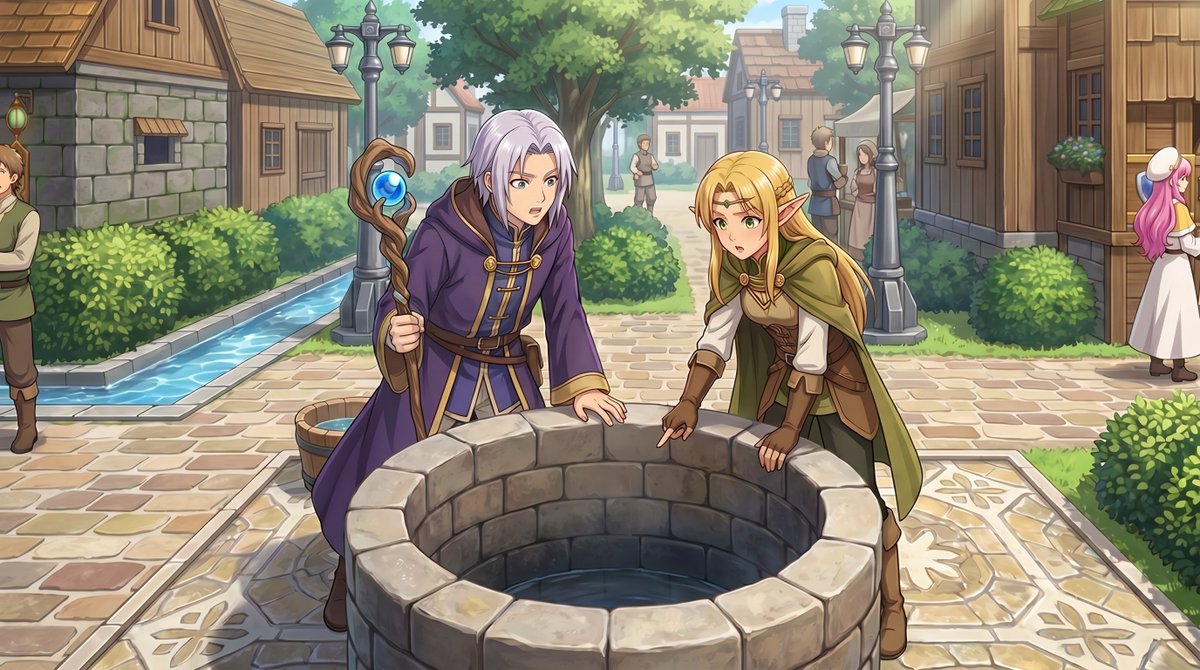
خريطة لعبة تقمص الأدوار لمشهد حدث أنمي
يحوّل هذا الخيار لقطة شاشة لمدينة من منظور علوي في برنامج RPG Maker إلى رسم توضيحي لمشهد سينمائي من منظور كامل لتصور لحظات الأحداث داخل اللعبة.
هذا GPT Image 2 لحالة الأنمي والألعاب . استخدم النموذج الجاهز للنسخ أدناه لإنشاء صور مشابهة، وراجع حقوق الإسناد Awesome GPT Image 2 Prompts وحقوق الاستخدام التجاري قبل إعادة الاستخدام.
هل تحتاج إلى مجموعة كاملة من المطالبات؟ استخدم الأنمي والألعاب للاطلاع على المزيد من الأمثلة ذات الصلة، أو افتح مركز المواضيع. GPT Image 2 كتالوج سريع للاطلاع على فهرس الأمثلة الكامل، والهياكل القابلة لإعادة الاستخدام، ونسب المصادر.
Free 1K preview
Generate one preview image instantly, no sign-up required.
Free text preview doesn’t preserve reference-image consistency.
1021/4000
المطالبة
نموذج جاهز للطباعة
Using the provided reference image, transform the top-down RPG town map into a polished anime-style event illustration from a human eye-level perspective. Keep the same village location and layout cues: the central stone well, the path network, the hedges, the wooden houses, and the narrow water canal on the left. Convert the 2 small sprite characters by the well into 2 full-size fantasy characters in the foreground: a silver-haired mage in a purple robe holding a staff, and a blonde elf in green-and-brown adventurer clothing, both leaning over and looking into the well. Add a cinematic JRPG feel with soft daylight, detailed painterly rendering, clean line art, and gentle depth of field. Preserve the sense that this scene is taking place in the same town square, but enrich it with natural perspective, more environmental detail, and 5 background villagers: 1 man cropped at the far left edge, 2 small figures standing on the center path in the distance, and 2 townspeople talking near the right-side buildings.
Best for
- - الأنمي والألعاب visual exploration
- - Image generation and reference-image edits
- - Reusable briefs that keep source attribution visible
Change these parts
- - Subject, product, character, or scene
- - Aspect ratio, camera, lighting, and background
- - Brand, text, color, and output constraints
Recommended model and settings
- - Model: gpt-image-2
- - Input mode: صورة إلى صورة
- - Aspect ratio: source
- - Commercial status: review original source
How to use this prompt
- 1. Copy the prompt and preserve its structure for the first test.
- 2. Replace the subject, context, and publishing channel.
- 3. Change one camera, lighting, or style variable per iteration.
- 4. Inspect the output, source, text, and rights before reuse.
Limitations, source, and reuse cautions
- - Generated output is an editable draft, not factual, legal, or rights evidence.
- - Review the linked source, people, brands, logos, text, and third-party media before commercial use.
مستورد من Awesome GPT Image 2 Prompts . يلزم ذكر المصدر. حالة الاستخدام التجاري هي allowed ؛ يرجى مراجعة حقوق المصدر قبل الاستخدام المدفوع.
المزيد من الحالات في هذه الفئة
يتم تحديد الأولويات حسب الفئة، وتوافق وضع الإدخال، والجودة، وانخفاض المخاطر.






إعادة استخدام الملاحظات ومصادرها
استخدم هذا التنبيه بأمان بعد معاينة الحالة.
- 1.انسخ الرسالة أو افتحها مباشرة في Dovoo باستخدام زر الإنشاء.
- 2.قم بتعديل المتغيرات ونسبة العرض إلى الارتفاع والصور المرجعية لتناسب حالة استخدامك الخاصة.
- 3.قبل النشر أو الاستخدام المدفوع، تحقق من حقوق المصدر، ومتطلبات الإسناد، ومخاطر العلامة التجارية أو التشابه.