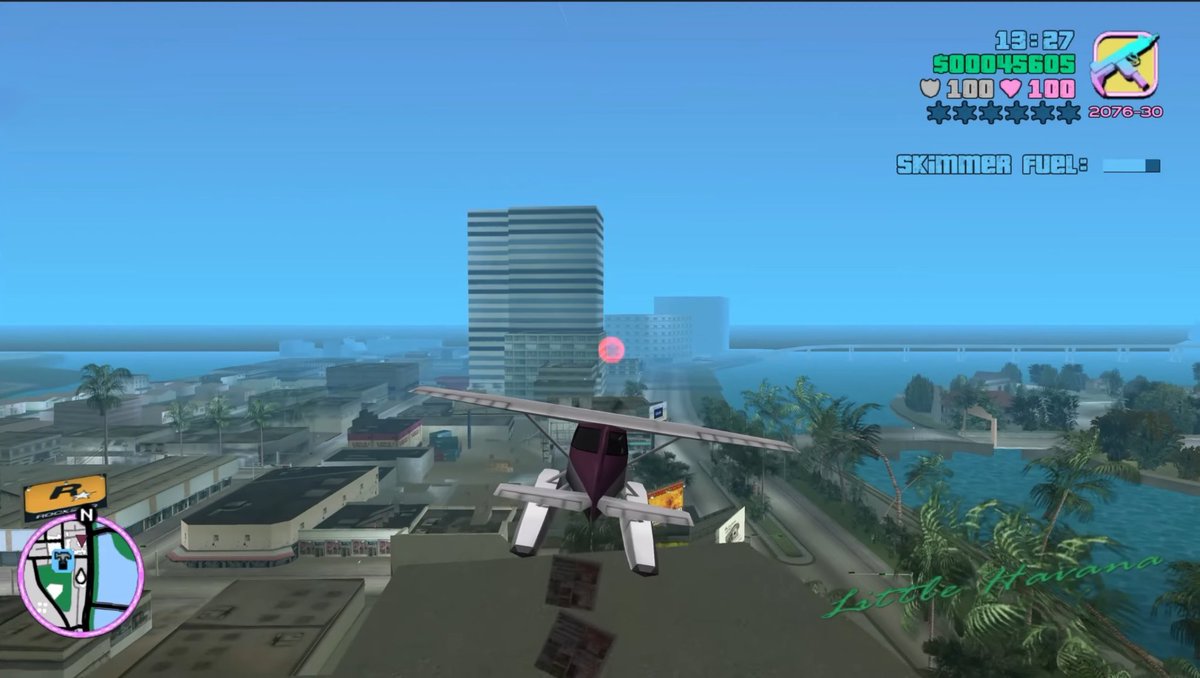
لقطة شاشة من لعبة طائرة مائية قديمة مفتوحة العالم
يقوم هذا الخيار بإنشاء لقطة شاشة من لعبة عالم مفتوح تعود إلى حقبة PS2، تُظهر طائرة مائية تحلق فوق مدينة استوائية مع واجهة مستخدم رسومية كاملة قديمة الطراز، وهو أمر مفيد لإعادة إنشاء صور ألعاب الفيديو الكلاسيكية.
هذا GPT Image 2 لحالة الأنمي والألعاب . استخدم النموذج الجاهز للنسخ أدناه لإنشاء صور مشابهة، وراجع حقوق الإسناد Awesome GPT Image 2 Prompts وحقوق الاستخدام التجاري قبل إعادة الاستخدام.
هل تحتاج إلى مجموعة كاملة من المطالبات؟ استخدم الأنمي والألعاب للاطلاع على المزيد من الأمثلة ذات الصلة، أو افتح مركز المواضيع. GPT Image 2 كتالوج سريع للاطلاع على فهرس الأمثلة الكامل، والهياكل القابلة لإعادة الاستخدام، ونسب المصادر.
Free 1K preview
Generate one preview image instantly, no sign-up required.
1644/4000
المطالبة
نموذج جاهز للطباعة
A third-person gameplay screenshot styled exactly like an early-2000s open-world crime game, showing a small white and burgundy seaplane flying low over a tropical coastal city. The camera is positioned directly behind the aircraft, centered on its tail, with the plane heading toward a cluster of mid-rise buildings near the waterfront. The city below has flat-roofed buildings, palm-lined streets, canals, and bright turquoise water, with a hazy blue sky and light atmospheric fog that softens the distance. A tall striped office tower stands near the center background, and a glowing pink checkpoint ring floats in front of the buildings. On the right side, a curving shoreline and canal are lined with dense palm trees. Add a retro video game HUD in the top-right corner with the time reading 13:27, green money text reading 500045605, two lines of white health and armor values both reading 100, a row of 6 wanted stars with 2 lit and 4 unlit, a small weapon icon in a rounded square, and ammo text reading 2076-30. Beneath that, display the mission text “SKIMMER FUEL!” with a small horizontal blue progress bar. In the bottom-left corner, include a circular minimap with a pink border, black streets, pale land, blue water, a north marker labeled N, and a small player arrow. In the bottom-right corner, overlay the location name {argument name="location name" default="Little Havana"} in elegant green cursive script. Use low-polygon vehicles and buildings, simple textures, soft shadows, saturated tropical colors, slight screen blur, and the unmistakable nostalgic look of a PlayStation 2-era action game screenshot with a 16:9 frame.متغيرات المطالبة
عناصر نائبة قابلة للتعديل موجودة في موجه الأوامر، مع قيمها الافتراضية.
عامل
location name
تقصير
Little Havana
Best for
- - الأنمي والألعاب visual exploration
- - Image generation and reference-image edits
- - Reusable briefs that keep source attribution visible
Change these parts
- - Subject, product, character, or scene
- - Aspect ratio, camera, lighting, and background
- - Brand, text, color, and output constraints
Recommended model and settings
- - Model: gpt-image-2
- - Input mode: تحويل النص إلى صورة
- - Aspect ratio: source
- - Commercial status: review original source
How to use this prompt
- 1. Copy the prompt and preserve its structure for the first test.
- 2. Replace the subject, context, and publishing channel.
- 3. Change one camera, lighting, or style variable per iteration.
- 4. Inspect the output, source, text, and rights before reuse.
Limitations, source, and reuse cautions
- - Generated output is an editable draft, not factual, legal, or rights evidence.
- - Review the linked source, people, brands, logos, text, and third-party media before commercial use.
مستورد من Awesome GPT Image 2 Prompts . يلزم ذكر المصدر. حالة الاستخدام التجاري هي allowed ؛ يرجى مراجعة حقوق المصدر قبل الاستخدام المدفوع.
المزيد من الحالات في هذه الفئة
يتم تحديد الأولويات حسب الفئة، وتوافق وضع الإدخال، والجودة، وانخفاض المخاطر.

Manga Desert Radio Telescope Road Trip
تحويل النص إلى صورة

Transparent Earbuds on Stone Pedestal
تحويل النص إلى صورة

Female Clown Cyborg Portrait
تحويل النص إلى صورة

Imperial Research Bunker on Volcanic Planet
تحويل النص إلى صورة

Greyscale Puzzle Portrait with Color Accent
تحويل النص إلى صورة

Surreal 3D Chess Match Artwork
تحويل النص إلى صورة
إعادة استخدام الملاحظات ومصادرها
استخدم هذا التنبيه بأمان بعد معاينة الحالة.
- 1.انسخ الرسالة أو افتحها مباشرة في Dovoo باستخدام زر الإنشاء.
- 2.قم بتعديل المتغيرات ونسبة العرض إلى الارتفاع والصور المرجعية لتناسب حالة استخدامك الخاصة.
- 3.قبل النشر أو الاستخدام المدفوع، تحقق من حقوق المصدر، ومتطلبات الإسناد، ومخاطر العلامة التجارية أو التشابه.