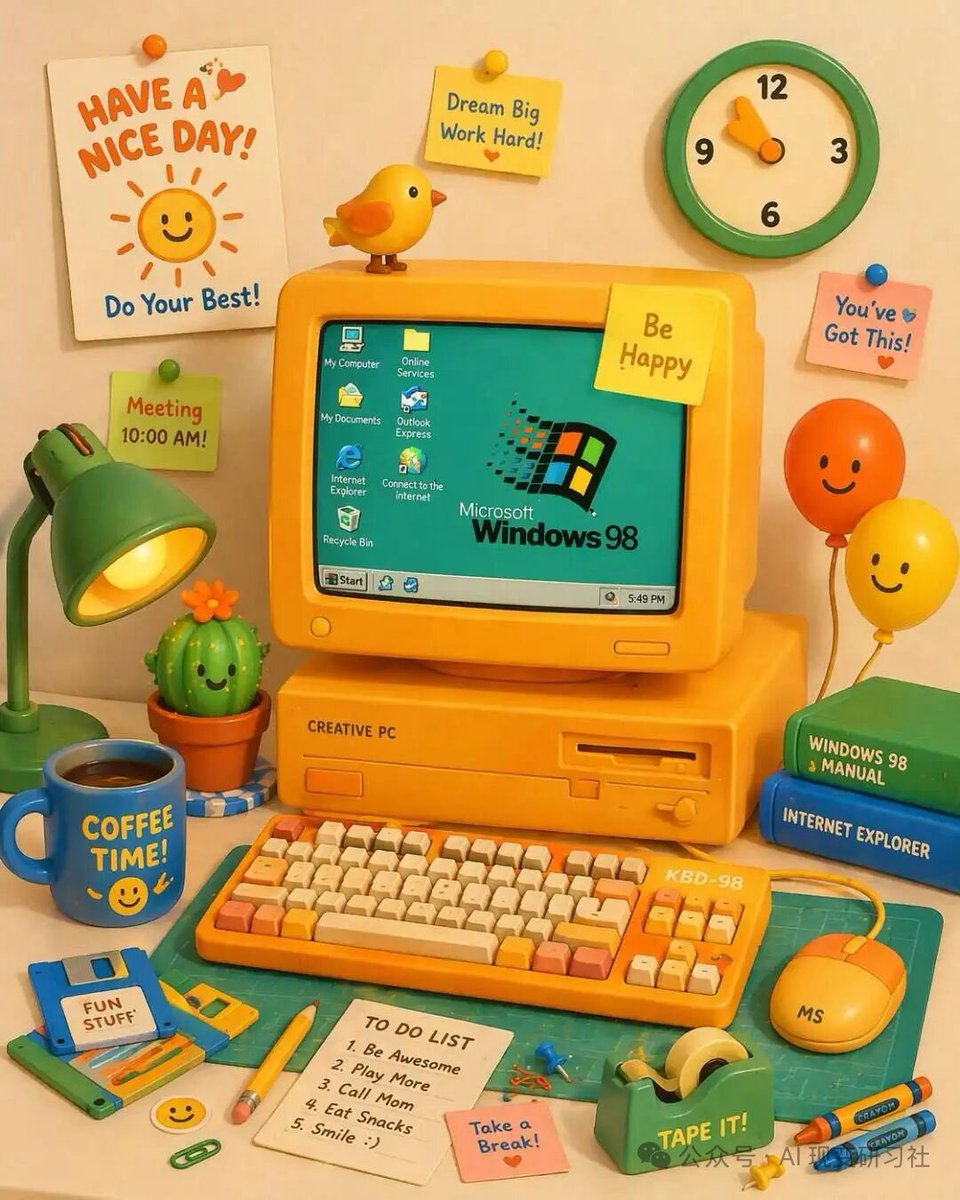
إعداد مكتب بتقنية الرسوم المتحركة ثلاثية الأبعاد الكلاسيكية
يُنشئ رسمًا ثلاثي الأبعاد مفصلًا للغاية وجذابًا لمكتب كمبيوتر قديم مع عناصر نصية قابلة للتخصيص.
هذا GPT Image 2 لحالة الرسم والتوضيح الفني . استخدم النموذج الجاهز للنسخ أدناه لإنشاء صور مشابهة، وراجع حقوق الإسناد Awesome GPT Image 2 Prompts وحقوق الاستخدام التجاري قبل إعادة الاستخدام.
هل تحتاج إلى مجموعة كاملة من المطالبات؟ استخدم الرسم والتوضيح الفني للاطلاع على المزيد من الأمثلة ذات الصلة، أو افتح مركز المواضيع. GPT Image 2 كتالوج سريع للاطلاع على فهرس الأمثلة الكامل، والهياكل القابلة لإعادة الاستخدام، ونسب المصادر.
Free 1K preview
Generate one preview image instantly, no sign-up required.
1766/4000
المطالبة
نموذج جاهز للطباعة
A vibrant, cute 3D claymation-style illustration of a retro yellow desktop computer setup on a desk. The central yellow CRT monitor displays a teal screen with the {argument name="OS logo text" default="Microsoft Windows 98"} logo and 7 desktop icons labeled 'My Computer', 'Online Services', 'My Documents', 'Outlook Express', 'Internet Explorer', 'Connect to the Internet', and 'Recycle Bin', plus a bottom taskbar with a 'Start' button and a clock reading '5:49 PM'. The monitor has a yellow sticky note reading '{argument name="monitor sticky note" default="Be Happy"}' and a small yellow bird perched on top. The computer base is labeled 'CREATIVE PC'. In front is a yellow mechanical keyboard labeled 'KBD-98' with orange and cream keys, and a yellow mouse labeled 'MS'. To the left is a green desk lamp, a smiling potted cactus, a blue floppy disk labeled '{argument name="floppy disk label" default="FUN STUFF"}', and a blue mug reading '{argument name="mug text" default="COFFEE TIME!"}' with a smiley face. To the right are 2 stacked books (green 'WINDOWS 98 MANUAL', blue 'INTERNET EXPLORER') and 2 smiling balloons (orange and yellow). The foreground features a green cutting mat, a yellow pencil, a green tape dispenser labeled 'TAPE IT!', 2 crayons, a pink sticky note reading 'Take a Break!', and a white notepad with a 5-item 'TO DO LIST': '1. Be Awesome', '2. Play More', '3. Call Mom', '4. Eat Snacks', '5. Smile :)'. The background wall has a green and cream clock, a white poster reading '{argument name="poster text" default="HAVE A NICE DAY!"}' with a smiling sun and 'Do Your Best!', and 3 additional sticky notes: a yellow one reading 'Dream Big Work Hard!', a pink one reading 'You've Got This!', and a green one reading 'Meeting 10:00 AM!'.متغيرات المطالبة
عناصر نائبة قابلة للتعديل موجودة في موجه الأوامر، مع قيمها الافتراضية.
عامل
OS logo text
تقصير
Microsoft Windows 98
عامل
monitor sticky note
تقصير
Be Happy
عامل
floppy disk label
تقصير
FUN STUFF
عامل
mug text
تقصير
COFFEE TIME!
عامل
poster text
تقصير
HAVE A NICE DAY!
Best for
- - الرسم والتوضيح الفني visual exploration
- - Image generation and reference-image edits
- - Reusable briefs that keep source attribution visible
Change these parts
- - Subject, product, character, or scene
- - Aspect ratio, camera, lighting, and background
- - Brand, text, color, and output constraints
Recommended model and settings
- - Model: gpt-image-2
- - Input mode: تحويل النص إلى صورة
- - Aspect ratio: source
- - Commercial status: review original source
How to use this prompt
- 1. Copy the prompt and preserve its structure for the first test.
- 2. Replace the subject, context, and publishing channel.
- 3. Change one camera, lighting, or style variable per iteration.
- 4. Inspect the output, source, text, and rights before reuse.
Limitations, source, and reuse cautions
- - Generated output is an editable draft, not factual, legal, or rights evidence.
- - Review the linked source, people, brands, logos, text, and third-party media before commercial use.
مستورد من Awesome GPT Image 2 Prompts . يلزم ذكر المصدر. حالة الاستخدام التجاري هي allowed ؛ يرجى مراجعة حقوق المصدر قبل الاستخدام المدفوع.
المزيد من الحالات في هذه الفئة
يتم تحديد الأولويات حسب الفئة، وتوافق وضع الإدخال، والجودة، وانخفاض المخاطر.

Transparent Earbuds on Stone Pedestal
تحويل النص إلى صورة

Surreal 3D Chess Match Artwork
تحويل النص إلى صورة

Manga Desert Radio Telescope Road Trip
تحويل النص إلى صورة

Female Clown Cyborg Portrait
تحويل النص إلى صورة

Grumpy Rhino Storybook Illustration
تحويل النص إلى صورة

Imperial Research Bunker on Volcanic Planet
تحويل النص إلى صورة
إعادة استخدام الملاحظات ومصادرها
استخدم هذا التنبيه بأمان بعد معاينة الحالة.
- 1.انسخ الرسالة أو افتحها مباشرة في Dovoo باستخدام زر الإنشاء.
- 2.قم بتعديل المتغيرات ونسبة العرض إلى الارتفاع والصور المرجعية لتناسب حالة استخدامك الخاصة.
- 3.قبل النشر أو الاستخدام المدفوع، تحقق من حقوق المصدر، ومتطلبات الإسناد، ومخاطر العلامة التجارية أو التشابه.