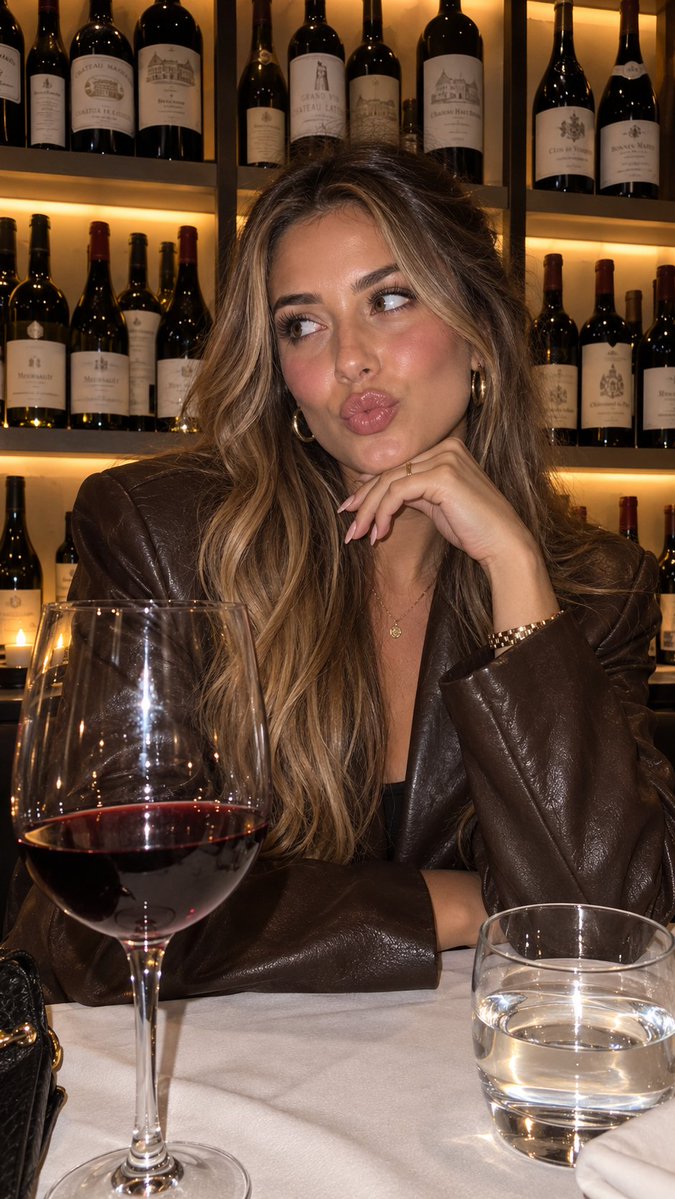
Product Placement Lifestyle Generation
A workflow for creating consistent lifestyle images of characters holding a specific product by referencing a detailed visual style JSON.
هذا GPT Image 2 لحالة المنتج والتسويق . استخدم النموذج الجاهز للنسخ أدناه لإنشاء صور مشابهة، وراجع حقوق الإسناد Awesome GPT Image 2 Prompts وحقوق الاستخدام التجاري قبل إعادة الاستخدام.
هل تحتاج إلى مجموعة كاملة من المطالبات؟ استخدم المنتج والتسويق للاطلاع على المزيد من الأمثلة ذات الصلة، أو افتح مركز المواضيع. GPT Image 2 كتالوج سريع للاطلاع على فهرس الأمثلة الكامل، والهياكل القابلة لإعادة الاستخدام، ونسب المصادر.
Free 1K preview
Generate one preview image instantly, no sign-up required.
1444/4000
المطالبة
نموذج جاهز للطباعة
“using this json as reference, generate a person holding my product [attach product image]”

> GPT-Image 2.5 generates the photo with that person holding your product

compare it with a version generated without the reference and look at the difference in the lighting and color grading

> save the generated character photo you’re happy with as your reference

> for future generations, attach the character photo each time and ask it to preserve the same facial features

now you have a reference character you can use across multiple product photos

you can also iterate the base json prompt and chat back and forth with GPT-6 Astra based on what you want, then repeat the same process..

i like this because it gives you much more direction over the color grading instead of leaving everything up to the model

the basic colours and grainy look are some of the things that can make an image feel AI-generated, so pay attention to those when comparing your results

this is how you can start building a library of high quality ugc images around your own products

the json gives GPT-Image 2.5 the lighting and color direction, your character reference helps with consistency, and you control the product placement

once you have that starting point, you can keep creating variations without writing everything from scratch

GPT-Image 2.5 Sunburst & Flare are available on Higgsfield. try this with your own product and reference images there
Best for
- - المنتج والتسويق visual exploration
- - Image generation and reference-image edits
- - Reusable briefs that keep source attribution visible
Change these parts
- - Subject, product, character, or scene
- - Aspect ratio, camera, lighting, and background
- - Brand, text, color, and output constraints
Recommended model and settings
- - Model: gpt-image-2
- - Input mode: تحويل النص إلى صورة
- - Aspect ratio: source
- - Commercial status: review original source
How to use this prompt
- 1. Copy the prompt and preserve its structure for the first test.
- 2. Replace the subject, context, and publishing channel.
- 3. Change one camera, lighting, or style variable per iteration.
- 4. Inspect the output, source, text, and rights before reuse.
Limitations, source, and reuse cautions
- - Generated output is an editable draft, not factual, legal, or rights evidence.
- - Review the linked source, people, brands, logos, text, and third-party media before commercial use.
مستورد من Awesome GPT Image 2 Prompts . يلزم ذكر المصدر. حالة الاستخدام التجاري هي allowed ؛ يرجى مراجعة حقوق المصدر قبل الاستخدام المدفوع.
المزيد من الحالات في هذه الفئة
يتم تحديد الأولويات حسب الفئة، وتوافق وضع الإدخال، والجودة، وانخفاض المخاطر.

Matte Black B.AI Keyboard Keycap
تحويل النص إلى صورة

GPT Image 2 Real-Life Character Street Snap
تحويل النص إلى صورة

MotoGP POV Cornering Shot
تحويل النص إلى صورة

Orange Rooftop Fashion Photo Prompt
تحويل النص إلى صورة

Luxury Travel Fashion Portrait Prompt
تحويل النص إلى صورة

Cute Focus Desk Flat Lay and Kawaii Illustration
تحويل النص إلى صورة
إعادة استخدام الملاحظات ومصادرها
استخدم هذا التنبيه بأمان بعد معاينة الحالة.
- 1.انسخ الرسالة أو افتحها مباشرة في Dovoo باستخدام زر الإنشاء.
- 2.قم بتعديل المتغيرات ونسبة العرض إلى الارتفاع والصور المرجعية لتناسب حالة استخدامك الخاصة.
- 3.قبل النشر أو الاستخدام المدفوع، تحقق من حقوق المصدر، ومتطلبات الإسناد، ومخاطر العلامة التجارية أو التشابه.