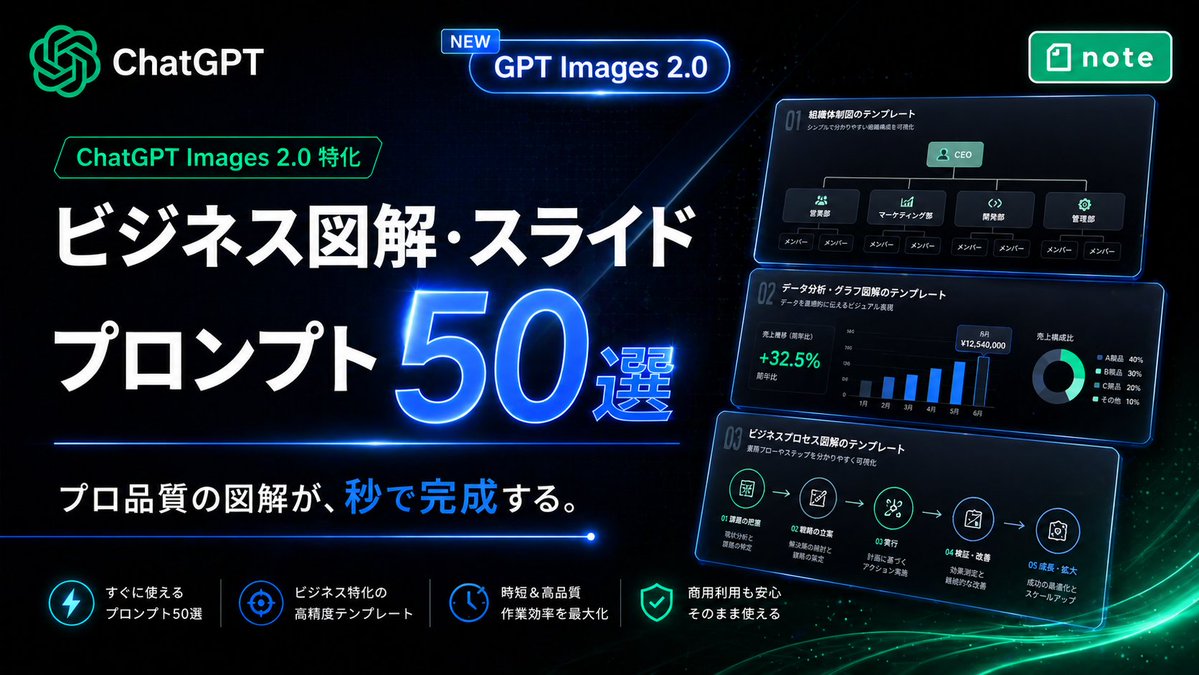
لافتة ترويجية يابانية نيونية بتقنية الذكاء الاصطناعي
لافتة ترويجية مستقبلية على طراز صفحات الهبوط اليابانية لبيع قوالب صور ChatGPT لإنشاء مخططات الأعمال والشرائح والرسوم البيانية.
هذا GPT Image 2 لحالة المنتج والتسويق . استخدم النموذج الجاهز للنسخ أدناه لإنشاء صور مشابهة، وراجع حقوق الإسناد Awesome GPT Image 2 Prompts وحقوق الاستخدام التجاري قبل إعادة الاستخدام.
هل تحتاج إلى مجموعة كاملة من المطالبات؟ استخدم المنتج والتسويق للاطلاع على المزيد من الأمثلة ذات الصلة، أو افتح مركز المواضيع. GPT Image 2 كتالوج سريع للاطلاع على فهرس الأمثلة الكامل، والهياكل القابلة لإعادة الاستخدام، ونسب المصادر.
Free 1K preview
Generate one preview image instantly, no sign-up required.
2957/4000
المطالبة
نموذج جاهز للطباعة
Create a high-impact Japanese promotional hero banner for a digital product about business infographic and slide prompts, in a futuristic neon tech style. Use a wide 16:9 composition with a deep black background, subtle dark blue grid texture, glowing blue light streaks, and soft green energy waves sweeping across the bottom right. The overall look should feel premium, cyber-luminous, modern SaaS marketing, with crisp contrast and polished UI lighting.

Place the ChatGPT logo and the word "ChatGPT" in the top left, glowing in green and white. Near the upper center, add a rounded glowing blue capsule badge with a small tag that says "NEW" and main text "GPT Images 2.0". In the top right, place a green rounded rectangular app-style badge with the note logo and the word "note".

On the left half, build the main headline stack in Japanese. Add a small green outlined label reading "ChatGPT Images 2.0 特化" above the headline. Then place a very large bold white headline on two lines: "ビジネス図解・スライド" and "プロンプト". Next to the second line, place an oversized glowing electric-blue number "50" with a bright neon rim light and the smaller text "選" attached to its lower right. Below the headline, add a thin horizontal blue neon divider line. Under it, place the subheadline in Japanese: "プロ品質の図解が、秒で完成する。" with the character group "秒で" highlighted in bright blue while the rest remains white.

On the right half, show 3 stacked floating dark UI cards with blue neon outlines, each slightly tilted and glowing, like business slide templates preview thumbnails. Count exactly 3 cards. The top card should show an organization chart template with the title "01 組織体制図のテンプレート", a small subtitle line, a CEO box at top, 4 department boxes beneath it, and 8 member boxes total along the bottom row. The middle card should show a data-analysis dashboard template titled "01 データ分析・グラフ図解のテンプレート", with a green percentage "+32.5%", a monthly vertical bar chart with 6 bars labeled from 1月 to 6月, and a donut chart legend with exactly 4 items. The bottom card should show a business process flow template titled "01 ビジネスプロセス図解のテンプレート", with a 5-step horizontal icon flow connected by arrows and small Japanese labels under each step.

Along the bottom, create a row of exactly 4 feature items separated by thin vertical dividers. Each feature item should have a glowing circular icon and two-line Japanese text in white. The 4 features are: "すぐに使える プロンプト50選", "ビジネス特化の 高精度テンプレート", "時短&高品質 作業効率を最大化", and "商用利用も安心 そのまま使える". Use icon styles resembling lightning, target/crosshair, clock, and shield respectively.

Typography should be bold, geometric sans-serif, with extremely large Japanese headline text, clean alignment, and strong hierarchy. Emphasize blue and green neon glows, glossy reflections, luminous edges, and a sleek conversion-focused landing-page aesthetic. No people, no photography, only graphic design, UI cards, icons, and Japanese marketing text.
Best for
- - المنتج والتسويق visual exploration
- - Image generation and reference-image edits
- - Reusable briefs that keep source attribution visible
Change these parts
- - Subject, product, character, or scene
- - Aspect ratio, camera, lighting, and background
- - Brand, text, color, and output constraints
Recommended model and settings
- - Model: gpt-image-2
- - Input mode: تحويل النص إلى صورة
- - Aspect ratio: source
- - Commercial status: review original source
How to use this prompt
- 1. Copy the prompt and preserve its structure for the first test.
- 2. Replace the subject, context, and publishing channel.
- 3. Change one camera, lighting, or style variable per iteration.
- 4. Inspect the output, source, text, and rights before reuse.
Limitations, source, and reuse cautions
- - Generated output is an editable draft, not factual, legal, or rights evidence.
- - Review the linked source, people, brands, logos, text, and third-party media before commercial use.
مستورد من Awesome GPT Image 2 Prompts . يلزم ذكر المصدر. حالة الاستخدام التجاري هي allowed ؛ يرجى مراجعة حقوق المصدر قبل الاستخدام المدفوع.
المزيد من الحالات في هذه الفئة
يتم تحديد الأولويات حسب الفئة، وتوافق وضع الإدخال، والجودة، وانخفاض المخاطر.

Transparent Earbuds on Stone Pedestal
تحويل النص إلى صورة

Manga Desert Radio Telescope Road Trip
تحويل النص إلى صورة

Female Clown Cyborg Portrait
تحويل النص إلى صورة

Wet Transparent Earbud Macro
تحويل النص إلى صورة

Imperial Research Bunker on Volcanic Planet
تحويل النص إلى صورة

Overhead Pepperoni Pizza Photo
تحويل النص إلى صورة
إعادة استخدام الملاحظات ومصادرها
استخدم هذا التنبيه بأمان بعد معاينة الحالة.
- 1.انسخ الرسالة أو افتحها مباشرة في Dovoo باستخدام زر الإنشاء.
- 2.قم بتعديل المتغيرات ونسبة العرض إلى الارتفاع والصور المرجعية لتناسب حالة استخدامك الخاصة.
- 3.قبل النشر أو الاستخدام المدفوع، تحقق من حقوق المصدر، ومتطلبات الإسناد، ومخاطر العلامة التجارية أو التشابه.