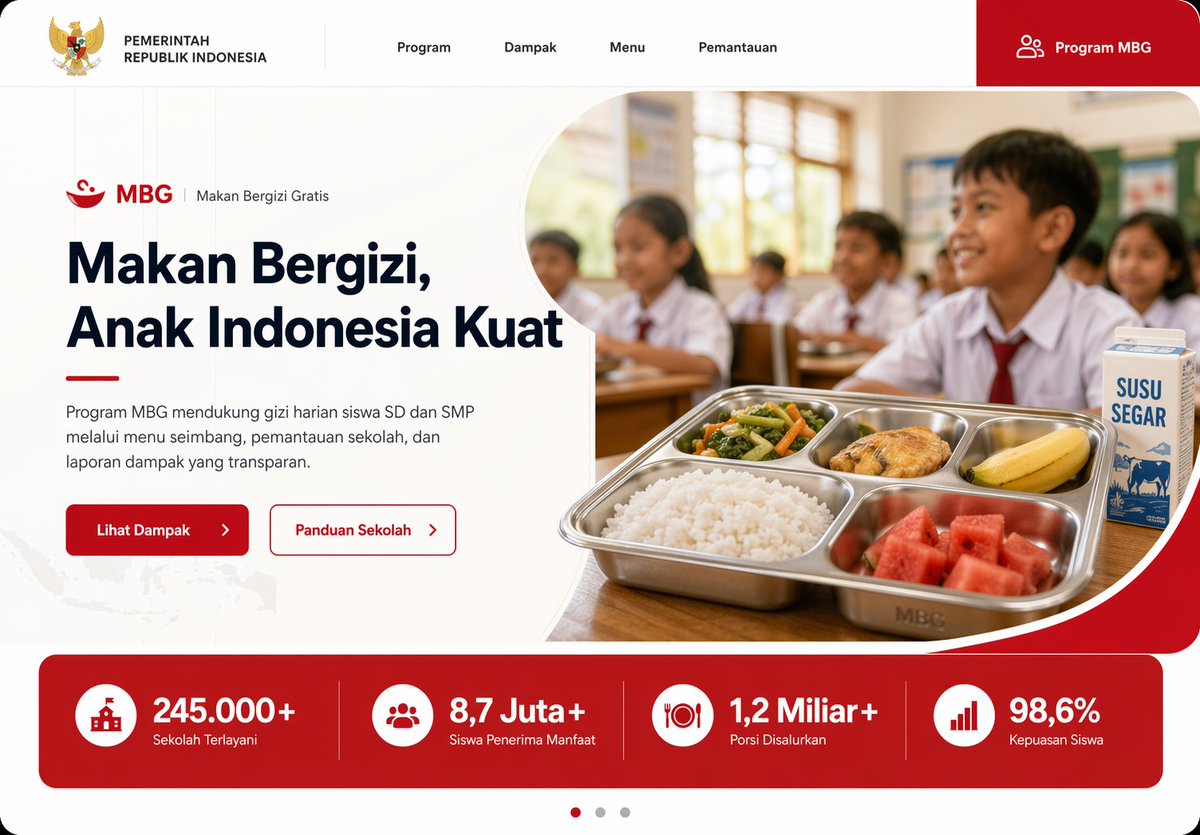
صفحة التغذية المدرسية الإندونيسية
نموذج أولي أنيق لصفحة رئيسية لموقع ويب مخصص لبرنامج التغذية المدرسية MBG في إندونيسيا، وهو مناسب للعروض التقديمية الحكومية أو التقنية المدنية أو تصميم الواجهة الأمامية.
هذا GPT Image 2 لحالة تصميمات جرافيكية وملصقات . استخدم النموذج الجاهز للنسخ أدناه لإنشاء صور مشابهة، وراجع حقوق الإسناد Awesome GPT Image 2 Prompts وحقوق الاستخدام التجاري قبل إعادة الاستخدام.
هل تحتاج إلى مجموعة كاملة من المطالبات؟ استخدم تصميمات جرافيكية وملصقات للاطلاع على المزيد من الأمثلة ذات الصلة، أو افتح مركز المواضيع. GPT Image 2 كتالوج سريع للاطلاع على فهرس الأمثلة الكامل، والهياكل القابلة لإعادة الاستخدام، ونسب المصادر.
Free 1K preview
Generate one preview image instantly, no sign-up required.
2701/4000
المطالبة
نموذج جاهز للطباعة
Create a modern government program landing page UI mockup for Indonesia in a clean, professional web design style, desktop widescreen aspect ratio. The page uses a white background with bold red accents, soft rounded corners, subtle gray dividers, and a polished frontend-dribbble presentation look. At the very top, build a horizontal navigation bar with 6 visible elements: the Indonesian Garuda emblem and the text "PEMERINTAH REPUBLIK INDONESIA" on the left, then 4 centered menu items labeled "Program", "Dampak", "Menu", and "Pemantauan", and on the far right a large red rounded button labeled "Program MBG" with a small people icon. Below it, design a hero section split into two columns. On the left, show a small program label line with a red bowl icon, the text "MBG", a vertical divider, and "Makan Bergizi Gratis". Under that, place a large bold headline reading "{argument name="headline text" default="Makan Bergizi, Anak Indonesia Kuat"}" in dark navy, spanning 3 lines. Add a short paragraph in Indonesian below: "Program MBG mendukung gizi harian siswa SD dan SMP melalui menu seimbang, pemantauan sekolah, dan laporan dampak yang transparan." Then place 2 call-to-action buttons side by side: a solid red button labeled "Lihat Dampak" with a right arrow, and an outlined white button with red border labeled "Panduan Sekolah" with a right arrow. On the right side of the hero, place a rounded large photo-style image framed by a sweeping white curved divider and red corner background. The image shows an Indonesian elementary classroom with 5 visible schoolchildren in white uniforms with red ties, seated at desks, warm daylight from windows, shallow depth of field, documentary-photo realism. In the foreground, on a wooden desk, show a stainless steel compartment tray meal with exactly 5 food items: white rice, mixed vegetables, a piece of fried chicken, a banana, and watermelon cubes. Beside the tray, place 1 milk carton labeled "SUSU SEGAR". Under the hero, add a full-width red statistics band with 4 equally spaced metric cards separated by thin vertical dividers. Each card has a white circular icon and bold white text. The 4 metrics are: "245.000+" with label "Sekolah Terlayani", "8,7 Juta+" with label "Siswa Penerima Manfaat", "1,2 Miliar+" with label "Porsi Disalurkan", and "98,6%" with label "Kepuasan Siswa". At the bottom center, add a 3-dot carousel indicator with the left dot active in red and the other 2 dots gray. Include a faint Indonesia map texture in the lower-left background. Use crisp typography, generous whitespace, high-end fintech/government website aesthetics, realistic UI proportions, and a production-ready landing page mockup appearance.متغيرات المطالبة
عناصر نائبة قابلة للتعديل موجودة في موجه الأوامر، مع قيمها الافتراضية.
عامل
headline text
تقصير
Makan Bergizi, Anak Indonesia Kuat
Best for
- - تصميمات جرافيكية وملصقات visual exploration
- - Image generation and reference-image edits
- - Reusable briefs that keep source attribution visible
Change these parts
- - Subject, product, character, or scene
- - Aspect ratio, camera, lighting, and background
- - Brand, text, color, and output constraints
Recommended model and settings
- - Model: gpt-image-2
- - Input mode: تحويل النص إلى صورة
- - Aspect ratio: source
- - Commercial status: review original source
How to use this prompt
- 1. Copy the prompt and preserve its structure for the first test.
- 2. Replace the subject, context, and publishing channel.
- 3. Change one camera, lighting, or style variable per iteration.
- 4. Inspect the output, source, text, and rights before reuse.
Limitations, source, and reuse cautions
- - Generated output is an editable draft, not factual, legal, or rights evidence.
- - Review the linked source, people, brands, logos, text, and third-party media before commercial use.
مستورد من Awesome GPT Image 2 Prompts . يلزم ذكر المصدر. حالة الاستخدام التجاري هي allowed ؛ يرجى مراجعة حقوق المصدر قبل الاستخدام المدفوع.
المزيد من الحالات في هذه الفئة
يتم تحديد الأولويات حسب الفئة، وتوافق وضع الإدخال، والجودة، وانخفاض المخاطر.

Transparent Earbuds on Stone Pedestal
تحويل النص إلى صورة

Manga Desert Radio Telescope Road Trip
تحويل النص إلى صورة

Female Clown Cyborg Portrait
تحويل النص إلى صورة

Imperial Research Bunker on Volcanic Planet
تحويل النص إلى صورة

Greyscale Puzzle Portrait with Color Accent
تحويل النص إلى صورة

Surreal 3D Chess Match Artwork
تحويل النص إلى صورة
إعادة استخدام الملاحظات ومصادرها
استخدم هذا التنبيه بأمان بعد معاينة الحالة.
- 1.انسخ الرسالة أو افتحها مباشرة في Dovoo باستخدام زر الإنشاء.
- 2.قم بتعديل المتغيرات ونسبة العرض إلى الارتفاع والصور المرجعية لتناسب حالة استخدامك الخاصة.
- 3.قبل النشر أو الاستخدام المدفوع، تحقق من حقوق المصدر، ومتطلبات الإسناد، ومخاطر العلامة التجارية أو التشابه.