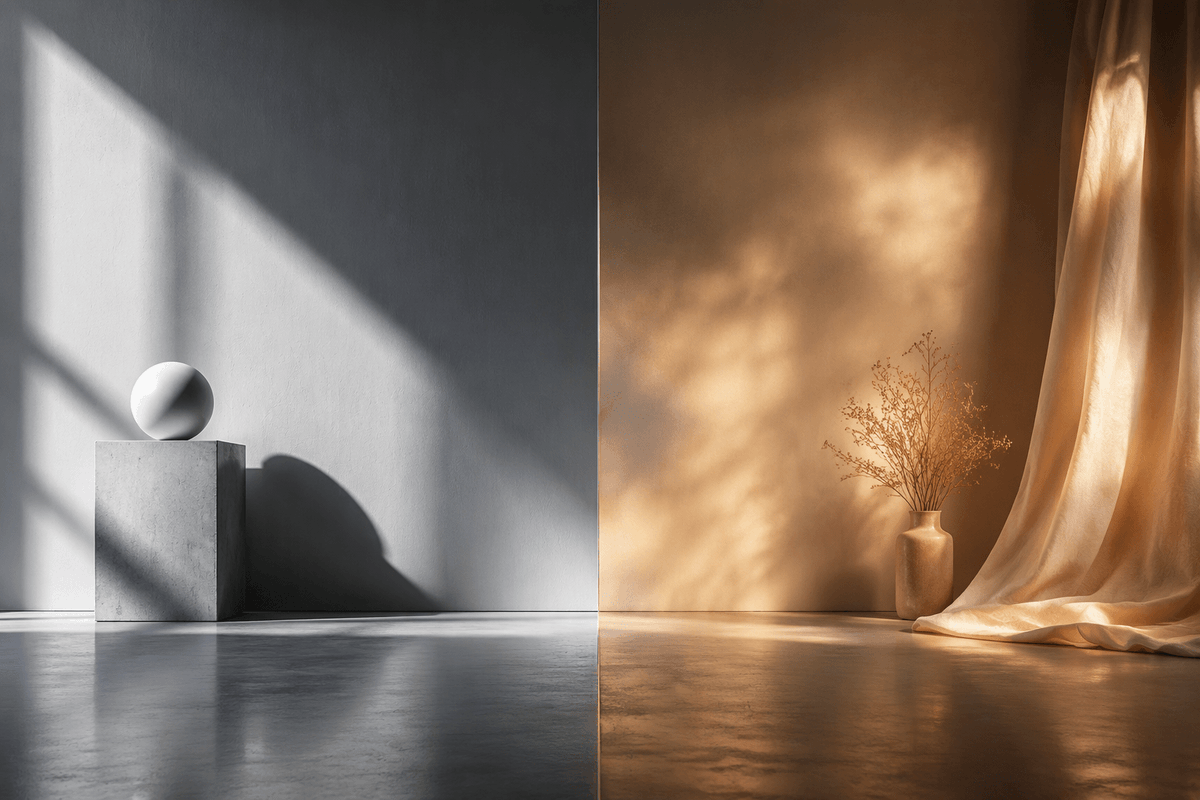
Split-Screen Hard vs Soft Light Interior
A photorealistic side-by-side studio scene comparing crisp cool hard sunlight with warm diffused atmospheric light for cinematic visual studies.
هذا GPT Image 2 لحالة التصميم الداخلي والمعماري . استخدم النموذج الجاهز للنسخ أدناه لإنشاء صور مشابهة، وراجع حقوق الإسناد Awesome GPT Image 2 Prompts وحقوق الاستخدام التجاري قبل إعادة الاستخدام.
هل تحتاج إلى مجموعة كاملة من المطالبات؟ استخدم التصميم الداخلي والمعماري للاطلاع على المزيد من الأمثلة ذات الصلة، أو افتح مركز المواضيع. GPT Image 2 كتالوج سريع للاطلاع على فهرس الأمثلة الكامل، والهياكل القابلة لإعادة الاستخدام، ونسب المصادر.
Free 1K preview
Generate one preview image instantly, no sign-up required.
1554/4000
المطالبة
نموذج جاهز للطباعة
Create a photorealistic cinematic split-screen interior still comparing two lighting moods, divided exactly down the vertical center by a thin straight seam. On the left half, show a cool monochrome minimalist studio corner with a smooth gray plaster wall and polished concrete floor; include exactly 2 geometric objects: a square concrete pedestal block near the lower left-center and a matte white sphere resting on top of it. Strong hard sunlight enters from an unseen window at the upper left, casting sharp diagonal window-frame shadows across the wall, the pedestal, and the floor, with a crisp oval shadow from the sphere. On the right half, show a warm amber-toned bohemian corner with a textured brown plaster wall and reflective concrete floor; include exactly 3 main objects: one small ceramic vase on the floor, one delicate bundle of dried branches inside the vase, and one sheer golden curtain hanging from the top right and pooling onto the floor. The right side lighting should be soft, diffused, glowing, and atmospheric, with mottled golden sunlight patterns on the wall and curtain. Use a wide 3:2 horizontal composition, symmetrical comparison layout, low camera height, realistic material textures, subtle floor reflections, no people, no text, no logos. The overall concept is {argument name="comparison theme" default="hard light versus soft light"}, with the left side in {argument name="left color mood" default="cool grayscale minimalism"} and the right side in {argument name="right color mood" default="warm golden ambience"}.متغيرات المطالبة
عناصر نائبة قابلة للتعديل موجودة في موجه الأوامر، مع قيمها الافتراضية.
عامل
comparison theme
تقصير
hard light versus soft light
عامل
left color mood
تقصير
cool grayscale minimalism
عامل
right color mood
تقصير
warm golden ambience
Best for
- - التصميم الداخلي والمعماري visual exploration
- - Image generation and reference-image edits
- - Reusable briefs that keep source attribution visible
Change these parts
- - Subject, product, character, or scene
- - Aspect ratio, camera, lighting, and background
- - Brand, text, color, and output constraints
Recommended model and settings
- - Model: gpt-image-2
- - Input mode: تحويل النص إلى صورة
- - Aspect ratio: source
- - Commercial status: review original source
How to use this prompt
- 1. Copy the prompt and preserve its structure for the first test.
- 2. Replace the subject, context, and publishing channel.
- 3. Change one camera, lighting, or style variable per iteration.
- 4. Inspect the output, source, text, and rights before reuse.
Limitations, source, and reuse cautions
- - Generated output is an editable draft, not factual, legal, or rights evidence.
- - Review the linked source, people, brands, logos, text, and third-party media before commercial use.
مستورد من Awesome GPT Image 2 Prompts . يلزم ذكر المصدر. حالة الاستخدام التجاري هي allowed ؛ يرجى مراجعة حقوق المصدر قبل الاستخدام المدفوع.
المزيد من الحالات في هذه الفئة
يتم تحديد الأولويات حسب الفئة، وتوافق وضع الإدخال، والجودة، وانخفاض المخاطر.

GPT Image 2 Real-Life Character Street Snap
تحويل النص إلى صورة

Matte Black B.AI Keyboard Keycap
تحويل النص إلى صورة

MotoGP POV Cornering Shot
تحويل النص إلى صورة

Orange Rooftop Fashion Photo Prompt
تحويل النص إلى صورة

Luxury Travel Fashion Portrait Prompt
تحويل النص إلى صورة

Cute Focus Desk Flat Lay and Kawaii Illustration
تحويل النص إلى صورة
إعادة استخدام الملاحظات ومصادرها
استخدم هذا التنبيه بأمان بعد معاينة الحالة.
- 1.انسخ الرسالة أو افتحها مباشرة في Dovoo باستخدام زر الإنشاء.
- 2.قم بتعديل المتغيرات ونسبة العرض إلى الارتفاع والصور المرجعية لتناسب حالة استخدامك الخاصة.
- 3.قبل النشر أو الاستخدام المدفوع، تحقق من حقوق المصدر، ومتطلبات الإسناد، ومخاطر العلامة التجارية أو التشابه.