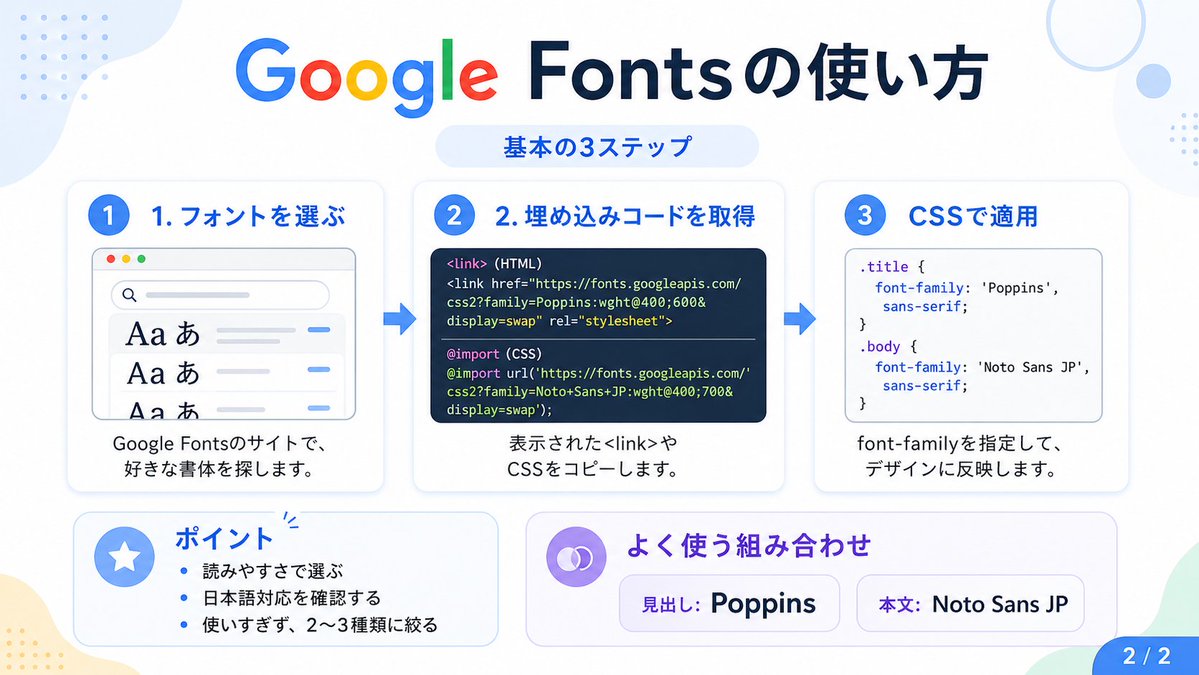
رسم بياني تعليمي للغة اليابانية من جوجل فونتس
يقوم هذا التوجيه بإنشاء رسم بياني ياباني واضح يشرح الخطوات الأساسية الثلاث لاستخدام خطوط جوجل، وهو مناسب للمنشورات الاجتماعية والدروس التعليمية وشرائح العرض التقديمي.
هذا GPT Image 2 لحالة تصميمات جرافيكية وملصقات . استخدم النموذج الجاهز للنسخ أدناه لإنشاء صور مشابهة، وراجع حقوق الإسناد Awesome GPT Image 2 Prompts وحقوق الاستخدام التجاري قبل إعادة الاستخدام.
هل تحتاج إلى مجموعة كاملة من المطالبات؟ استخدم تصميمات جرافيكية وملصقات للاطلاع على المزيد من الأمثلة ذات الصلة، أو افتح مركز المواضيع. GPT Image 2 كتالوج سريع للاطلاع على فهرس الأمثلة الكامل، والهياكل القابلة لإعادة الاستخدام، ونسب المصادر.
Free 1K preview
Generate one preview image instantly, no sign-up required.
3784/4000
المطالبة
نموذج جاهز للطباعة
{
  "type": "Japanese infographic",
  "topic": "How to use Google Fonts",
  "style": "clean modern flat design, white background, soft pastel blue and mint corner blobs, rounded cards with subtle shadows, tech tutorial aesthetic, crisp vector typography and UI illustrations",
  "canvas": {
    "aspect_ratio": "16:9"
  },
  "headline": {
    "main": "Google Fontsの使い方",
    "sub": "基本の3ステップ"
  },
  "layout": {
    "sections": [
      {
        "title": "1. フォントを選ぶ",
        "position": "left",
        "count": 1,
        "labels": [
          "1. フォントを選ぶ"
        ],
        "card_style": "rounded white panel with light blue border/shadow",
        "icon": "blue numbered circle with 1",
        "illustration": "browser window showing a font search interface, 3 visible font preview rows with large Aa あ samples, a search bar at top, small colored window buttons, light gray interface lines and blue accent dashes",
        "body_text": "Google Fontsのサイトで、好きな書体を探します。"
      },
      {
        "title": "2. 埋め込みコードを取得",
        "position": "center",
        "count": 1,
        "labels": [
          "2. 埋め込みコードを取得"
        ],
        "card_style": "rounded white panel with light blue border/shadow",
        "icon": "blue numbered circle with 2",
        "illustration": "dark code panel with two labeled code examples separated by a thin divider",
        "code_blocks": {
          "count": 2,
          "labels": [
            "<link> (HTML)",
            "@import (CSS)"
          ],
          "content": [
            "<link href=\"https://fonts.googleapis.com/css2?family=Poppins:wght@400;600&display=swap\" rel=\"stylesheet\">",
            "@import url('https://fonts.googleapis.com/css2?family=Noto+Sans+JP:wght@400;700&display=swap');"
          ]
        },
        "body_text": "表示された<link>やCSSをコピーします。"
      },
      {
        "title": "3. CSSで適用",
        "position": "right",
        "count": 1,
        "labels": [
          "3. CSSで適用"
        ],
        "card_style": "rounded white panel with light blue border/shadow",
        "icon": "blue numbered circle with 3",
        "illustration": "white code card containing CSS with two selectors and font-family rules",
        "code_blocks": {
          "count": 2,
          "labels": [
            ".title",
            "body"
          ],
          "content": [
            ".title { font-family: 'Poppins', sans-serif; }",
            "body { font-family: 'Noto Sans JP', sans-serif; }"
          ]
        },
        "body_text": "font-familyを指定して、デザインに反映します。"
      },
      {
        "title": "ポイント",
        "position": "bottom-left",
        "count": 3,
        "labels": [
          "読みやすさで選ぶ",
          "日本語対応を確認する",
          "使いすぎず、2〜3種類に絞る"
        ],
        "card_style": "rounded white panel with pale blue tint",
        "icon": "blue star in a circle",
        "body_format": "bullet list"
      },
      {
        "title": "よく使う組み合わせ",
        "position": "bottom-center-right",
        "count": 2,
        "labels": [
          "見出し: Poppins",
          "Main text: Noto Sans JP"
        ],
        "card_style": "rounded white panel with pale lavender tint",
        "icon": "purple linked-rings symbol",
        "body_format": "two pill-shaped example boxes"
      }
    ],
    "connectors": {
      "count": 2,
      "style": "large blue right-pointing arrows between the 3 top cards"
    },
    "pagination": {
      "text": "2 / 2",
      "position": "bottom-right",
      "style": "blue rounded corner tab"
    }
  },
  "text_language": "Japanese",
  "color_palette": {
    "primary_blue": "#2f80ff",
    "navy": "#0f2b5b",
    "google_colors": [
      "#4285F4",
      "#DB4437",
      "#F4B400",
      "#0F9D58"
    ],
    "lavender": "#8b6cff",
    "background": "#ffffff"
  }
}
Best for
- - تصميمات جرافيكية وملصقات visual exploration
- - Image generation and reference-image edits
- - Reusable briefs that keep source attribution visible
Change these parts
- - Subject, product, character, or scene
- - Aspect ratio, camera, lighting, and background
- - Brand, text, color, and output constraints
Recommended model and settings
- - Model: gpt-image-2
- - Input mode: تحويل النص إلى صورة
- - Aspect ratio: source
- - Commercial status: review original source
How to use this prompt
- 1. Copy the prompt and preserve its structure for the first test.
- 2. Replace the subject, context, and publishing channel.
- 3. Change one camera, lighting, or style variable per iteration.
- 4. Inspect the output, source, text, and rights before reuse.
Limitations, source, and reuse cautions
- - Generated output is an editable draft, not factual, legal, or rights evidence.
- - Review the linked source, people, brands, logos, text, and third-party media before commercial use.
مستورد من Awesome GPT Image 2 Prompts . يلزم ذكر المصدر. حالة الاستخدام التجاري هي allowed ؛ يرجى مراجعة حقوق المصدر قبل الاستخدام المدفوع.
المزيد من الحالات في هذه الفئة
يتم تحديد الأولويات حسب الفئة، وتوافق وضع الإدخال، والجودة، وانخفاض المخاطر.

Transparent Earbuds on Stone Pedestal
تحويل النص إلى صورة

Manga Desert Radio Telescope Road Trip
تحويل النص إلى صورة

Female Clown Cyborg Portrait
تحويل النص إلى صورة

Imperial Research Bunker on Volcanic Planet
تحويل النص إلى صورة

Greyscale Puzzle Portrait with Color Accent
تحويل النص إلى صورة

Surreal 3D Chess Match Artwork
تحويل النص إلى صورة
إعادة استخدام الملاحظات ومصادرها
استخدم هذا التنبيه بأمان بعد معاينة الحالة.
- 1.انسخ الرسالة أو افتحها مباشرة في Dovoo باستخدام زر الإنشاء.
- 2.قم بتعديل المتغيرات ونسبة العرض إلى الارتفاع والصور المرجعية لتناسب حالة استخدامك الخاصة.
- 3.قبل النشر أو الاستخدام المدفوع، تحقق من حقوق المصدر، ومتطلبات الإسناد، ومخاطر العلامة التجارية أو التشابه.