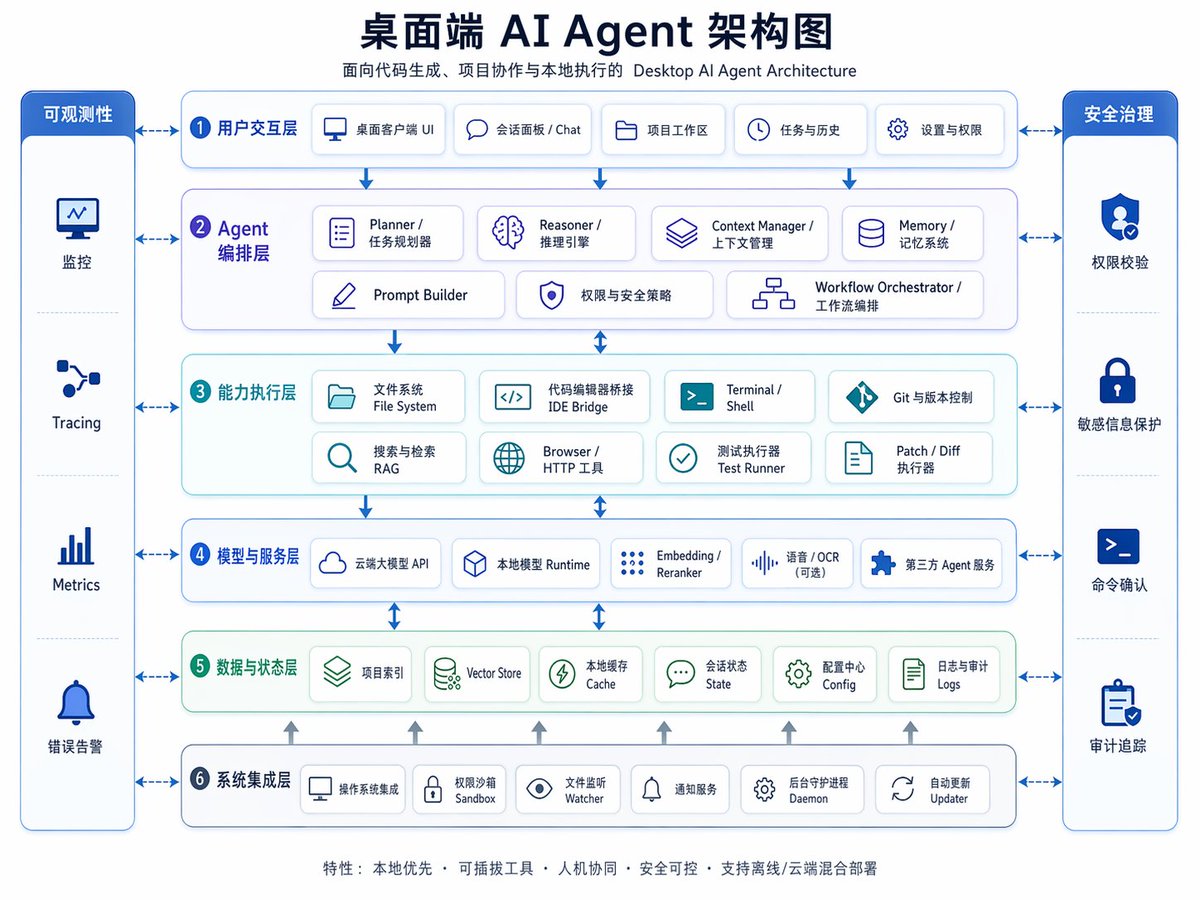
مخطط بنية وكيل الذكاء الاصطناعي لسطح المكتب
رسم بياني أنيق ثنائي اللغة (الصينية والإنجليزية) لهيكلة المؤسسات، يُستخدم في العروض التقديمية، أو تخطيط المنتجات، أو شرح التصميم متعدد الطبقات لنظام وكيل الذكاء الاصطناعي المكتبي.
هذا GPT Image 2 لحالة تصميمات جرافيكية وملصقات . استخدم النموذج الجاهز للنسخ أدناه لإنشاء صور مشابهة، وراجع حقوق الإسناد Awesome GPT Image 2 Prompts وحقوق الاستخدام التجاري قبل إعادة الاستخدام.
هل تحتاج إلى مجموعة كاملة من المطالبات؟ استخدم تصميمات جرافيكية وملصقات للاطلاع على المزيد من الأمثلة ذات الصلة، أو افتح مركز المواضيع. GPT Image 2 كتالوج سريع للاطلاع على فهرس الأمثلة الكامل، والهياكل القابلة لإعادة الاستخدام، ونسب المصادر.
Free 1K preview
Generate one preview image instantly, no sign-up required.
4000/4000
المطالبة
نموذج جاهز للطباعة
{
  "type": "bilingual enterprise architecture infographic",
  "topic": "{argument name=\"headline text\" default=\"Desktop AI Agent Architecture Diagram\"}",
  "subtitle": "Desktop AI Agent Architecture for Code Generation, Project Collaboration, and Local Execution",
  "style": {
    "look": "clean modern SaaS diagram, corporate presentation slide, vector infographic",
    "background": "very light gray-white",
    "palette": {
      "primary": "deep navy blue",
      "secondary": "medium blue",
      "accent": "teal green",
      "support": "soft gray",
      "security": "bright royal blue"
    },
    "typography": "bold Chinese headline with smaller bilingual labels, crisp sans-serif, high legibility",
    "icons": "minimal line icons inside rounded white cards with subtle shadows and blue outlines",
    "geometry": "symmetrical grid, rounded rectangles, thin connector arrows, evenly spaced modules"
  },
  "layout": {
    "orientation": "landscape 4:3 presentation slide",
    "header": {
      "title_centered": true,
      "title_size": "large",
      "subtitle_below": true
    },
    "sections": [
      {
        "title": "Observability",
        "position": "far left vertical sidebar",
        "count": 4,
        "labels": [
          "Monitoring",
          "Tracing",
          "Metrics",
          "Error Alerting"
        ],
        "container": "tall rounded blue panel with four stacked cells and icons"
      },
      {
        "title": "Security Governance",
        "position": "far right vertical sidebar",
        "count": 4,
        "labels": [
          "Permission Verification",
          "Sensitive Information Protection",
          "Command Confirmation",
          "Audit Trail"
        ],
        "container": "tall rounded blue panel with four stacked cells and icons"
      },
      {
        "title": "1 User Interaction Layer",
        "position": "top horizontal layer",
        "count": 5,
        "labels": [
          "Desktop Client UI",
          "Session Panel / Chat",
          "Project Workspace",
          "Tasks & History",
          "Settings & Permissions"
        ],
        "container": "wide rounded white panel with blue border"
      },
      {
        "title": "2 Agent Orchestration Layer",
        "position": "second horizontal layer",
        "count": 7,
        "labels": [
          "Planner / Task Planner",
          "Reasoner / Inference Engine",
          "Context Manager / Context Management",
          "Memory / Memory System",
          "Prompt Builder",
          "Permissions & Security Policies",
          "Workflow Orchestrator / Workflow Orchestration"
        ],
        "container": "wide rounded white panel with faint purple-blue tint"
      },
      {
        "title": "3 Capability Execution Layer",
        "position": "third horizontal layer",
        "count": 8,
        "labels": [
          "File System",
          "IDE Bridge",
          "Terminal / Shell",
          "Git & Version Control",
          "Search & Retrieval RAG",
          "Browser / HTTP Tool",
          "Test Runner",
          "Patch / Diff Runner"
        ],
        "container": "wide rounded white panel with faint teal tint"
      },
      {
        "title": "4 Models and Service Layer",
        "position": "fourth horizontal layer",
        "count": 5,
        "labels": [
          "Cloud-based Large Model API",
          "Local Model Runtime",
          "Embedding / Reranker",
          "Speech / OCR (optional)",
          "Third-party Agent Service"
        ],
        "container": "wide rounded white panel with blue border"
      },
      {
        "title": "5 Data and State Layer",
        "position": "fifth horizontal layer",
        "count": 6,
        "labels": [
          "Project Index",
          "Vector Store",
          "Local Cache",
          "Session State",
          "Configuration Center Config",
          "Logs and Audit Logs"
        ],
        "container": "wide rounded white panel with faint green tint"
      },
      {
        "title": "6 System Integration Layer",
        "position": "bottom horizontal layer",
        "count": 6,
        "labels": [
          "Operating System Integration",
          "Permission Sandbox",
          "File Watcher",
          "Notification Service",
          "Background Daemon",
          "Auto Updater"
        ],
        "container": "wide rounded white panel with blue border"
      }
    ],
    "centerpiece": "six stacked architecture layers in the middle with side governance columns",
    "connectors": "dashed double-headed arrows connect each central layer to both sidebars; vertical blue arrows flow downward between central layers; small upward gray arrows rise from the bottom integration layer into the data layer",
    "footer": {
      "count": 1,
      "text": "Features: Local First · Pluggable Tools · Human-Machine Collaboration · Secure and Controllable · Supports Offline/Cloud Hybrid Deployment",
      "position": "bottom center"
    }
  },
  "rendering": {
    "flat_vector": true,
    "high_resolution": true,
    "sharp_lines": true,
    "balanced_whitespace": true,
    "professional_pitch_deck_quality": true
  }
}
متغيرات المطالبة
عناصر نائبة قابلة للتعديل موجودة في موجه الأوامر، مع قيمها الافتراضية.
عامل
headline text
تقصير
Desktop AI Agent Architecture Diagram
Best for
- - تصميمات جرافيكية وملصقات visual exploration
- - Image generation and reference-image edits
- - Reusable briefs that keep source attribution visible
Change these parts
- - Subject, product, character, or scene
- - Aspect ratio, camera, lighting, and background
- - Brand, text, color, and output constraints
Recommended model and settings
- - Model: gpt-image-2
- - Input mode: تحويل النص إلى صورة
- - Aspect ratio: source
- - Commercial status: review original source
How to use this prompt
- 1. Copy the prompt and preserve its structure for the first test.
- 2. Replace the subject, context, and publishing channel.
- 3. Change one camera, lighting, or style variable per iteration.
- 4. Inspect the output, source, text, and rights before reuse.
Limitations, source, and reuse cautions
- - Generated output is an editable draft, not factual, legal, or rights evidence.
- - Review the linked source, people, brands, logos, text, and third-party media before commercial use.
مستورد من Awesome GPT Image 2 Prompts . يلزم ذكر المصدر. حالة الاستخدام التجاري هي allowed ؛ يرجى مراجعة حقوق المصدر قبل الاستخدام المدفوع.
المزيد من الحالات في هذه الفئة
يتم تحديد الأولويات حسب الفئة، وتوافق وضع الإدخال، والجودة، وانخفاض المخاطر.

Transparent Earbuds on Stone Pedestal
تحويل النص إلى صورة

Manga Desert Radio Telescope Road Trip
تحويل النص إلى صورة

Female Clown Cyborg Portrait
تحويل النص إلى صورة

Imperial Research Bunker on Volcanic Planet
تحويل النص إلى صورة

Greyscale Puzzle Portrait with Color Accent
تحويل النص إلى صورة

Surreal 3D Chess Match Artwork
تحويل النص إلى صورة
إعادة استخدام الملاحظات ومصادرها
استخدم هذا التنبيه بأمان بعد معاينة الحالة.
- 1.انسخ الرسالة أو افتحها مباشرة في Dovoo باستخدام زر الإنشاء.
- 2.قم بتعديل المتغيرات ونسبة العرض إلى الارتفاع والصور المرجعية لتناسب حالة استخدامك الخاصة.
- 3.قبل النشر أو الاستخدام المدفوع، تحقق من حقوق المصدر، ومتطلبات الإسناد، ومخاطر العلامة التجارية أو التشابه.