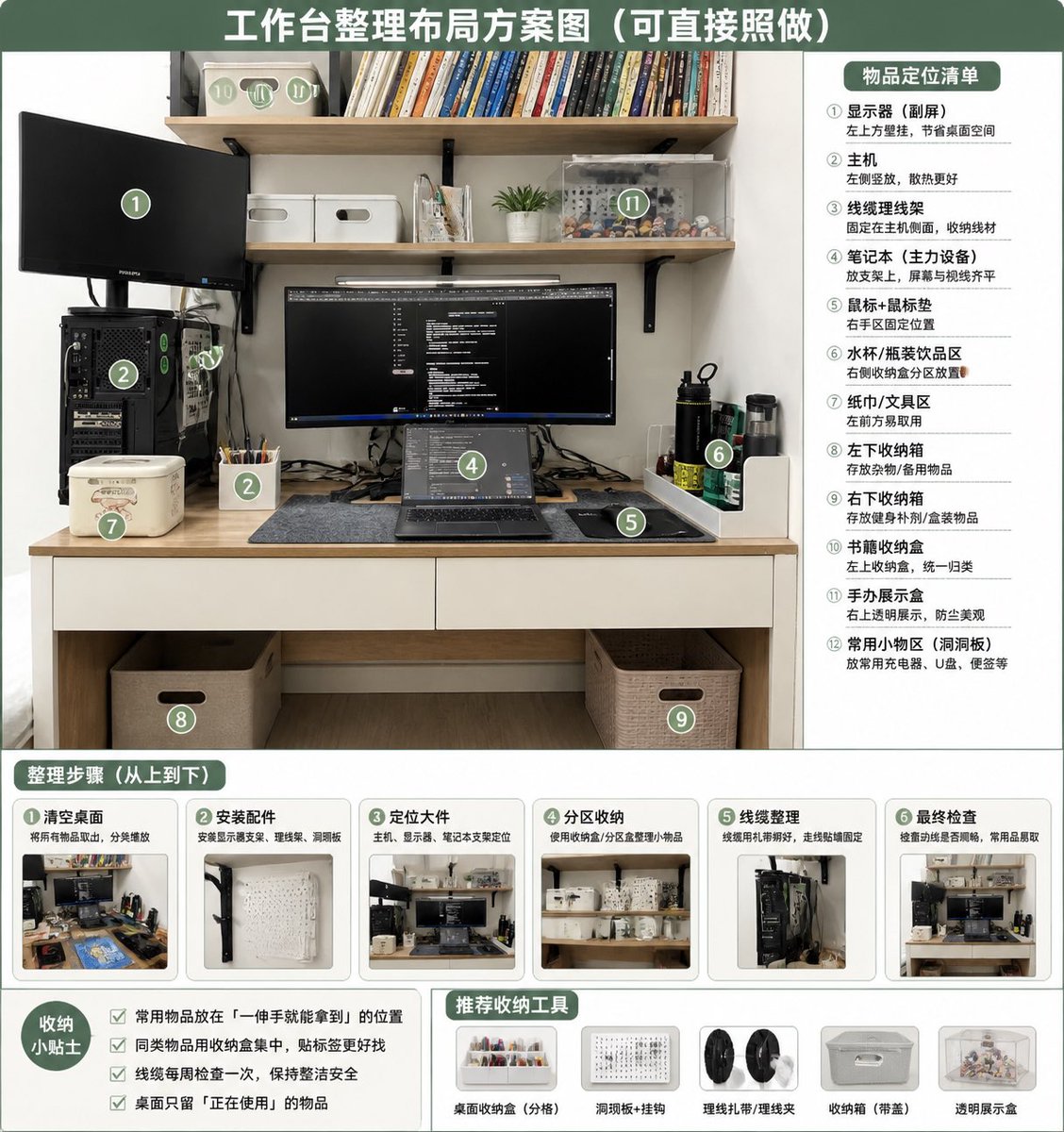
رسم بياني لتنظيم المكتب
يحوّل صورة مكتب فوضوي إلى خطة تنظيم مرتبة ومرقمة مع مناطق وخطوات ونصائح وأدوات تخزين موصى بها.
هذا GPT Image 2 لحالة تصميمات جرافيكية وملصقات . استخدم النموذج الجاهز للنسخ أدناه لإنشاء صور مشابهة، وراجع حقوق الإسناد Awesome GPT Image 2 Prompts وحقوق الاستخدام التجاري قبل إعادة الاستخدام.
هل تحتاج إلى مجموعة كاملة من المطالبات؟ استخدم تصميمات جرافيكية وملصقات للاطلاع على المزيد من الأمثلة ذات الصلة، أو افتح مركز المواضيع. GPT Image 2 كتالوج سريع للاطلاع على فهرس الأمثلة الكامل، والهياكل القابلة لإعادة الاستخدام، ونسب المصادر.
Free 1K preview
Generate one preview image instantly, no sign-up required.
Free text preview doesn’t preserve reference-image consistency.
2191/4000
المطالبة
نموذج جاهز للطباعة
Using REFERENCE_0 as the source photo, create a clean, realistic “after organization” desktop layout plan infographic. Keep the same desk, shelves, monitor/laptop setup, PC tower position, and overall room viewpoint, but tidy the workspace: route cables neatly, clear the desktop, place items into defined storage zones, add matching storage boxes/baskets, a pegboard/accessory area, pen cup, book storage box, transparent display case, and dedicated bottle/tissue/small-tool areas. Use a green-and-white instructional poster style with a large top headline: {argument name="headline text" default="Workstation Organization Layout Plan (Can be directly followed)"}. Overlay 12 green circular numbered markers on the organized photo and include a right-side panel titled {argument name="right panel title" default="Item Placement List"} listing exactly 12 labeled zones: ① monitor / secondary screen, ② main PC tower, ③ cable management, ④ laptop work area, ⑤ mouse pad / mouse area, ⑥ water cup / bottle area, ⑦ tissue / tool area, ⑧ left under-desk storage box, ⑨ right under-desk storage box, ⑩ book storage box, ⑪ figure display area, ⑫ common small-items area / pegboard. Add a bottom section titled {argument name="steps title" default="Organization Steps (From top to bottom)"} with exactly 6 step cards, each containing a small before/after-style thumbnail and short Chinese labels: ① clear desktop, ② install accessories, ③ position large items, ④ partition storage, ⑤ cable management, ⑥ final inspection. Add a bottom-left tips box titled {argument name="tips title" default="Storage Tips"} with exactly 4 checkbox tips about putting frequently used items within one-hand reach, grouping similar items, checking cables weekly, and keeping only currently used items on the desk. Add a bottom-center/right recommendations row titled {argument name="tools title" default="Recommended Storage Tools"} with exactly 5 product icons: desktop organizer tray, pegboard + hooks, cable ties / cable clips, storage box with handle, transparent display box. Make the design neat, practical, bright, and directly actionable, like a home-office organization guide derived from the original photo.متغيرات المطالبة
عناصر نائبة قابلة للتعديل موجودة في موجه الأوامر، مع قيمها الافتراضية.
عامل
headline text
تقصير
Workstation Organization Layout Plan (Can be directly followed)
عامل
right panel title
تقصير
Item Placement List
عامل
steps title
تقصير
Organization Steps (From top to bottom)
عامل
tips title
تقصير
Storage Tips
عامل
tools title
تقصير
Recommended Storage Tools
Best for
- - تصميمات جرافيكية وملصقات visual exploration
- - Image generation and reference-image edits
- - Reusable briefs that keep source attribution visible
Change these parts
- - Subject, product, character, or scene
- - Aspect ratio, camera, lighting, and background
- - Brand, text, color, and output constraints
Recommended model and settings
- - Model: gpt-image-2
- - Input mode: صورة إلى صورة
- - Aspect ratio: source
- - Commercial status: review original source
How to use this prompt
- 1. Copy the prompt and preserve its structure for the first test.
- 2. Replace the subject, context, and publishing channel.
- 3. Change one camera, lighting, or style variable per iteration.
- 4. Inspect the output, source, text, and rights before reuse.
Limitations, source, and reuse cautions
- - Generated output is an editable draft, not factual, legal, or rights evidence.
- - Review the linked source, people, brands, logos, text, and third-party media before commercial use.
مستورد من Awesome GPT Image 2 Prompts . يلزم ذكر المصدر. حالة الاستخدام التجاري هي allowed ؛ يرجى مراجعة حقوق المصدر قبل الاستخدام المدفوع.
المزيد من الحالات في هذه الفئة
يتم تحديد الأولويات حسب الفئة، وتوافق وضع الإدخال، والجودة، وانخفاض المخاطر.






إعادة استخدام الملاحظات ومصادرها
استخدم هذا التنبيه بأمان بعد معاينة الحالة.
- 1.انسخ الرسالة أو افتحها مباشرة في Dovoo باستخدام زر الإنشاء.
- 2.قم بتعديل المتغيرات ونسبة العرض إلى الارتفاع والصور المرجعية لتناسب حالة استخدامك الخاصة.
- 3.قبل النشر أو الاستخدام المدفوع، تحقق من حقوق المصدر، ومتطلبات الإسناد، ومخاطر العلامة التجارية أو التشابه.