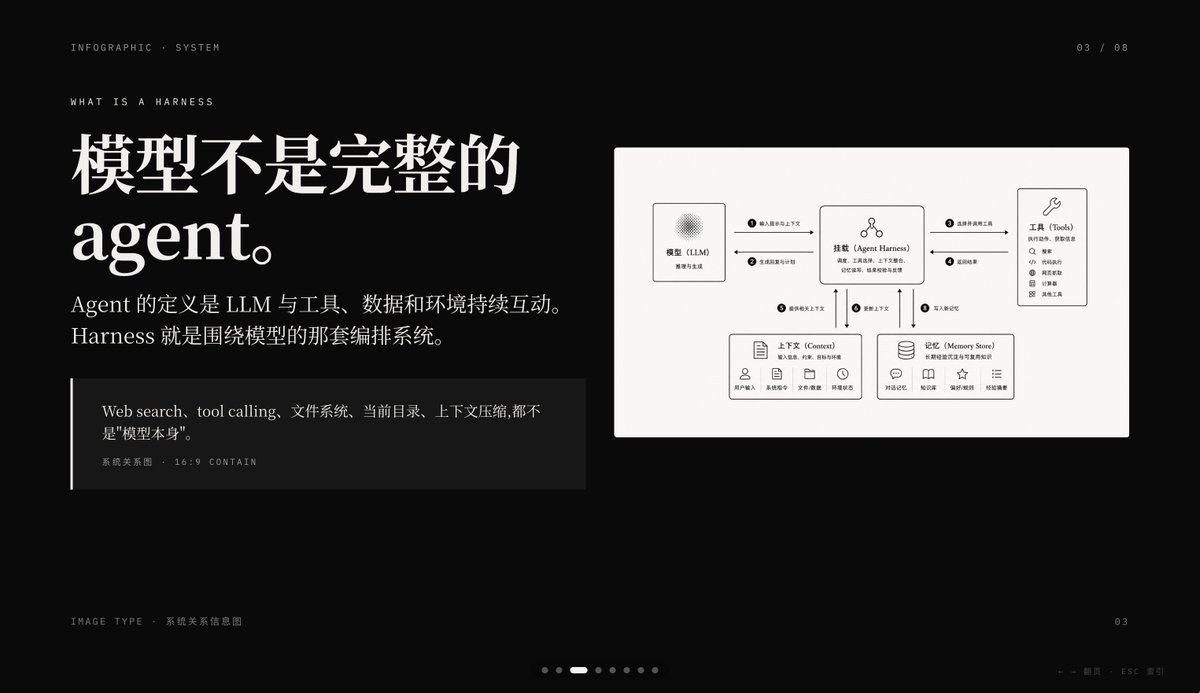
شريحة إنفوغرافية حول تسخير الذكاء الاصطناعي المظلم
شريحة عرض تقديمي مميزة بخلفية سوداء تشرح آلية عمل وكيل الذكاء الاصطناعي مع طباعة تحريرية صينية كبيرة ومخطط علاقة نظام نظيف، مثالية لأغلفة عروض PowerPoint التقديمية أو صفحات شرح المفاهيم.
هذا GPT Image 2 لحالة تصميمات جرافيكية وملصقات . استخدم النموذج الجاهز للنسخ أدناه لإنشاء صور مشابهة، وراجع حقوق الإسناد Awesome GPT Image 2 Prompts وحقوق الاستخدام التجاري قبل إعادة الاستخدام.
هل تحتاج إلى مجموعة كاملة من المطالبات؟ استخدم تصميمات جرافيكية وملصقات للاطلاع على المزيد من الأمثلة ذات الصلة، أو افتح مركز المواضيع. GPT Image 2 كتالوج سريع للاطلاع على فهرس الأمثلة الكامل، والهياكل القابلة لإعادة الاستخدام، ونسب المصادر.
Free 1K preview
Generate one preview image instantly, no sign-up required.
4000/4000
المطالبة
نموذج جاهز للطباعة
{
  "type": "dark editorial infographic slide",
  "style": "premium keynote-style presentation page with minimalist Swiss-inspired layout, strong contrast, elegant serif headline paired with small uppercase sans-serif metadata, lots of negative space, cinematic black background, subtle grain, refined white typography, monochrome diagram card",
  "aspect_ratio": "16:9",
  "background": {
    "color": "deep black"
  },
  "layout": {
    "sections": [
      {
        "title": "top metadata",
        "position": "top edge",
        "count": 3,
        "labels": [
          "INFOGRAPHIC · SYSTEM",
          "03 / 08",
          "WHAT IS A HARNESS"
        ]
      },
      {
        "title": "main text block",
        "position": "left side",
        "count": 3,
        "labels": [
          "The model is not a complete Agent.",
          "The definition of an Agent is the continuous interaction of an LLM with tools, data, and the environment. Harness is the orchestration system around the model.",
          "Web search, tool calling, file system, current directory, and context compression are not the \"model itself\"."
        ]
      },
      {
        "title": "diagram card",
        "position": "right side",
        "count": 5,
        "labels": [
          "Model (LLM)",
          "Mount (Agent Harness)",
          "Tools",
          "Context",
          "Memory Store"
        ]
      },
      {
        "title": "footer",
        "position": "bottom edge",
        "count": 4,
        "labels": [
          "Image Type · System Relationship Diagram",
          "03",
          "← → Page   ESC Close",
          "7 pagination dots with the 3rd highlighted"
        ]
      }
    ],
    "centerpiece": "a large off-white rectangular card on the right containing a clean systems diagram"
  },
  "typography": {
    "headline_font": "high-contrast editorial serif, oversized, bold",
    "body_font": "modern serif for Chinese body copy",
    "meta_font": "thin uppercase sans-serif with generous tracking"
  },
  "diagram": {
    "card_color": "warm light gray",
    "border": "none or extremely subtle",
    "line_style": "thin black connector arrows",
    "icon_style": "simple outline icons",
    "nodes": [
      {
        "name": "Model (LLM)",
        "position": "upper left inside card",
        "details": "small box with subtle radial texture behind the heading, subtitle suggests reasoning and generation"
      },
      {
        "name": "Mount (Agent Harness)",
        "position": "upper center inside card",
        "details": "central orchestration box with small person-like icon above title and short descriptive text below"
      },
      {
        "name": "Tools",
        "position": "upper right inside card",
        "details": "tall box with wrench icon and a vertical list of 8 tool items"
      },
      {
        "name": "Context",
        "position": "lower left inside card",
        "details": "wide box with document icon, description line, and 5 small labeled icons along the bottom"
      },
      {
        "name": "Memory Store",
        "position": "lower right inside card",
        "details": "wide box with database icon, description line, and 5 small labeled icons along the bottom"
      }
    ],
    "connections": {
      "count": 8,
      "description": "numbered circular markers on the connector arrows show the orchestration flow between the 5 nodes, including bidirectional links from the central harness to tools, context, and memory, plus one link from the model to the harness"
    }
  },
  "color_palette": {
    "count": 4,
    "colors": [
      "black background",
      "white headline text",
      "soft gray body text",
      "warm light-gray diagram panel"
    ]
  },
  "customization": {
    "headline": "{argument name=\"headline text\" default=\"The model is not a complete Agent.\"}",
    "page_index": "{argument name=\"page number\" default=\"03 / 08\"}",
    "section_kicker": "{argument name=\"section label\" default=\"WHAT IS A HARNESS\"}",
    "diagram_topic": "{argument name=\"diagram topic\" default=\"System Relationship Diagram\"}",
    "quote": "{argument name=\"quote\" default=\"Web search, tool calling, file system, current directory, and context compression are not the "model itself".\"}"
  }
}
متغيرات المطالبة
عناصر نائبة قابلة للتعديل موجودة في موجه الأوامر، مع قيمها الافتراضية.
عامل
headline text
تقصير
The model is not a complete Agent.
عامل
page number
تقصير
03 / 08
عامل
section label
تقصير
WHAT IS A HARNESS
عامل
diagram topic
تقصير
System Relationship Diagram
عامل
quote
تقصير
Web search, tool calling, file system, current directory, and context compression are not the "model itself".
Best for
- - تصميمات جرافيكية وملصقات visual exploration
- - Image generation and reference-image edits
- - Reusable briefs that keep source attribution visible
Change these parts
- - Subject, product, character, or scene
- - Aspect ratio, camera, lighting, and background
- - Brand, text, color, and output constraints
Recommended model and settings
- - Model: gpt-image-2
- - Input mode: تحويل النص إلى صورة
- - Aspect ratio: source
- - Commercial status: review original source
How to use this prompt
- 1. Copy the prompt and preserve its structure for the first test.
- 2. Replace the subject, context, and publishing channel.
- 3. Change one camera, lighting, or style variable per iteration.
- 4. Inspect the output, source, text, and rights before reuse.
Limitations, source, and reuse cautions
- - Generated output is an editable draft, not factual, legal, or rights evidence.
- - Review the linked source, people, brands, logos, text, and third-party media before commercial use.
مستورد من Awesome GPT Image 2 Prompts . يلزم ذكر المصدر. حالة الاستخدام التجاري هي allowed ؛ يرجى مراجعة حقوق المصدر قبل الاستخدام المدفوع.
المزيد من الحالات في هذه الفئة
يتم تحديد الأولويات حسب الفئة، وتوافق وضع الإدخال، والجودة، وانخفاض المخاطر.

Transparent Earbuds on Stone Pedestal
تحويل النص إلى صورة

Manga Desert Radio Telescope Road Trip
تحويل النص إلى صورة

Female Clown Cyborg Portrait
تحويل النص إلى صورة

Imperial Research Bunker on Volcanic Planet
تحويل النص إلى صورة

Greyscale Puzzle Portrait with Color Accent
تحويل النص إلى صورة

Surreal 3D Chess Match Artwork
تحويل النص إلى صورة
إعادة استخدام الملاحظات ومصادرها
استخدم هذا التنبيه بأمان بعد معاينة الحالة.
- 1.انسخ الرسالة أو افتحها مباشرة في Dovoo باستخدام زر الإنشاء.
- 2.قم بتعديل المتغيرات ونسبة العرض إلى الارتفاع والصور المرجعية لتناسب حالة استخدامك الخاصة.
- 3.قبل النشر أو الاستخدام المدفوع، تحقق من حقوق المصدر، ومتطلبات الإسناد، ومخاطر العلامة التجارية أو التشابه.