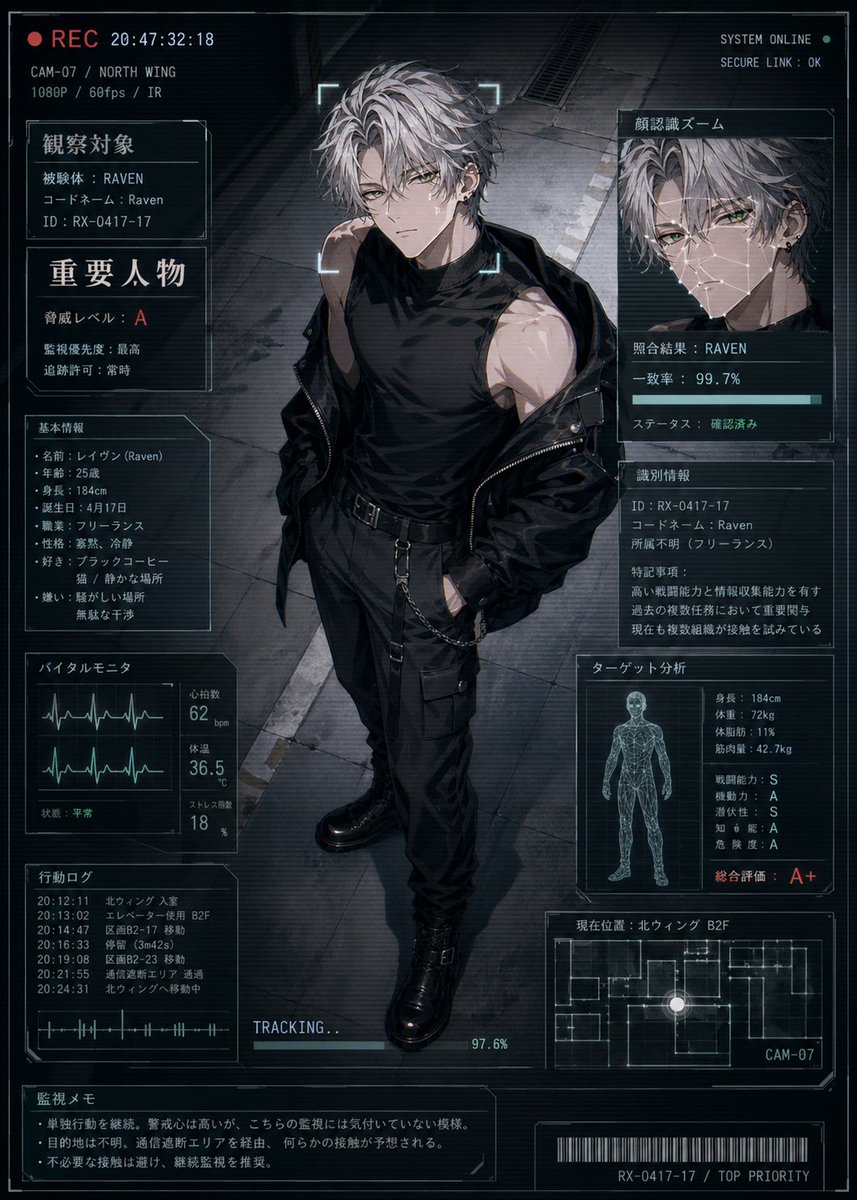
شاشة حالة شخصية سايبربانك
ملف مراقبة أنمي مستقبلي يُظهر عميلاً بكامل جسده مع لوحات عرض معلومات يابانية كثيفة، وهو مثالي لبطاقات حالة الشخصية، وملفات تعريف الخيال العلمي، ومقدمات العملاء السريين.
هذا GPT Image 2 لحالة الأنمي والألعاب . استخدم النموذج الجاهز للنسخ أدناه لإنشاء صور مشابهة، وراجع حقوق الإسناد Awesome GPT Image 2 Prompts وحقوق الاستخدام التجاري قبل إعادة الاستخدام.
هل تحتاج إلى مجموعة كاملة من المطالبات؟ استخدم الأنمي والألعاب للاطلاع على المزيد من الأمثلة ذات الصلة، أو افتح مركز المواضيع. GPT Image 2 كتالوج سريع للاطلاع على فهرس الأمثلة الكامل، والهياكل القابلة لإعادة الاستخدام، ونسب المصادر.
Free 1K preview
Generate one preview image instantly, no sign-up required.
2787/4000
المطالبة
نموذج جاهز للطباعة
A cinematic anime-style futuristic surveillance status screen showing a full-body young man standing in the center of a dark industrial corridor, viewed from a slightly high angle as if captured by a security camera. He is a tall, lean, athletic male with messy silver-gray hair, pale skin, and a cool, dangerous presence, wearing a black sleeveless high-neck shirt, black tactical pants with straps and side pockets, a black belt with hanging chain details, heavy black combat boots, and a black jacket slipping off his shoulders. His expression is serious and unreadable, framed by a glowing scan bracket around the face like a live target lock. The overall image is a high-tech HUD dossier overlay in a blue-gray and black palette with subtle cyan interface lines, screen noise, scanlines, and a moody cyberpunk thriller atmosphere. The layout contains 10 distinct UI panels around the character: 1 top-left recording strip with a red REC indicator, timestamp, camera code, location, and video specs; 1 left upper identification panel labeled 観察対象 with subject data including codename Raven and ID; 1 left middle warning panel labeled 重要人物 with risk level A and other threat notes; 1 left lower basic profile panel labeled 基本情報 listing name, age, height, birth date, job, personality, likes, and dislikes; 1 bottom-left vital monitor panel labeled バイタルモニタ with 2 waveform graphs and numeric readouts for heart rate, temperature, and stress; 1 lower-left action log panel labeled 行動ログ with 6 timestamped entries; 1 large upper-right facial recognition panel labeled 顔認識ズーム showing 1 zoomed portrait crop, a match result for RAVEN, a 99.7% accuracy bar, and verified status; 1 right middle identification details panel labeled 識別情報 with ID, codename, affiliation unknown, and a paragraph of notes; 1 right lower target analysis panel labeled ターゲット分析 with 1 wireframe human figure and multiple stat lines including height, weight, body fat, muscle mass, combat ability, mobility, intelligence, danger level, and a large overall evaluation A+; 1 bottom-right current location panel labeled 現在位置 with 1 minimap floor plan, a glowing position dot, and camera label CAM-07. Add 1 bottom-center tracking progress bar reading TRACKING... at 97.6%, 1 bottom-left surveillance memo box labeled 監視メモ with 3 short bullet-style notes, and 1 bottom barcode strip with the code RX-0417-17 / TOP PRIORITY. Include small top-right system text such as SYSTEM ONLINE and SECURE LINK : OK. Use Japanese text throughout the interface, crisp thin-line sci-fi frames, layered transparent screens, realistic lighting on the character, and polished gpt-image-2 anime illustration quality, like a classified character status display for a covert operative named {argument name="character name" default="Raven"}.متغيرات المطالبة
عناصر نائبة قابلة للتعديل موجودة في موجه الأوامر، مع قيمها الافتراضية.
عامل
character name
تقصير
Raven
Best for
- - الأنمي والألعاب visual exploration
- - Image generation and reference-image edits
- - Reusable briefs that keep source attribution visible
Change these parts
- - Subject, product, character, or scene
- - Aspect ratio, camera, lighting, and background
- - Brand, text, color, and output constraints
Recommended model and settings
- - Model: gpt-image-2
- - Input mode: تحويل النص إلى صورة
- - Aspect ratio: source
- - Commercial status: review original source
How to use this prompt
- 1. Copy the prompt and preserve its structure for the first test.
- 2. Replace the subject, context, and publishing channel.
- 3. Change one camera, lighting, or style variable per iteration.
- 4. Inspect the output, source, text, and rights before reuse.
Limitations, source, and reuse cautions
- - Generated output is an editable draft, not factual, legal, or rights evidence.
- - Review the linked source, people, brands, logos, text, and third-party media before commercial use.
مستورد من Awesome GPT Image 2 Prompts . يلزم ذكر المصدر. حالة الاستخدام التجاري هي allowed ؛ يرجى مراجعة حقوق المصدر قبل الاستخدام المدفوع.
المزيد من الحالات في هذه الفئة
يتم تحديد الأولويات حسب الفئة، وتوافق وضع الإدخال، والجودة، وانخفاض المخاطر.

Manga Desert Radio Telescope Road Trip
تحويل النص إلى صورة

Transparent Earbuds on Stone Pedestal
تحويل النص إلى صورة

Female Clown Cyborg Portrait
تحويل النص إلى صورة

Imperial Research Bunker on Volcanic Planet
تحويل النص إلى صورة

Greyscale Puzzle Portrait with Color Accent
تحويل النص إلى صورة

Surreal 3D Chess Match Artwork
تحويل النص إلى صورة
إعادة استخدام الملاحظات ومصادرها
استخدم هذا التنبيه بأمان بعد معاينة الحالة.
- 1.انسخ الرسالة أو افتحها مباشرة في Dovoo باستخدام زر الإنشاء.
- 2.قم بتعديل المتغيرات ونسبة العرض إلى الارتفاع والصور المرجعية لتناسب حالة استخدامك الخاصة.
- 3.قبل النشر أو الاستخدام المدفوع، تحقق من حقوق المصدر، ومتطلبات الإسناد، ومخاطر العلامة التجارية أو التشابه.