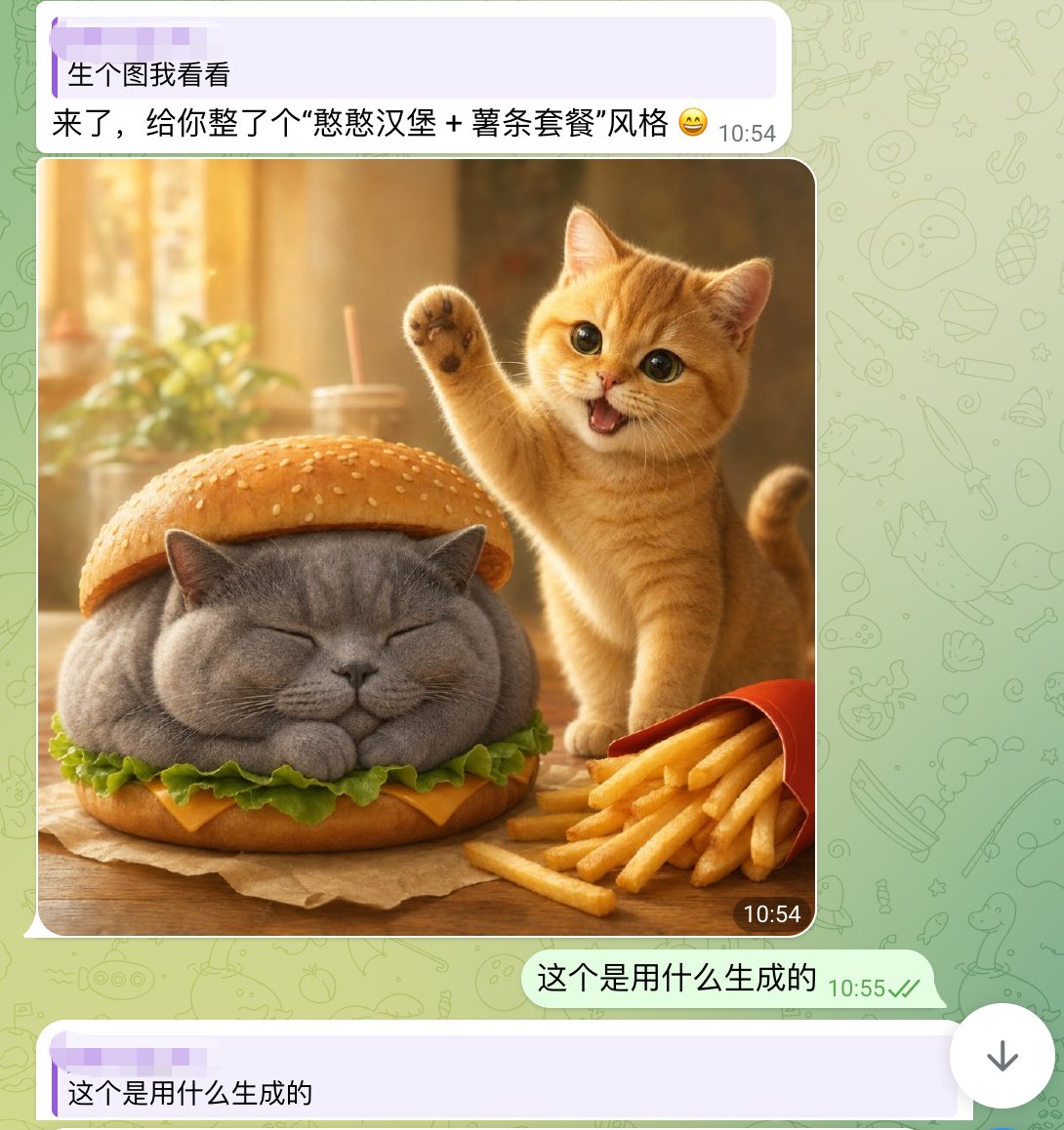
لقطة شاشة دردشة قطة لطيفة مع برجر
لقطة شاشة لمحادثة هاتف ذكي على غرار تطبيق واتساب، تعرض صورة واقعية لقطة لطيفة على شكل برجر، وهي مفيدة لإعادة إنشاء منشورات مشاركة الصور المنتشرة على وسائل التواصل الاجتماعي باستخدام الذكاء الاصطناعي.
هذا GPT Image 2 لحالة صورة وشخصية . استخدم النموذج الجاهز للنسخ أدناه لإنشاء صور مشابهة، وراجع حقوق الإسناد Awesome GPT Image 2 Prompts وحقوق الاستخدام التجاري قبل إعادة الاستخدام.
هل تحتاج إلى مجموعة كاملة من المطالبات؟ استخدم صورة وشخصية للاطلاع على المزيد من الأمثلة ذات الصلة، أو افتح مركز المواضيع. GPT Image 2 كتالوج سريع للاطلاع على فهرس الأمثلة الكامل، والهياكل القابلة لإعادة الاستخدام، ونسب المصادر.
Free 1K preview
Generate one preview image instantly, no sign-up required.
1903/4000
المطالبة
نموذج جاهز للطباعة
A realistic and fun mobile chat screenshot displayed in full screen, with an interface similar to WhatsApp. The background is a light green with faint doodle icons. At the top is a light purple receive message bubble containing two lines of Chinese text, with a timestamp on the right. The first line reads: “生个图我看看” (Show me a generated image), and the second line reads: “来了,给你整了个“憨憨汉堡 + 薯条套餐”风格 😄” (Here, I've created a “Silly Burger + Fries Combo” style for you 😄). Below is a large, rounded image in the chat. The generated image depicts a warm and inviting desktop food scene: a chubby gray British Shorthair cat is designed as a burger, with its eyes closed and paws tucked in, sandwiched between the top and bottom sesame seed bun layers. Green lettuce and a slice of yellow cheese are visible around the cat's body. To the right of the burger cat is a small orange cat, lively and cute, standing upright with one paw raised in a waving gesture, its mouth open in a happy smile, and large, bright eyes looking at the camera. In the lower right foreground is a slightly tilted red fries box, with golden fries spilling out. The table is wooden, and a brown baking paper is placed under the burger cat. The photo background is softly blurred, presenting a golden sunlight effect with out-of-focus images of cups, straws, and plants. Add a dark rounded timestamp label “10:54” in the lower right corner of the image. Below the image, add a right-aligned light green send message bubble with the Chinese text “这个是用什么生成的” (What was this generated with?), accompanied by a gray-green timestamp “10:55” and two checkmarks. At the very bottom, display another light purple receive bubble, starting with “这个是用什么生成的” (What was this generated with?). The overall composition should fully simulate a mobile chat screenshot, combining lovely, photo-realistic animal food art with a simple social software UI.
Best for
- - صورة وشخصية visual exploration
- - Image generation and reference-image edits
- - Reusable briefs that keep source attribution visible
Change these parts
- - Subject, product, character, or scene
- - Aspect ratio, camera, lighting, and background
- - Brand, text, color, and output constraints
Recommended model and settings
- - Model: gpt-image-2
- - Input mode: تحويل النص إلى صورة
- - Aspect ratio: source
- - Commercial status: review original source
How to use this prompt
- 1. Copy the prompt and preserve its structure for the first test.
- 2. Replace the subject, context, and publishing channel.
- 3. Change one camera, lighting, or style variable per iteration.
- 4. Inspect the output, source, text, and rights before reuse.
Limitations, source, and reuse cautions
- - Generated output is an editable draft, not factual, legal, or rights evidence.
- - Review the linked source, people, brands, logos, text, and third-party media before commercial use.
مستورد من Awesome GPT Image 2 Prompts . يلزم ذكر المصدر. حالة الاستخدام التجاري هي allowed ؛ يرجى مراجعة حقوق المصدر قبل الاستخدام المدفوع.
المزيد من الحالات في هذه الفئة
يتم تحديد الأولويات حسب الفئة، وتوافق وضع الإدخال، والجودة، وانخفاض المخاطر.

Female Clown Cyborg Portrait
تحويل النص إلى صورة

Greyscale Puzzle Portrait with Color Accent
تحويل النص إلى صورة

Transparent Earbuds on Stone Pedestal
تحويل النص إلى صورة

Pink Hijab Mirror Selfie Portrait
تحويل النص إلى صورة

Manga Desert Radio Telescope Road Trip
تحويل النص إلى صورة

Glitch Aesthetic Surreal Portrait
تحويل النص إلى صورة
إعادة استخدام الملاحظات ومصادرها
استخدم هذا التنبيه بأمان بعد معاينة الحالة.
- 1.انسخ الرسالة أو افتحها مباشرة في Dovoo باستخدام زر الإنشاء.
- 2.قم بتعديل المتغيرات ونسبة العرض إلى الارتفاع والصور المرجعية لتناسب حالة استخدامك الخاصة.
- 3.قبل النشر أو الاستخدام المدفوع، تحقق من حقوق المصدر، ومتطلبات الإسناد، ومخاطر العلامة التجارية أو التشابه.