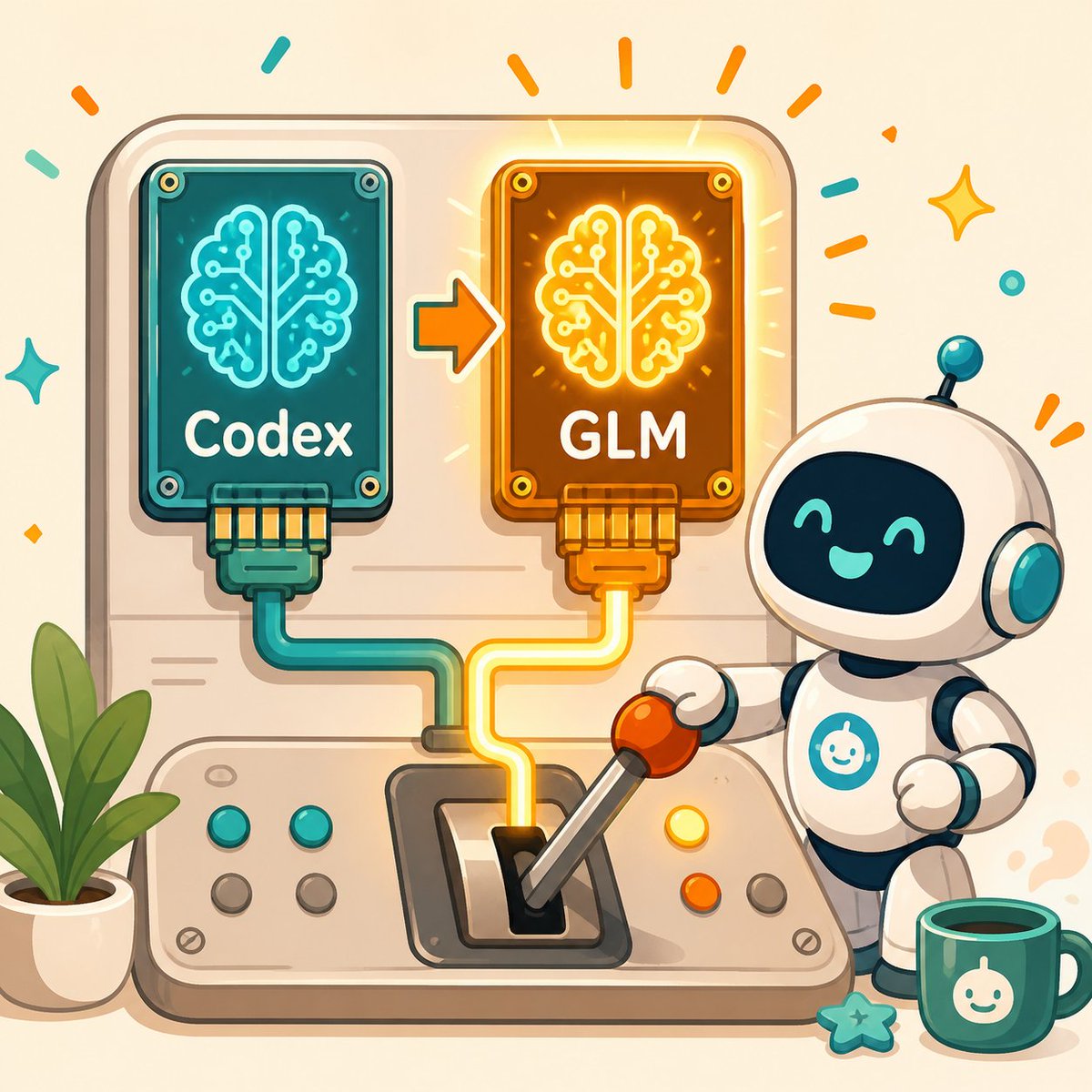
Kawaii AI Model Switch Machine
A cheerful square tech mascot illustration showing a robot switching an AI brain chip from Codex to GLM, useful for blog or social posts about changing AI models.
هذا GPT Image 2 لحالة الرسم والتوضيح الفني . استخدم النموذج الجاهز للنسخ أدناه لإنشاء صور مشابهة، وراجع حقوق الإسناد Awesome GPT Image 2 Prompts وحقوق الاستخدام التجاري قبل إعادة الاستخدام.
هل تحتاج إلى مجموعة كاملة من المطالبات؟ استخدم الرسم والتوضيح الفني للاطلاع على المزيد من الأمثلة ذات الصلة، أو افتح مركز المواضيع. GPT Image 2 كتالوج سريع للاطلاع على فهرس الأمثلة الكامل، والهياكل القابلة لإعادة الاستخدام، ونسب المصادر.
Free 1K preview
Generate one preview image instantly, no sign-up required.
1922/4000
المطالبة
نموذج جاهز للطباعة
Create a cheerful square 1:1 kawaii tech illustration showing an AI model switch-over machine. The scene is a rounded beige control panel on a warm cream background. On the upper left of the panel, place a teal circuit-board chip labeled {argument name="left chip label" default="Codex"}, with a glowing cyan brain-shaped circuit icon, four visible corner screws, and a teal cable plugged into its bottom. On the upper right, place an orange/gold circuit-board chip labeled {argument name="right chip label" default="GLM"}, with a glowing yellow brain-shaped circuit icon, four visible corner screws, and a yellow cable plugged into its bottom. Between the chips, draw one orange arrow pointing from the left chip to the right chip to indicate switching. The right chip should emit warm glow rays and celebratory orange marks.

At the bottom center, show a physical lever console with the yellow cable routed into the lever slot; the lever is tilted toward the right and has an orange ball handle held by a cute small white robot on the right side. The robot has a glossy white rounded body, a black face screen with turquoise smiling eyes and mouth, teal ear-like side disks, a tiny antenna with a teal ball, dark blue joints, and a teal circular chest emblem with a simple smiling bot icon. Include exactly six round console buttons: two teal buttons on the left row, two gray buttons below them, one yellow button near the robot, and one orange button below it, plus one gray button further right. Add a potted green plant on the lower left, a teal mug with the same white smiling bot icon on the lower right, and a small teal star charm near the mug. Decorate the background with confetti strokes and sparkles in orange and teal. Use soft rounded shapes, clean outlines, gentle shadows, warm highlights, vector-like digital art, friendly startup mascot style, no photorealism, no extra text beyond the two chip labels.
متغيرات المطالبة
عناصر نائبة قابلة للتعديل موجودة في موجه الأوامر، مع قيمها الافتراضية.
عامل
left chip label
تقصير
Codex
عامل
right chip label
تقصير
GLM
Best for
- - الرسم والتوضيح الفني visual exploration
- - Image generation and reference-image edits
- - Reusable briefs that keep source attribution visible
Change these parts
- - Subject, product, character, or scene
- - Aspect ratio, camera, lighting, and background
- - Brand, text, color, and output constraints
Recommended model and settings
- - Model: gpt-image-2
- - Input mode: تحويل النص إلى صورة
- - Aspect ratio: source
- - Commercial status: review original source
How to use this prompt
- 1. Copy the prompt and preserve its structure for the first test.
- 2. Replace the subject, context, and publishing channel.
- 3. Change one camera, lighting, or style variable per iteration.
- 4. Inspect the output, source, text, and rights before reuse.
Limitations, source, and reuse cautions
- - Generated output is an editable draft, not factual, legal, or rights evidence.
- - Review the linked source, people, brands, logos, text, and third-party media before commercial use.
مستورد من Awesome GPT Image 2 Prompts . يلزم ذكر المصدر. حالة الاستخدام التجاري هي allowed ؛ يرجى مراجعة حقوق المصدر قبل الاستخدام المدفوع.
المزيد من الحالات في هذه الفئة
يتم تحديد الأولويات حسب الفئة، وتوافق وضع الإدخال، والجودة، وانخفاض المخاطر.

إعادة استخدام الملاحظات ومصادرها
استخدم هذا التنبيه بأمان بعد معاينة الحالة.
- 1.انسخ الرسالة أو افتحها مباشرة في Dovoo باستخدام زر الإنشاء.
- 2.قم بتعديل المتغيرات ونسبة العرض إلى الارتفاع والصور المرجعية لتناسب حالة استخدامك الخاصة.
- 3.قبل النشر أو الاستخدام المدفوع، تحقق من حقوق المصدر، ومتطلبات الإسناد، ومخاطر العلامة التجارية أو التشابه.