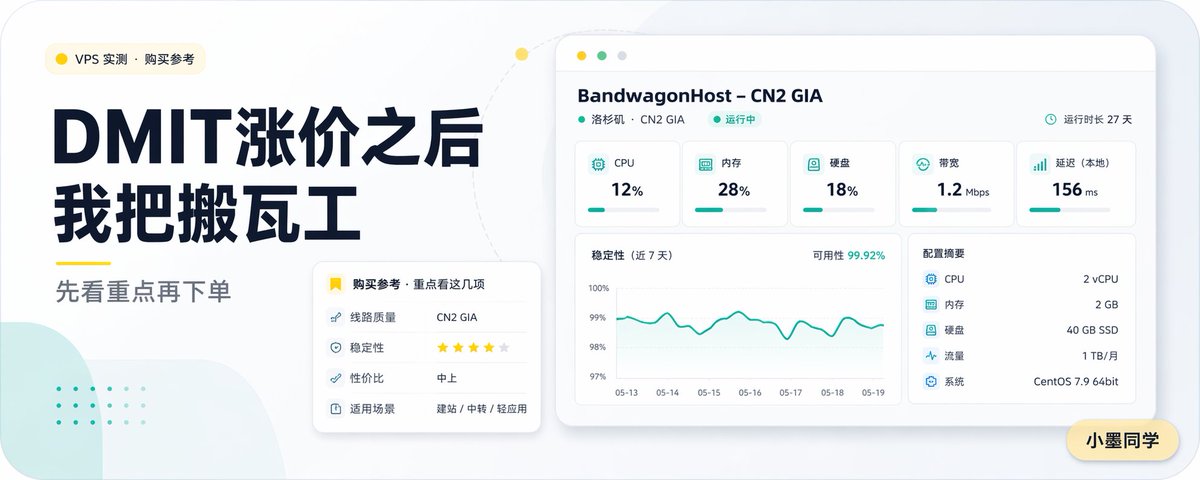
مقارنة بين خدمات الخوادم الافتراضية الخاصة الصينية
غلاف مقال تقني صيني مصقول ذو تنسيق عريض يتميز بعنوان رئيسي جريء، ولوحة تحكم لمراقبة الخادم، وبطاقات توصيات لمحتوى مقارنة الخوادم الافتراضية الخاصة.
هذا GPT Image 2 لحالة تصميمات جرافيكية وملصقات . استخدم النموذج الجاهز للنسخ أدناه لإنشاء صور مشابهة، وراجع حقوق الإسناد Awesome GPT Image 2 Prompts وحقوق الاستخدام التجاري قبل إعادة الاستخدام.
هل تحتاج إلى مجموعة كاملة من المطالبات؟ استخدم تصميمات جرافيكية وملصقات للاطلاع على المزيد من الأمثلة ذات الصلة، أو افتح مركز المواضيع. GPT Image 2 كتالوج سريع للاطلاع على فهرس الأمثلة الكامل، والهياكل القابلة لإعادة الاستخدام، ونسب المصادر.
Free 1K preview
Generate one preview image instantly, no sign-up required.
3022/4000
المطالبة
نموذج جاهز للطباعة
Create a concise and modern Chinese tech blog cover, using a 16:9 widescreen layout. The background should be a soft light gray, with rounded corners on the canvas, and a minimalist dashboard aesthetic. Place a small rounded corner category tag with a yellow dot icon in the upper left corner, with the text “VPS Measurement · Purchase Reference”. Below this, set two stacked, oversized dark navy blue Chinese titles: “After DMIT Price Increase” and “I Switched to BandwagonHost”. Add a short yellow underline decoration below the titles, followed by a medium gray subtitle: “See the Highlights First, Then Place Your Order”. The layout should be sophisticated, editorial, and easy to read, with strong contrast and ample spacing. On the right side, display a floating desktop application-style server monitoring panel, primarily white with subtle shadows and rounded corners. The top should feature a light beige browser bar with three circular window buttons. The panel title should be “BandwagonHost – CN2 GIA”, followed by the smaller text “Los Angeles · CN2 GIA” and a green “Running” status label. A small clock icon and the text “Runtime 27 Days” should be in the upper right corner. The panel’s top row should contain 5 indicator cards, labeled “CPU” displaying “12%”, “Memory” displaying “28%”, “Disk” displaying “18%”, “Bandwidth” displaying “1.2 Mbps”, and “Latency (Local)” displaying “156 ms”, each with a teal icon and a thin teal progress bar. Below and to the left, place a large line chart card titled “Stability (Last 7 Days)”. The upper right corner should indicate “Availability 99.92%”. The chart should have a teal fluctuating curve, with the y-axis scale ranging from 97% to 100% and date labels from “05-13” to “05-19”. To the right of the chart, add a specification card titled “Configuration Summary”, listing 5 items: “CPU 2 vCPU”, “Memory 2 GB”, “Disk 40 GB SSD”, “Traffic 1 TB/month”, and “System CentOS 7.9 64bit”. In the overlapping area of the lower left text block and the dashboard, add a smaller white rounded shadow recommendation card. The header should include a yellow bookmark icon and the text “Purchase Reference · Focus on These”. Inside, list 4 items: “Line Quality CN2 GIA”, “Stability ★★★★☆”, “Cost Performance Medium-High”, and “Application Scenarios Website Building / Transit / Lightweight Applications”. Add soft decorative elements to the background: a light mint green abstract rounded shape in the lower left corner, with faint mint green dot patterns above it, and a light-colored dotted arc extending from the left text area to the top of the dashboard, with a small yellow dot on the curve. Place a yellow rounded nameplate in the lower right corner of the canvas with the text “Xiao Mo Tongxue”. The overall color scheme should be restrained, using dark navy blue, teal, yellow, white, and light gray, presenting a clear vector style rendering, delicate shadows, and a spacious composition to create a professional and refined AI-generated VPS review article cover.
Best for
- - تصميمات جرافيكية وملصقات visual exploration
- - Image generation and reference-image edits
- - Reusable briefs that keep source attribution visible
Change these parts
- - Subject, product, character, or scene
- - Aspect ratio, camera, lighting, and background
- - Brand, text, color, and output constraints
Recommended model and settings
- - Model: gpt-image-2
- - Input mode: تحويل النص إلى صورة
- - Aspect ratio: source
- - Commercial status: review original source
How to use this prompt
- 1. Copy the prompt and preserve its structure for the first test.
- 2. Replace the subject, context, and publishing channel.
- 3. Change one camera, lighting, or style variable per iteration.
- 4. Inspect the output, source, text, and rights before reuse.
Limitations, source, and reuse cautions
- - Generated output is an editable draft, not factual, legal, or rights evidence.
- - Review the linked source, people, brands, logos, text, and third-party media before commercial use.
مستورد من Awesome GPT Image 2 Prompts . يلزم ذكر المصدر. حالة الاستخدام التجاري هي allowed ؛ يرجى مراجعة حقوق المصدر قبل الاستخدام المدفوع.
المزيد من الحالات في هذه الفئة
يتم تحديد الأولويات حسب الفئة، وتوافق وضع الإدخال، والجودة، وانخفاض المخاطر.

Transparent Earbuds on Stone Pedestal
تحويل النص إلى صورة

Manga Desert Radio Telescope Road Trip
تحويل النص إلى صورة

Female Clown Cyborg Portrait
تحويل النص إلى صورة

Imperial Research Bunker on Volcanic Planet
تحويل النص إلى صورة

Greyscale Puzzle Portrait with Color Accent
تحويل النص إلى صورة

Surreal 3D Chess Match Artwork
تحويل النص إلى صورة
إعادة استخدام الملاحظات ومصادرها
استخدم هذا التنبيه بأمان بعد معاينة الحالة.
- 1.انسخ الرسالة أو افتحها مباشرة في Dovoo باستخدام زر الإنشاء.
- 2.قم بتعديل المتغيرات ونسبة العرض إلى الارتفاع والصور المرجعية لتناسب حالة استخدامك الخاصة.
- 3.قبل النشر أو الاستخدام المدفوع، تحقق من حقوق المصدر، ومتطلبات الإسناد، ومخاطر العلامة التجارية أو التشابه.