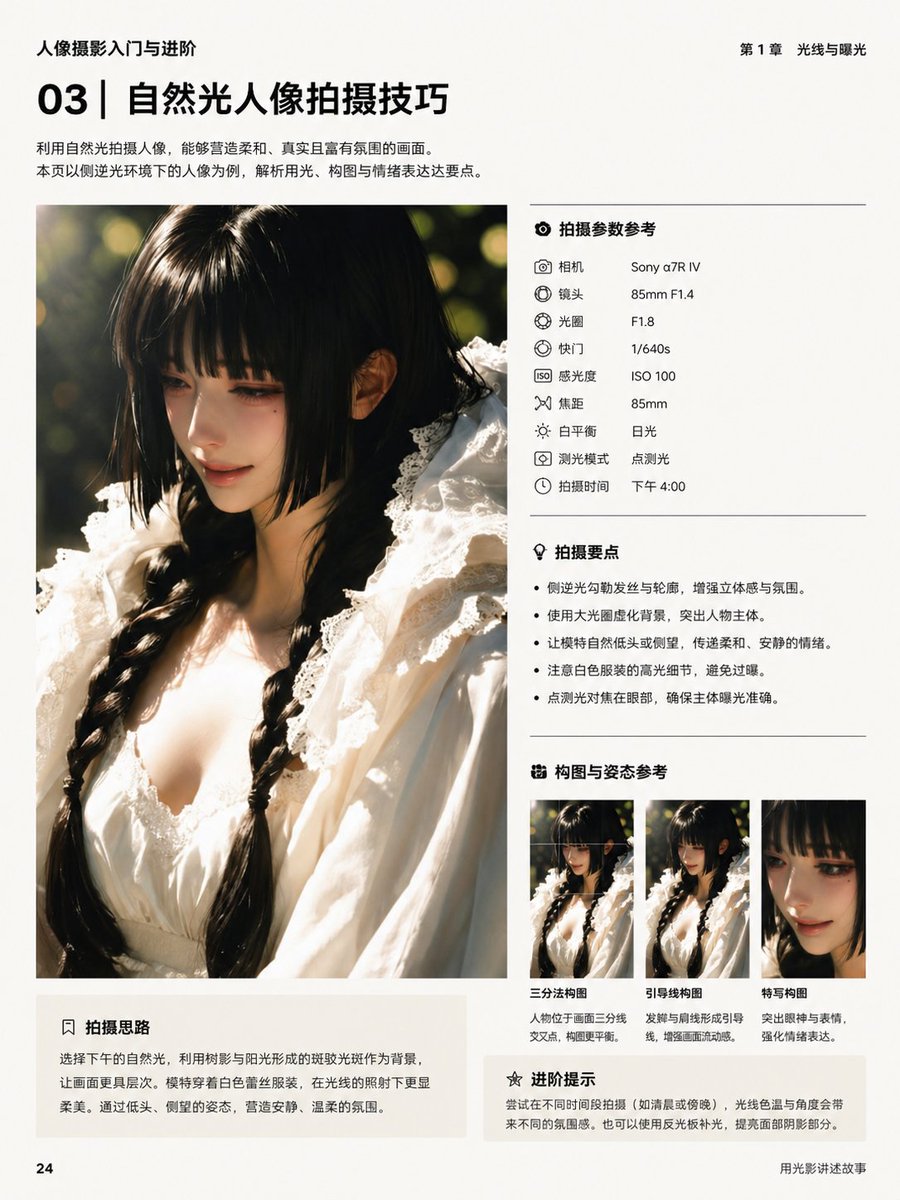
تصميم كتاب التصوير الفوتوغرافي الصيني
صفحة كتاب تحريري صيني مصقولة لدرس تعليمي في تصوير البورتريه، مفيدة لإنشاء تصميمات تخطيطية على غرار المجلات أو تصميمات تعليمية.
هذا GPT Image 2 لحالة تصميمات جرافيكية وملصقات . استخدم النموذج الجاهز للنسخ أدناه لإنشاء صور مشابهة، وراجع حقوق الإسناد Awesome GPT Image 2 Prompts وحقوق الاستخدام التجاري قبل إعادة الاستخدام.
هل تحتاج إلى مجموعة كاملة من المطالبات؟ استخدم تصميمات جرافيكية وملصقات للاطلاع على المزيد من الأمثلة ذات الصلة، أو افتح مركز المواضيع. GPT Image 2 كتالوج سريع للاطلاع على فهرس الأمثلة الكامل، والهياكل القابلة لإعادة الاستخدام، ونسب المصادر.
Free 1K preview
Generate one preview image instantly, no sign-up required.
4000/4000
المطالبة
نموذج جاهز للطباعة
{
  "bottom_left_box": {
    "body": "Choose afternoon natural light, utilizing the dappled light created by tree shadows and sunlight as a background to add more layers to the image. The model wears a white lace outfit, appearing even softer and more delicate under the light. Through poses like looking down and glancing sideways, create a quiet and gentle atmosphere.",
    "position": "bottom left under main image",
    "title": "Shooting Ideas"
  },
  "genre": "photography tutorial layout",
  "language": "Chinese",
  "main_image": {
    "background": "dark green outdoor foliage with sunlit bokeh",
    "face": "Show every face clearly with natural, detailed facial features",
    "framing": "vertical crop from chest to top of head",
    "lighting": "strong side backlight with golden rim light on hair and shoulders, soft warm highlights, shallow depth of field, circular bokeh background",
    "position": "left column",
    "subject": "close-up portrait of a young woman with long black twin braids, wearing a white lace dress with ruffled collar and delicate trim, shot in warm late-afternoon natural light"
  },
  "page": {
    "background": "off-white matte paper",
    "footer_right": "Telling Stories with Light and Shadow",
    "header_left": "Introduction to and advancement in portrait photography.",
    "header_right": "Chapter 1: Light and Exposure",
    "page_number": "24",
    "size": "portrait book page"
  },
  "right_column": {
    "sections": [
      {
        "count": 9,
        "items": [
          {
            "label": "Camera",
            "value": "Sony α7R IV"
          },
          {
            "label": "Lens",
            "value": "85mm F1.4"
          },
          {
            "label": "Aperture",
            "value": "F1.8"
          },
          {
            "label": "Shutter",
            "value": "1/640s"
          },
          {
            "label": "ISO",
            "value": "ISO 100"
          },
          {
            "label": "Focal Length",
            "value": "85mm"
          },
          {
            "label": "White balance",
            "value": "Daylight"
          },
          {
            "label": "Metering mode",
            "value": "Spot metering"
          },
          {
            "label": "Shooting time",
            "value": "4:00 PM"
          }
        ],
        "position": "upper right",
        "title": "Shooting Parameter Reference"
      },
      {
        "count": 4,
        "items": [
          "Use backlighting to outline hair and contours, enhancing three-dimensionality and atmosphere.",
          "Use a large aperture to blur the background and highlight the subject.",
          "Have the model naturally lower their head or look to the side to convey a soft and quiet mood.",
          "Spot metering and focusing on the face ensures accurate subject exposure."
        ],
        "position": "mid right",
        "title": "Shooting Points"
      },
      {
        "count": 3,
        "items": [
          {
            "description": "Positioning the subject at the intersection of the rule of thirds lines creates a more balanced composition.",
            "label": "Rule of thirds composition"
          },
          {
            "description": "The braid and shoulder line create guiding lines, enhancing the flow of the image.",
            "label": "Leading lines composition"
          },
          {
            "description": "Emphasize the eyes and expression to strengthen emotional expression.",
            "label": "Close-up composition"
          }
        ],
        "position": "lower right",
        "title": "Composition and pose reference"
      },
      {
        "count": 1,
        "items": [
          "Try shooting at different times of day (such as morning or evening). The color temperature and angle of the light will create different atmospheres. You can also use a reflector to fill in the light and improve the highlights and shadows on the face."
        ],
        "position": "bottom right",
        "title": "Advanced Tips"
      }
    ]
  },
  "style": {
    "color_palette": "warm cream, black, soft gray, golden sunlight, deep green, white fabric",
    "grid": "large image on left, structured information panels on right, subtle divider lines between sections",
    "overall": "clean premium editorial book design, minimalist Chinese typography, modern photography education layout",
    "typography": "bold sans-serif chapter number and headline, smaller regular body text, neat aligned labels and values, monochrome black text"
  },
  "title_block": {
    "headline": "Natural Light Portrait Photography Techniques",
    "position": "top left",
    "section_number": "03",
    "subtext": "Using natural light to photograph portraits can create soft, realistic, and atmospheric images. This page takes portraits shot in sidelight as an example to analyze three key points: lighting, composition, and emotional expression."
  },
  "type": "book interior editorial page"
}
Best for
- - تصميمات جرافيكية وملصقات visual exploration
- - Image generation and reference-image edits
- - Reusable briefs that keep source attribution visible
Change these parts
- - Subject, product, character, or scene
- - Aspect ratio, camera, lighting, and background
- - Brand, text, color, and output constraints
Recommended model and settings
- - Model: gpt-image-2
- - Input mode: تحويل النص إلى صورة
- - Aspect ratio: source
- - Commercial status: review original source
How to use this prompt
- 1. Copy the prompt and preserve its structure for the first test.
- 2. Replace the subject, context, and publishing channel.
- 3. Change one camera, lighting, or style variable per iteration.
- 4. Inspect the output, source, text, and rights before reuse.
Limitations, source, and reuse cautions
- - Generated output is an editable draft, not factual, legal, or rights evidence.
- - Review the linked source, people, brands, logos, text, and third-party media before commercial use.
مستورد من Awesome GPT Image 2 Prompts . يلزم ذكر المصدر. حالة الاستخدام التجاري هي allowed ؛ يرجى مراجعة حقوق المصدر قبل الاستخدام المدفوع.
المزيد من الحالات في هذه الفئة
يتم تحديد الأولويات حسب الفئة، وتوافق وضع الإدخال، والجودة، وانخفاض المخاطر.

Transparent Earbuds on Stone Pedestal
تحويل النص إلى صورة

Manga Desert Radio Telescope Road Trip
تحويل النص إلى صورة

Female Clown Cyborg Portrait
تحويل النص إلى صورة

Imperial Research Bunker on Volcanic Planet
تحويل النص إلى صورة

Greyscale Puzzle Portrait with Color Accent
تحويل النص إلى صورة

Surreal 3D Chess Match Artwork
تحويل النص إلى صورة
إعادة استخدام الملاحظات ومصادرها
استخدم هذا التنبيه بأمان بعد معاينة الحالة.
- 1.انسخ الرسالة أو افتحها مباشرة في Dovoo باستخدام زر الإنشاء.
- 2.قم بتعديل المتغيرات ونسبة العرض إلى الارتفاع والصور المرجعية لتناسب حالة استخدامك الخاصة.
- 3.قبل النشر أو الاستخدام المدفوع، تحقق من حقوق المصدر، ومتطلبات الإسناد، ومخاطر العلامة التجارية أو التشابه.