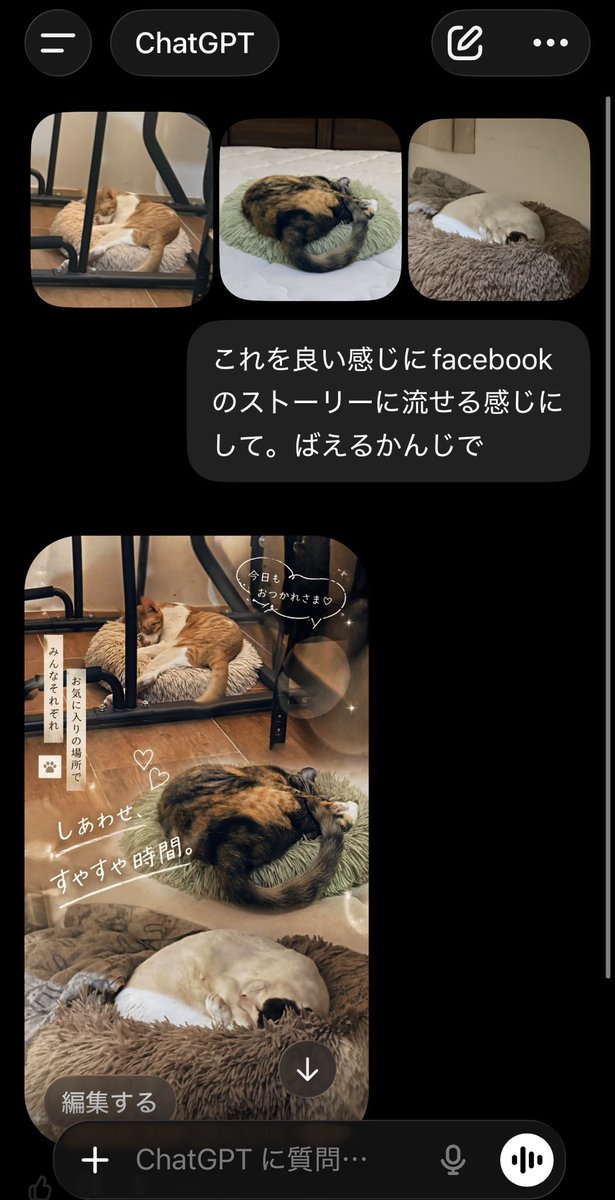
لقطة شاشة من تطبيق ChatGPT Cat Story
لقطة شاشة واقعية لتطبيق جوال تُظهر تطبيق ChatGPT وهو يحول ثلاث صور لقطط إلى صورة مجمعة يابانية دافئة على فيسبوك ستوري، وهي مفيدة للنماذج الأولية وعروض وسائل التواصل الاجتماعي والمفاهيم المرئية لواجهة المستخدم.
هذا GPT Image 2 لحالة إلهام آخر . استخدم النموذج الجاهز للنسخ أدناه لإنشاء صور مشابهة، وراجع حقوق الإسناد Awesome GPT Image 2 Prompts وحقوق الاستخدام التجاري قبل إعادة الاستخدام.
هل تحتاج إلى مجموعة كاملة من المطالبات؟ استخدم إلهام آخر للاطلاع على المزيد من الأمثلة ذات الصلة، أو افتح مركز المواضيع. GPT Image 2 كتالوج سريع للاطلاع على فهرس الأمثلة الكامل، والهياكل القابلة لإعادة الاستخدام، ونسب المصادر.
Free 1K preview
Generate one preview image instantly, no sign-up required.
2016/4000
المطالبة
نموذج جاهز للطباعة
A realistic smartphone screenshot of the ChatGPT mobile app in dark mode, shown on a black background with iOS-style UI. At the top, display a header with a hamburger menu icon on the left, a rounded tab labeled "ChatGPT" in the center, and two icons on the right: a compose icon and a three-dot menu. Below that, show a row of exactly 3 rounded-corner photo thumbnails of sleeping cats: first, an orange-and-white cat sleeping on a fluffy cushion under a black metal chair frame on a wooden floor; second, a calico cat curled tightly on a pale green round cushion on a bed; third, a cream-colored cat curled up asleep in a brown plush pet bed. Under the thumbnails, place a dark gray chat bubble with white Japanese text that says: "これを良い感じにfacebookのストーリーに流せる感じにして。ばえるかんじで". Beneath the message, show the generated image as a tall vertical Facebook-story-style collage using the same 3 cat photos blended into one warm, cozy composition. The top section features the orange-and-white cat under the chair, the middle section features the curled calico cat, and the bottom section features the cream-colored cat in the fluffy bed. Apply soft beige and brown tones, dreamy lighting, light bokeh circles, subtle sparkles, and a gentle lifestyle aesthetic. Add cute handwritten-style Japanese overlay text and stickers across the collage: a speech bubble near the top saying "今日も おつかれさま♡", a vertical note on the left reading "みんなそれぞれ お気に入りの場所で", two small heart doodles near the center, and a large diagonal caption reading "しあわせ すやすや時間。". At the bottom-left of the generated image, overlay a rounded dark button labeled "編集する", and near the bottom-center place a circular download icon with a downward arrow. At the very bottom of the screen, include the ChatGPT input bar with a plus icon, placeholder text "ChatGPT に質問…", a microphone icon, and a circular voice button. Make the overall image look like an authentic captured app screen, vertically oriented, with a thin white scroll bar visible along the right edge.
Best for
- - إلهام آخر visual exploration
- - Image generation and reference-image edits
- - Reusable briefs that keep source attribution visible
Change these parts
- - Subject, product, character, or scene
- - Aspect ratio, camera, lighting, and background
- - Brand, text, color, and output constraints
Recommended model and settings
- - Model: gpt-image-2
- - Input mode: تحويل النص إلى صورة
- - Aspect ratio: source
- - Commercial status: review original source
How to use this prompt
- 1. Copy the prompt and preserve its structure for the first test.
- 2. Replace the subject, context, and publishing channel.
- 3. Change one camera, lighting, or style variable per iteration.
- 4. Inspect the output, source, text, and rights before reuse.
Limitations, source, and reuse cautions
- - Generated output is an editable draft, not factual, legal, or rights evidence.
- - Review the linked source, people, brands, logos, text, and third-party media before commercial use.
مستورد من Awesome GPT Image 2 Prompts . يلزم ذكر المصدر. حالة الاستخدام التجاري هي allowed ؛ يرجى مراجعة حقوق المصدر قبل الاستخدام المدفوع.
المزيد من الحالات في هذه الفئة
يتم تحديد الأولويات حسب الفئة، وتوافق وضع الإدخال، والجودة، وانخفاض المخاطر.

Transparent Earbuds on Stone Pedestal
تحويل النص إلى صورة

Manga Desert Radio Telescope Road Trip
تحويل النص إلى صورة

Female Clown Cyborg Portrait
تحويل النص إلى صورة

Imperial Research Bunker on Volcanic Planet
تحويل النص إلى صورة

Android Quantum Lab Workstation
تحويل النص إلى صورة

Greyscale Puzzle Portrait with Color Accent
تحويل النص إلى صورة
إعادة استخدام الملاحظات ومصادرها
استخدم هذا التنبيه بأمان بعد معاينة الحالة.
- 1.انسخ الرسالة أو افتحها مباشرة في Dovoo باستخدام زر الإنشاء.
- 2.قم بتعديل المتغيرات ونسبة العرض إلى الارتفاع والصور المرجعية لتناسب حالة استخدامك الخاصة.
- 3.قبل النشر أو الاستخدام المدفوع، تحقق من حقوق المصدر، ومتطلبات الإسناد، ومخاطر العلامة التجارية أو التشابه.