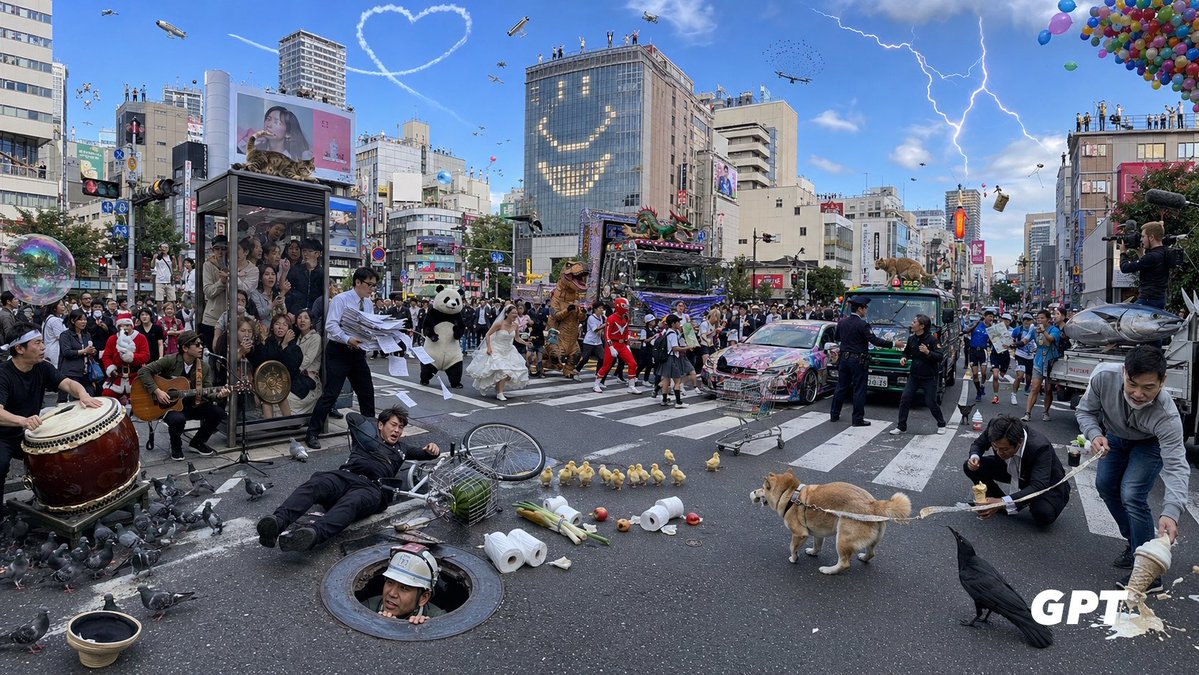
Chaotic Shibuya Scramble Crossing
A highly detailed photorealistic prompt for generating an absurdly crowded Tokyo scramble crossing full of surreal events and countable visual details.
هذا GPT Image 2 لحالة المناظر الطبيعية . استخدم النموذج الجاهز للنسخ أدناه لإنشاء صور مشابهة، وراجع حقوق الإسناد Awesome GPT Image 2 Prompts وحقوق الاستخدام التجاري قبل إعادة الاستخدام.
هل تحتاج إلى مجموعة كاملة من المطالبات؟ استخدم المناظر الطبيعية للاطلاع على المزيد من الأمثلة ذات الصلة، أو افتح مركز المواضيع. GPT Image 2 كتالوج سريع للاطلاع على فهرس الأمثلة الكامل، والهياكل القابلة لإعادة الاستخدام، ونسب المصادر.
Free 1K preview
Generate one preview image instantly, no sign-up required.
3515/4000
المطالبة
نموذج جاهز للطباعة
Goal: Create an ultra-dense, chaotic photorealistic wide-angle street scene at a huge Japanese scramble crossing, like Shibuya in Tokyo, packed with absurd events happening simultaneously. The image should feel like a single candid news photograph with extreme information density, realistic lighting, and many tiny details.

Canvas: Wide horizontal 16:9 image, street-level perspective, slightly fisheye wide-angle lens, daytime under a bright blue sky. Dense city buildings, billboards, traffic lights, crosswalk stripes, signs, and crowds fill the background. Add a small white “GPT” watermark in the bottom-right corner.

Setting and background: Use {argument name="location" default="a busy Shibuya-style Tokyo scramble crossing"}. Surround the crossing with mid-rise commercial buildings, digital billboards, rooftop spectators, traffic signals, and urban signage. In the sky include exactly 8 aerial features: 1 heart-shaped skywriting trail, 1 blimp, 1 small helicopter, 1 airplane, 1 drone, 1 flock of tiny birds, 1 lightning bolt striking from clouds on the right, and 1 large cluster of colorful balloons in the upper-right corner. On one tall glass building, make lit windows form a large smiling face.

Main crowd and vehicles: Fill the intersection with a dense crowd of pedestrians and performers. Include exactly 5 main vehicles: 1 elaborately decorated neon parade truck with a dragon on top, 1 colorful graffiti-covered sports car, 1 green taxi, 1 small bus or van, and 1 silver fish-shaped parade float or vehicle at the far right. Add photographers and camera operators on the right edge documenting the chaos.

Foreground incidents and objects: Show exactly 12 prominent foreground details: 1 large taiko drum player on the far left, 1 seated guitarist near the drum, 1 transparent phone-booth-like glass box packed with people, 1 businessman dropping loose papers, 1 man in a black suit fallen beside a bicycle, 1 construction worker emerging from a round manhole, 1 overturned birdcage with green contents, 1 scattered group of pigeons, 1 row of ducklings crossing the road, 1 tan Shiba Inu dog on a leash, 1 large black crow in the lower-right foreground, and 1 man spilling noodles or creamy food from a bowl on the far right.

Costumed characters and performers: Include exactly 7 standout characters among the crowd: 1 Santa Claus, 1 panda mascot, 1 bride in a white wedding dress running through the crossing, 1 brown dinosaur mascot, 1 red superhero or sentai character, 1 schoolgirl in uniform, and 1 police officer trying to manage the scene.

Additional surreal details: Add exactly 7 extra chaotic props or actions: 1 giant soap bubble floating on the left, 1 shopping cart abandoned in the middle road, 1 microphone stand and speakers for street performance, 1 traffic cone near the vehicles, 1 airborne suitcase or box on the right, 1 small animal or mascot peeking from a vehicle roof, and scattered toilet paper rolls, apples, bottles, and debris across the crosswalk.

Visual style: Photorealistic, high-resolution documentary photography, crisp detail everywhere, natural shadows, realistic Japanese city atmosphere, no anime styling. Use {argument name="time of day" default="bright afternoon"}, {argument name="weather mood" default="sunny blue sky with dramatic lightning"}, {argument name="crowd density" default="extremely crowded"}, and {argument name="chaos level" default="maximum but still readable"}. Keep the composition balanced so every counted object is visible.
متغيرات المطالبة
عناصر نائبة قابلة للتعديل موجودة في موجه الأوامر، مع قيمها الافتراضية.
عامل
location
تقصير
a busy Shibuya-style Tokyo scramble crossing
عامل
time of day
تقصير
bright afternoon
عامل
weather mood
تقصير
sunny blue sky with dramatic lightning
عامل
crowd density
تقصير
extremely crowded
عامل
chaos level
تقصير
maximum but still readable
Best for
- - المناظر الطبيعية visual exploration
- - Image generation and reference-image edits
- - Reusable briefs that keep source attribution visible
Change these parts
- - Subject, product, character, or scene
- - Aspect ratio, camera, lighting, and background
- - Brand, text, color, and output constraints
Recommended model and settings
- - Model: gpt-image-2
- - Input mode: تحويل النص إلى صورة
- - Aspect ratio: source
- - Commercial status: review original source
How to use this prompt
- 1. Copy the prompt and preserve its structure for the first test.
- 2. Replace the subject, context, and publishing channel.
- 3. Change one camera, lighting, or style variable per iteration.
- 4. Inspect the output, source, text, and rights before reuse.
Limitations, source, and reuse cautions
- - Generated output is an editable draft, not factual, legal, or rights evidence.
- - Review the linked source, people, brands, logos, text, and third-party media before commercial use.
مستورد من Awesome GPT Image 2 Prompts . يلزم ذكر المصدر. حالة الاستخدام التجاري هي allowed ؛ يرجى مراجعة حقوق المصدر قبل الاستخدام المدفوع.
المزيد من الحالات في هذه الفئة
يتم تحديد الأولويات حسب الفئة، وتوافق وضع الإدخال، والجودة، وانخفاض المخاطر.

GPT Image 2 Real-Life Character Street Snap
تحويل النص إلى صورة

Matte Black B.AI Keyboard Keycap
تحويل النص إلى صورة

MotoGP POV Cornering Shot
تحويل النص إلى صورة

Orange Rooftop Fashion Photo Prompt
تحويل النص إلى صورة

Luxury Travel Fashion Portrait Prompt
تحويل النص إلى صورة

Cute Focus Desk Flat Lay and Kawaii Illustration
تحويل النص إلى صورة
إعادة استخدام الملاحظات ومصادرها
استخدم هذا التنبيه بأمان بعد معاينة الحالة.
- 1.انسخ الرسالة أو افتحها مباشرة في Dovoo باستخدام زر الإنشاء.
- 2.قم بتعديل المتغيرات ونسبة العرض إلى الارتفاع والصور المرجعية لتناسب حالة استخدامك الخاصة.
- 3.قبل النشر أو الاستخدام المدفوع، تحقق من حقوق المصدر، ومتطلبات الإسناد، ومخاطر العلامة التجارية أو التشابه.