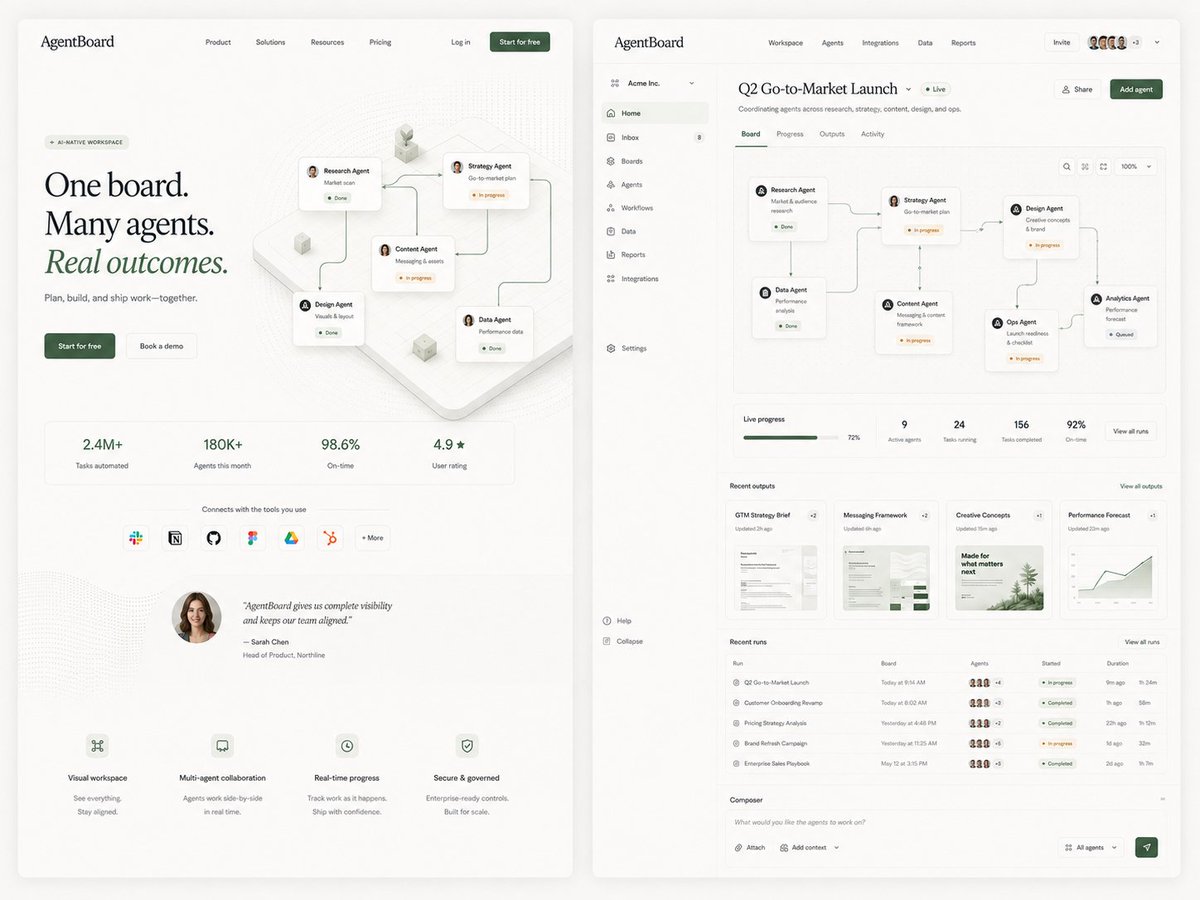
AgentBoard SaaS Landing and Dashboard UI
Generates a refined side-by-side SaaS landing page and dashboard mockup for an AI agent workspace, useful for product design exploration.
هذا GPT Image 2 لحالة المنتج والتسويق . استخدم النموذج الجاهز للنسخ أدناه لإنشاء صور مشابهة، وراجع حقوق الإسناد Awesome GPT Image 2 Prompts وحقوق الاستخدام التجاري قبل إعادة الاستخدام.
هل تحتاج إلى مجموعة كاملة من المطالبات؟ استخدم المنتج والتسويق للاطلاع على المزيد من الأمثلة ذات الصلة، أو افتح مركز المواضيع. GPT Image 2 كتالوج سريع للاطلاع على فهرس الأمثلة الكامل، والهياكل القابلة لإعادة الاستخدام، ونسب المصادر.
Free 1K preview
Generate one preview image instantly, no sign-up required.
4000/4000
المطالبة
نموذج جاهز للطباعة
Goal: Create a polished editorial SaaS product exploration image for an AI agent collaboration platform called {argument name="product name" default="AgentBoard"}, showing two large web UI screens side by side on a warm off-white background: a marketing landing page on the left and the product dashboard on the right. Use refined startup design, soft shadows, rounded cards, thin gray dividers, lots of whitespace, muted forest-green accents, black serif display typography for the landing headline, and small clean sans-serif UI text.

Canvas: Wide 4:3 composition, approximately 1200×900. Place two tall browser-like panels with rounded corners and subtle drop shadows, separated by a narrow gutter. Background is light cream with faint grain and very soft vignette.

Left screen, marketing landing page: Top navigation bar with the logo text “AgentBoard” at top left, 4 centered nav links labeled Product, Solutions, Resources, Pricing, then Log in and a dark green “Start for free” button on the right. Hero area has a small pill label “AI-NATIVE WORKSPACE”, a large three-line headline reading “One board. Many agents. Real outcomes.” with “Real outcomes.” italic and green, supporting line “Plan, build, and ship work—together.”, and 2 CTA buttons: dark green “Start for free” and light outlined “Book a demo”. To the right of the hero text, show an isometric workflow board with exactly 5 connected agent cards: Research Agent, Strategy Agent, Content Agent, Design Agent, and Data Agent, linked by curved connector lines with small status chips such as Done and In progress. Below, include exactly 4 metric tiles: “2.4M+ Tasks automated”, “180K+ Agents this month”, “98.6% On-time”, and “4.9★ User rating”. Under the metrics, include a row labeled “Connects with the tools you use” with exactly 7 integration icons/buttons: Slack, Notion, GitHub, Figma, Google Drive, HubSpot, and “+ More”. Add a testimonial block with a circular female headshot and the quote “AgentBoard gives us complete visibility and keeps our team aligned.” credited to Sarah Chen, Head of Product, Northline. At the bottom, include exactly 4 feature blurbs with tiny line icons: Visual workspace, Multi-agent collaboration, Real-time progress, and Secure & governed.

Right screen, product dashboard: Create a dense but elegant web app interface. Top app bar shows “AgentBoard” on the left, main tabs Workspace, Agents, Integrations, Data, Reports, plus an Invite button, a row of 5 small user avatars, a “+3” badge, and a dropdown chevron. Left sidebar for workspace “Acme Inc.” with exactly 11 navigation items: Home, Inbox with an 8 badge, Boards, Agents, Workflows, Data, Reports, Integrations, Settings, Help, and Collapse. Main page title reads {argument name="dashboard title" default="Q2 Go-to-Market Launch"} with a green “Live” pill and subtitle “Coordinating agents across research, strategy, content, design, and ops.” Include Share and dark green Add agent buttons.

Dashboard content: Below the title, show exactly 4 tabs: Board, Progress, Outputs, Activity, with Board active. The main board canvas contains exactly 6 connected workflow cards arranged left-to-right with curved connector lines: Research Agent “Market & audience research” Done; Data Agent “Performance analysis” Done; Strategy Agent “Go-to-market plan” In progress; Content Agent “Messaging & content framework” In progress; Design Agent “Creative concepts & brand” In progress; Ops Agent “Launch readiness & checklist” In progress; Analytics Agent “Performance forecast” Queued. Include small board controls at top right: search icon, layout icon, fit icon, zoom “100%”, and dropdown.

Under the board, add a KPI strip with exactly 5 items: Live progress 72% with green progress bar, 9 Active agents, 24 Tasks running, 156 Tasks completed, and 92% On-time, plus a “View all runs” button. Add a Recent outputs section with exactly 4 document cards: GTM Strategy Brief, Messaging Framework, Creative Concepts, and Performance Forecast, each with a small preview thumbnail and update time. Add a Recent runs table with exactly 5 rows: Q2 Go-to-Market Launch, Customer Onboarding Revamp, Pricing Strategy Analysis, Brand Refresh Campaign, and Enterprise Sales Playbook; include tiny agent avatar clusters, colored status pills, started times, and durations. At the bottom, include a Composer input bar with placeholder “What would you like the agents to work on?”, buttons for Attach and Add context, an “All agents” dropdown, and a green send button.

Visual style: Premium minimal product mockup, realistic UI proportions, crisp vector-like rendering, tiny legible interface text where possible, subtle dotted background texture, pale beige cards, green status indicators, fine connector lines, modern editorial SaaS aesthetic suitable for a product-design exploration tweet.

Constraints: Use exactly 2 main screens, exactly 5 agent cards on the landing hero, exactly 4 metric tiles, exactly 7 integration icons, exactly 4 bottom feature blurbs, exactly 11 sidebar items, exactly 4 dashboard tabs, exactly 6 workflow agent cards on the dashboard board plus the queued Analytics card as the seventh endpoint, exactly 5 KPI items, exactly 4 output cards, and exactly 5 table rows. Do not add extra panels, watermarks, browser chrome, or decorative text beyond the described UI.
متغيرات المطالبة
عناصر نائبة قابلة للتعديل موجودة في موجه الأوامر، مع قيمها الافتراضية.
عامل
product name
تقصير
AgentBoard
عامل
dashboard title
تقصير
Q2 Go-to-Market Launch
Best for
- - المنتج والتسويق visual exploration
- - Image generation and reference-image edits
- - Reusable briefs that keep source attribution visible
Change these parts
- - Subject, product, character, or scene
- - Aspect ratio, camera, lighting, and background
- - Brand, text, color, and output constraints
Recommended model and settings
- - Model: gpt-image-2
- - Input mode: تحويل النص إلى صورة
- - Aspect ratio: source
- - Commercial status: review original source
How to use this prompt
- 1. Copy the prompt and preserve its structure for the first test.
- 2. Replace the subject, context, and publishing channel.
- 3. Change one camera, lighting, or style variable per iteration.
- 4. Inspect the output, source, text, and rights before reuse.
Limitations, source, and reuse cautions
- - Generated output is an editable draft, not factual, legal, or rights evidence.
- - Review the linked source, people, brands, logos, text, and third-party media before commercial use.
مستورد من Awesome GPT Image 2 Prompts . يلزم ذكر المصدر. حالة الاستخدام التجاري هي allowed ؛ يرجى مراجعة حقوق المصدر قبل الاستخدام المدفوع.
المزيد من الحالات في هذه الفئة
يتم تحديد الأولويات حسب الفئة، وتوافق وضع الإدخال، والجودة، وانخفاض المخاطر.

Codex Silver Token Product Shot
تحويل النص إلى صورة

Elfina Fantasy Porcelain Plate
تحويل النص إلى صورة

Neon Flux Cyberpunk Portrait
تحويل النص إلى صورة

Photorealistic Woman Reference Sheet
تحويل النص إلى صورة
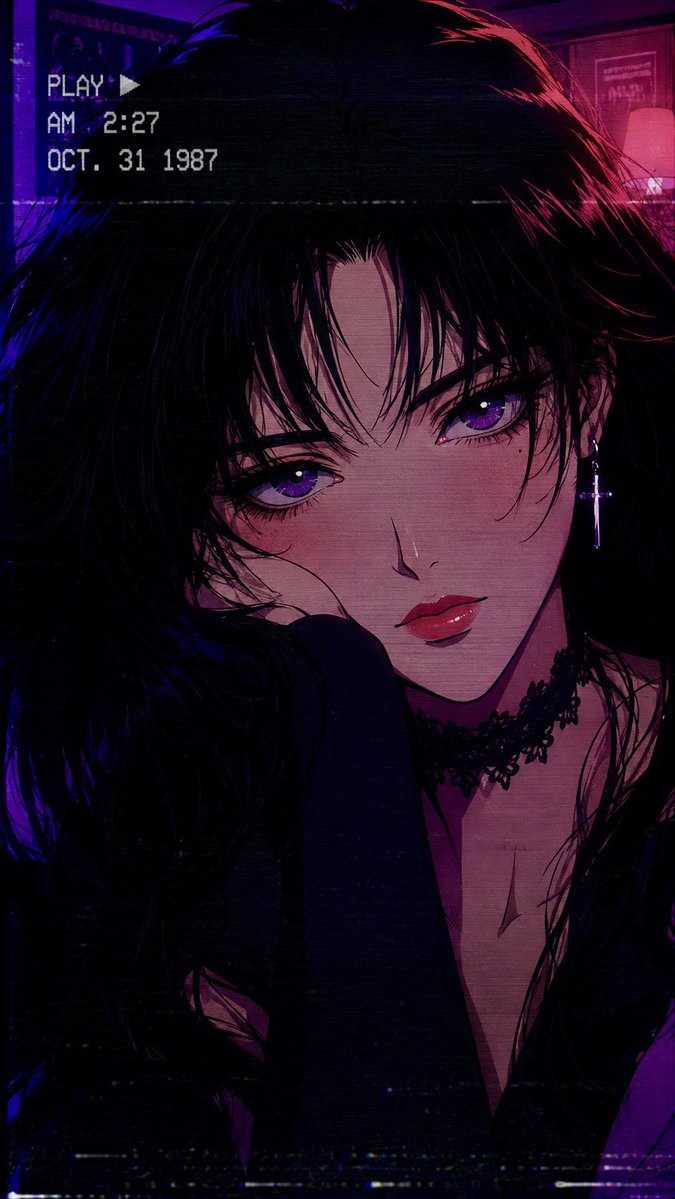
80s Retro Anime Goth Portrait
تحويل النص إلى صورة

Miniature London Paper-Craft Diorama
تحويل النص إلى صورة
إعادة استخدام الملاحظات ومصادرها
استخدم هذا التنبيه بأمان بعد معاينة الحالة.
- 1.انسخ الرسالة أو افتحها مباشرة في Dovoo باستخدام زر الإنشاء.
- 2.قم بتعديل المتغيرات ونسبة العرض إلى الارتفاع والصور المرجعية لتناسب حالة استخدامك الخاصة.
- 3.قبل النشر أو الاستخدام المدفوع، تحقق من حقوق المصدر، ومتطلبات الإسناد، ومخاطر العلامة التجارية أو التشابه.